# Introduction to Chirp DePIN
Chirp is a decentralized physical infrastructure network (DePIN) built for real-world IoT connectivity and geolocation services. Instead of relying on a single telecom operator or cloud vendor, Chirp uses a distributed network model: devices, contributors, and service consumers interact through a shared infrastructure that is designed to scale globally, remain interoperable across hardware types, and provide measurable utility to enterprises and developers.
At its core, Chirp is designed to solve two persistent problems in IoT deployments:
1. **Connectivity in the real world** — reliably moving small packets of sensor data across long distances, through challenging environments, and at low power.
2. **Location without depending on GPS** — enabling positioning even where GPS is inaccurate, unavailable, or too energy-intensive.
This combination positions Chirp as more than a single-network protocol. It is intended to operate as an IoT infrastructure layer that supports multiple communication standards while also producing a signal-derived positioning capability that can be used across logistics, security, industrial automation, smart city deployments, and indoor or GPS-denied environments.
#### What “DePIN” means in the context of Chirp
DePIN refers to networks where physical infrastructure is deployed, operated, and expanded through decentralized incentives rather than centralized capital expenditure. In Chirp’s case, the infrastructure includes IoT network coverage and the data layer used for geopositioning.
This decentralized design matters because it changes how coverage scales and how services can remain resilient:
* **Network growth is distributed**: infrastructure expansion is not limited to a single company’s rollout strategy.
* **Coverage becomes a shared asset**: multiple products and applications can build on the same underlying network.
* **Participation is open-ended**: the network can be extended where it is economically or operationally valuable rather than only where a centralized provider chooses to invest.
#### Chirp’s infrastructure: a multi-protocol IoT network
Chirp is built as a multi-protocol IoT network rather than a single-protocol system. In practice, this means it is designed to support several communication standards and deployment patterns, so integrators can connect the devices that best fit their use case instead of forcing every deployment into one connectivity model.
Chirp’s supported and planned protocol coverage includes:
* **LoRa / LoRaWAN**
* **BLE**
* **Zigbee**
* **Thread**
* **LR-FHSS**
* **Cellular IoT**
* **Mioty (planned)**
This multi-protocol approach is important for enterprise adoption because real-world IoT is heterogeneous. Different sites, industries, and device types require different power profiles, bandwidth, latency, and range characteristics. Chirp is designed to accommodate that reality.
#### Geolocation as a service: positioning without GPS
A major part of Chirp’s value proposition is the creation of a positioning layer built from observed signals (such as Wi-Fi, cellular, and BLE environments). The practical outcome is the ability to estimate location even where GPS performs poorly—indoors, near dense infrastructure, or in environments where GPS is restricted.
Chirp’s geopositioning capability is supported by large-scale signal collection via its user ecosystem. The Chirp mobile app (Kage) collects data from surrounding wireless environments and links it to GPS coordinates at the time of scanning. Over time, this produces a database of signal fingerprints that can later be used to infer location without requiring constant GPS use.
This is especially relevant for:
* Indoor asset tracking and navigation
* Dense urban logistics
* Battery-constrained trackers
* Security and monitoring in GPS-denied environments
#### Network participants and incentives
Chirp is designed around distinct roles that contribute to network growth and service delivery:
* **Network users and contributors** expand the network’s data and coverage footprint through participation.
* **Keepers** deploy infrastructure components that extend coverage and network availability.
* **Service consumers** (developers and businesses) use Chirp for connectivity, automation, and location-aware applications.
Chirp uses a token-driven incentive structure to align these roles and promote continuous network expansion. Participants are rewarded for actions that grow the usefulness of the network—whether through coverage deployment, data contribution, or other network-supporting behavior.
Two notable infrastructure and participation mechanisms include:
* **Blackbirds**: low-power terrestrial IoT miners that help expand network coverage and earn rewards.
* **Kage (and Wings of Chronos)**: a consumer-facing participation layer where users contribute data through scanning and gamified discovery mechanics.
#### Product and service layer: from infrastructure to usable solutions
A common failure mode in IoT networks is that they provide connectivity but do not provide enough of the surrounding tooling to make deployments easy. Chirp is designed to be a full-stack platform that can support end-to-end workflows, including:
* Device onboarding and management
* Data visualization and monitoring
* Automation logic and rules
* Alerting and event-driven actions
* Service access through APIs
This platform orientation is meant to shorten the time between “network access” and “working system,” especially for developers and integrators building production deployments.
One example of Chirp’s product direction is **Chirp Lens**, which enables IP cameras to connect into the Chirp ecosystem and support AI-enabled functions such as license plate recognition and automation.
#### Monetization and real-world demand
Chirp is structured to support real usage demand through a service-driven model. Businesses can pay for connectivity and automation via:
* **IoT API services**
* **SaaS subscriptions**
* **Data Credits**
Data Credits function as a consumption mechanism: users purchase credits to access services, and this process is designed to align network usage with economic demand.
#### Governance and long-term evolution
Chirp uses on-chain governance to allow token holders and network participants to influence key decisions. The goal is to maintain decentralization not only at the infrastructure level, but also in how the network evolves over time—covering changes to incentives, expansion priorities, and ecosystem direction.
Looking forward, Chirp’s roadmap includes AI-driven edge capabilities and a direction toward putting devices “on-chain” with unique on-chain identities, aiming to make device management, ownership, and interaction more composable in decentralized environments.
# Chirp's DePIN Network
## What is Chirp's DePIN Network?
Chirp is a Decentralized Physical Infrastructure Network (DePIN) designed to unify the fragmented IoT landscape by enabling seamless connectivity between devices across multiple radio standards. Unlike traditional, centralized IoT networks, Chirp is community-powered, rewarding users for expanding coverage, providing real-world data, and contributing to a geolocation database.
At its core, Chirp’s DePIN operates on a mesh network of Blackbird gateways—low-power terrestrial gateways deployed by individuals (Keepers) who earn CHIRP tokens for maintaining the network. These gateways support multiple wireless radio protocols, allowing businesses and developers to connect, manage, and automate IoT devices without vendor lock-in.
Geopositioning is a key part of Chirp’s IoT infrastructure, enabling indoor wayfinding, power-efficient tracking, and real-world asset (RWA) applications. To accelerate the expansion of this geolocation database, Chirp gamifies network growth through Kage, a Walk, Scan, and Earn experience that incentivizes users to map wireless networks (Wi-Fi, BLE, and cell towers). By rewarding participants for collecting real-world signal data, Kage strengthens Chirp’s positioning capabilities, unlocking new use cases for automation, smart environments, and decentralized applications (DApps).
The Chirp ecosystem is powered by the CHIRP token, which fuels network operations, data transactions, and governance. With built-in Data Credits (DC), every interaction within Chirp—whether registering a device, accessing network services, or claiming rewards—drives token movement and ensures sustainable network growth.
# Keepers
## Who Are Keepers?
Keepers are the backbone of Chirp’s Decentralized Physical Infrastructure Network (DePIN). They are individuals or businesses that deploy and maintain Blackbird gateways, expanding Chirp’s global IoT coverage while earning CHIRP tokens as rewards.
By operating Blackbirds—low-power terrestrial gateways—Keepers provide wireless signal coverage across LoRa, LoRaWAN, BLE, Zigbee, Thread, and Mioty (planned). This infrastructure forms the Chirp network, allowing end devices such as temperature sensors, trackers, and IoT applications to connect. Connecting devices is a paid service, enabling businesses and developers to build IoT automation, geolocation solutions, and decentralized applications (DApps) on top of Chirp.
Keepers play a crucial role in strengthening Chirp’s IoT ecosystem, ensuring reliable network coverage, decentralized geolocation, and data availability for applications such as indoor wayfinding, power-efficient tracking, and real-world asset (RWA) management.
To participate, Keepers must deploy, register, and maintain their Blackbird gateways, ensuring they remain operational and strategically placed. In return, they receive CHIRP token rewards based on network demand, uptime, and contribution to the ecosystem.
# Data Hunters
## Who Are Data Hunters?
Data Hunters are Kage players who contribute to Chirp’s Decentralized Physical Infrastructure Network (DePIN) by scanning and mapping wireless networks. As they move through cities and buildings, Data Hunters detect Wi-Fi, Bluetooth, and cellular signals, helping build Chirp’s decentralized geolocation database.
Unlike traditional geolocation systems that rely solely on GPS, Chirp leverages crowdsourced wireless data to enable indoor wayfinding, power-efficient tracking, and real-world asset (RWA) applications. By playing Kage, Data Hunters gamify the process of expanding Chirp’s geolocation capabilities, ensuring more accurate positioning and unlocking new automation use cases.
To participate, Data Hunters walk, scan, and earn rewards in CHIRP tokens based on the quality and uniqueness of their collected data. Their contributions enhance Chirp’s IoT network, making it more robust for businesses, developers, and individuals who rely on precise location-based services.
# Wallet and Rewards
* [Sui Wallet](/chirp-network/rewards/sui_wallet)
* [Blackbird Miner Rewards Claim](/chirp-network/rewards/claim_rewards)
* [Airdrop Rewards Claim](/chirp-network/rewards/airdrop)
* [Kage - Wallet and Rewards Claim](/chirp-network/rewards/kage)
* [Ledger Wallet and Rewards Claim](/chirp-network/rewards/ledger)
## Welcome, User!
If you find yourself here, you're probably curious about how it all works with wallets and rewards on the Chirp platform! This section will guide you through everything you need to know—from creating and connecting your Sui wallet to claiming your rewards. Whether you're a Keeper gathering rewards from Blackbird Miner, a player enjoying Kage game incentives, or a lucky recipient of an airdrop, we’ve got you covered. Follow the simple steps below to maximize your experience and start earning!
# Sui Wallet
To interact with the Chirp platform and be able to earn and further claim CHIRP rewards, you'll need to create and connect Sui wallet to Chirp.
## Sui Wallet Creation
Please bear in mind that currently Chirp platform supports these Google chrome wallet extensions:
* [Suiet](https://chromewebstore.google.com/detail/suiet-sui-wallet/khpkpbbcccdmmclmpigdgddabeilkdpd)
* [Sui Wallet](https://chromewebstore.google.com/detail/sui-wallet/opcgpfmipidbgpenhmajoajpbobppdil)
* [Martian Sui Wallet](https://chromewebstore.google.com/detail/martian-aptos-sui-wallet/efbglgofoippbgcjepnhiblaibcnclgk)
So choose one of them to be able to interact with the Chirp platform. If you already use other wallets or platforms for interacting with Sui blockchain - visit our guideline on how to export your seed phrase.
To create a reward wallet, please install one of Google Chrome extension wallets for Sui blockchain (i.e. Sui wallet). After installation is complete, create your personal Sui wallet. You can create it with your Google account, but for improved security we recommend using a method with the “passphrase”.
When wallet is created check settings if the Mainnet selected.
## Sui Wallet Connection to Chirp
When your Sui wallet is set up please navigate to . Sign up if you are new to Chirp or sign in into your Chirp account. After, go to the Settings section in the menu, choose Wallet and click on Connect wallet button.
Select a wallet extension you have installed.
Next you need to choose the correct wallet address and click Connect.
Confirm wallet by clicking the Save wallet address button.
To verify a reward wallet, you need to sign message with your wallet, click Sign.
After that your rewards wallet is set and verified.
## Adding SUI to Your Wallet
When you are ready to claim your earned CHIRP tokens, it's essential to have a small balance of SUI in your wallet to cover the gas fees required for the transaction. Without SUI to pay for gas, the claim attempt will result in an error.
## Why Do You Need SUI?
Every transaction on the Sui network requires a small gas fee in SUI for successful completion. Even for claiming CHIRP tokens, gas is needed, so having at least a small amount of SUI in your wallet is a necessary requirement.
## How Much SUI is Needed?
A minimum of 0.1 SUI is required for most standard claim operations. It’s recommended to keep at least 1 SUI in your wallet to cover several transactions and avoid any potential issues.
## How to Purchase SUI
Buy SUI on Exchanges: You can purchase SUI tokens on popular cryptocurrency exchanges and transfer them to your wallet. Here are some recommended exchanges where you can buy SUI:
* Binance
* Coinbase
* Kraken
Please ensure you have a small balance of SUI in your wallet before claiming CHIRP tokens. This will guarantee a smooth transaction process and help you receive your rewards without any delays.
# Blackbird Miner Rewards Claim
1. **Navigate to the Mining Board in the Chirp Wireless App**:
* Open the Chirp Wireless app and go to the Mining Board section, where your current mining rewards are displayed.
2. **Click on "Claim Rewards"**:
* On the Mining Board page, find the "Claim Rewards" button. Click on it to start the withdrawal process.
3. **Select the Number of Tokens to Withdraw**:
* After clicking the "Claim Rewards" button, a window will appear showing your available balance.
* In this window, you can select the number of tokens you wish to withdraw. Specify the amount of tokens to transfer to your SUI Wallet.
4. **Install and Activate the SUI Wallet Extension in Chrome**:
* Officially Supported Wallets:
* Chirp Wireless officially supports the SUI Wallet for token withdrawals. Make sure to use a supported wallet to ensure smooth transactions.
* If your wallet is not officially supported, the transaction might fail or not be processed correctly. In such cases, we recommend switching to an officially supported wallet like the SUI Wallet or contacting Chirp's customer support for further guidance.
* If the SUI Wallet is not yet installed, follow the installation guide for the Chrome extension available on the SUI Wallet's resource [page](https://blog.sui.io/sui-wallets/).
* To add the wallet to the Chirp Wireless platform, follow the instructions provided via [link](/chirp-network/rewards/sui_wallet).
5. **Confirm the Transaction in SUI Wallet**:
* A request for transaction confirmation will appear in the SUI Wallet extension.
* Carefully review the transaction details and click "Confirm" (or the equivalent button) to complete the transfer to your SUI Wallet.
6. **Wait for the Transaction to Complete**:
* After confirming the transaction, the funds will be transferred from Chirp Wireless to your SUI Wallet. The app will notify you when the transaction is complete.
7. **Check the Balance in SUI Wallet**:
* Open the SUI Wallet through the Chrome extension and verify that the funds have been credited to your wallet. The balance should update to reflect the received funds.
# Airdrop Rewards Claim
In this section, you will find out how to ensure that your CHIRP airdrops have been successfully sent to your Sui wallet and what to do if you're using a Sui wallet that is not supported by the Chirp platform. We'll guide you through the steps to verify your rewards and help you claim them seamlessly, regardless of the wallet you're using!
If are you using one of 4 Google Chrome extension wallets for Sui blockchain (i.e. Sui wallet) and your wallet is already connected to Chirp platform your available for claim CHIRP tokens will automatically appear in your Chirp account. You can navigate to the User board and claim your CHIRP airdrop.

If you are using Sui wallet that is not supported by Chirp platform you will need to make a few additional simple steps to claim your CHIRP tokens.
First of all please ensure that your CHIRP airdrop was successfully deposited on the Sui wallet that you specified. Visit Suiscan and enter your wallet address in the search bar. Review your transaction history to confirm that the tokens were sent to your wallet. This step will help you verify that the tokens have been deposited to your wallet and all you need to do is complete a few simple steps described below to claim them on the Chirp platform.
## Why do You Need to Export a Seed Phrase?
Chirp platform currently supports 4 Google Chrome extension wallets for Sui blockchain (i.e. Sui wallet or Suiet, Ethos, and Wave) and in order to claim your CHIRP tokens you will need to export the seed phrase of the wallet where CHIRP airdrop was deposited and import it to one of these 4 Sui wallet extensions.
## 1. How to Export a Seed Phrase from Trust Wallet
1. **Open Trust Wallet**:
* Launch the Trust Wallet app on your mobile device.
2. **Go to Settings**:
* Tap on the settings icon in the lower right corner of the screen.
3. **Select the Desired Wallet**:
* In the "Wallets" section, choose the wallet for which you want to create a backup of the seed phrase.
4. **Reveal the Recovery Phrase**:
* Tap the **"Show Recovery Phrase"** option.
5. **Enter Password**:
* You will be prompted to enter your password to confirm your identity.
6. **Write Down the Seed Phrase**:
* Your 12-word seed phrase will appear on the screen. Write it down and store it in a safe place, ensuring no one else has access to it.
7. **Store Safely**:
* Never share your seed phrase with anyone else and keep it stored securely. Losing the seed phrase may result in the permanent loss of access to your funds.
**Additional Information**:
This guide explains how to back up your seed phrase and why it's important to store it securely.
**Source:** [Trust Wallet: How to Back Up Your Recovery Phrase](https://community.trustwallet.com/t/backup-your-recovery-phrase-or-private-key/81996)
## 2. How to Export a Seed Phrase from MetaMask
1. **What is a Seed Phrase?**
A seed phrase (recovery phrase) is a set of 12 words that you use to recover access to your MetaMask wallet in case you lose your password or device.
2. **How to Access the Seed Phrase**
* Open the MetaMask extension in your browser.
* Log into your account and go to **Settings** → **Security & Privacy**.
* Click **Reveal Secret Recovery Phrase** and enter your password for confirmation.
* Write down the recovery phrase and store it in a secure location.
1. **How to Export a Seed Phrase**You cannot directly export the seed phrase, but you can write it down:
* Make sure to write it down on paper or store it in a secure digital format.
* Keep the phrase stored in a secure place away from unauthorized access.
**Source:**
[MetaMask: How to Reveal Your Secret Recovery Phrase](https://support.metamask.io/ru/privacy-and-security/how-to-reveal-your-secret-recovery-phrase/)
***
## 3. How to Import a Seed Phrase into Sui Wallet
1. **Open Sui Wallet**
Launch the Sui Wallet in your browser. You will see the "Add Account" screen.
2. **Select "Import Passphrase"**
On the **"Add Account"** screen, select **"Import Passphrase"** under the **"Import Existing Accounts"** section.
3. **Enter Your Seed Phrase**
On the next screen, you will be prompted to enter the 12 words of your seed phrase. Enter the words in the correct order.
4. **Confirm the Import**
After entering all the words, click **"Add Account"** to complete the import process. Your wallet will be restored.
5. **Finish Setup**
After a successful import, you may be asked to set up a new password to protect your wallet. Create a strong password and complete the setup.
***
## Conclusion
A seed phrase is the key to your cryptocurrency wallet. Whether you are using Trust Wallet, Ledger, MetaMask, or Sui Wallet, always follow security guidelines to protect your assets from potential loss.
# Kage - Wallet and Rewards Claim
## How to Connect Your Wallet and Withdraw Tokens
To claim your Kage rewards, you need to connect your Sui wallet to the Chirp platform.
**Important**: Wallet connection, disconnection, and rewards claims are only available through the Sui extension on a desktop, as the Sui wallet can only be connected via the desktop version.
## Steps to Connect Your Wallet and Withdraw Tokens
### 1. Go to the Chirp platform
* On your computer, open Chrome browser.
* Go to [app.chirpwireless.io](https://app.chirpwireless.io).
### 2. Log in to your account using the same ID you use in the game
* Use the same username and password that you created when signing up for the Kage game.
* If you forgot your password, look for the "Forgot Password" link and follow the steps to reset it.

### 3. Connect your Sui wallet
* Once logged in, go to Wallet from the side menu.
* Click the **"Connect wallet"** button.
* You’ll be shown a range of wallets. Please choose the one that suits you. We recommend Sui and Suiet wallets. Then, confirm sharing your wallet address in the wallet app.
After this, you should see a message confirming that the wallet was successfully added. Next, you need to verify it. You will be redirected to Sui, where you should press the **"Sign"** button. Once this is done, the wallet will be added to your account on the Chirp platform and Kage game.

### 4. Check Claimable Rewards
After successfully connecting your wallet, go to the **User Board** page.
In the **General info** section, you’ll see the number of tokens available for claiming.

### 5. Withdraw tokens: Data Credits (DCs) and Locking

Before withdrawing your CHIRP tokens earned in Kage, make sure your Sui wallet has a small amount of SUI to cover network transaction fees.
Claiming rewards also requires Data Credits, which are used to pay a small platform service fee. The fee is 1% of the CHIRP amount claimed, with a minimum of $0.10 and a maximum of $10.00, charged in Data Credits.
Data Credits are used for various Chirp services like SIM top-ups, platform fees, and reward claims. They are non-refundable and non-transferable, with a fixed value of **$0.01 USD per one DC**.
You can top up your Data Credits directly in your account settings using a card, PayPal, or cryptocurrency via NowPayments. To manage or refill your balance, go to: .
Be aware that your rewards are subject to a time-based locking mechanism. When rewards are first distributed they are fully locked, but are still available for early withdrawal with penalty applied.
Penalty decreases over time:
* Immediately after distribution — 60% penalty, 40% available.
* After 1 month — penalty reduced to 40%, 60% available.
* After 2 months — penalty reduced to 26%, 74% available.
* After 3 months (45 epochs) — the penalty is removed, allowing you to withdraw 100% of rewards. Further rewards will also gradually unlock following the same logic.
## What happens next?
CHIRP tokens will be transferred to your Sui wallet, where you can hold onto them, use them for Chirp platform features, or eventually convert them through a cryptocurrency exchange.
## Need help?
If you're unsure about any of these steps, or if something isn't working, don't hesitate to reach out to Chirp's support team. We are here to help you every step of the way!
# Ledger Wallet and Rewards Claim
## Using Ledger Wallet to Withdraw Chirp Tokens to Your Wallet
Before You Begin: If you haven't set up a wallet on your Ledger device, follow instructions:
* [Using hardware wallets with Suiet](https://docs.suiet.app/wallet/guides/using-hardware-wallet)
* [Connect your Ledger to SUI via SUI Wallet](https://support.ledger.com/article/10779621201949-zd)
**⚠️ Currently, the** [**Sui Wallet**](https://suiwallet.com/) **Chrome extension may cause errors during transaction signing. If you encounter such issues, we recommend setting up your Ledger wallet using the** [**Suiet wallet**](https://suiet.app/) **extension instead**
### Working with Ledger Wallet
1. Blind Sign Transaction Process:
* When withdrawing funds to a wallet via Ledger, the "Blind Sign Transaction" process will be utilized.
* Blind signing allows you to sign transactions without revealing their details, significantly enhancing the security of your operations. Before confirming, ensure you understand the transaction you are about to sign.
2. Transaction Confirmation:
* A confirmation request will appear on your Ledger device screen.
* Carefully review the transaction details displayed on the Ledger device, including the amount, recipient address, and other parameters.
* If all the details are correct and the transaction appears valid, press "Confirm" on the Ledger to complete the withdrawal process.
### Completing and Verifying the Transaction
* After confirming the transaction, it will be sent to the blockchain for processing. Ensure that the transaction is successfully completed and the funds have been credited to your wallet.
* For additional security and to verify the success of the operation, use the transaction hash to track its status on the blockchain.
### Video instructions
Open Sui app on Ledger
{% file src="/files/MDf1RSX840eLHHbcRQ37" %}
Claim tokens with Sui Wallet
{% embed url="" %}
Sign the transaction with Ledger
{% file src="/files/gpMui3XReuXthTCVkL7P" %}
## How to Export a Seed Phrase from Ledger
1. **What is a Seed Phrase?**
A seed phrase (or recovery phrase) is a set of 24 words generated when setting up your Ledger device. It is used to recover access to your wallet in case the device is lost or reset.
2. **Accessing the Seed Phrase**
Ledger does not allow you to view the seed phrase after the initial setup. If you haven’t saved it, you won’t be able to recover your wallet later.
* If you lose the seed phrase, you won’t be able to access the funds in your wallet. In this case, you will need to reset the device and create a new wallet.
3. **How to Export a Seed Phrase**
While the seed phrase cannot be exported directly, you can reset the device and create a new wallet:
1. **Reset the Device**:
* Open the Ledger Live app and go to device settings.
* Choose the reset option to erase all data.
2. **Create a New Wallet**:
* Follow the on-screen instructions to set up a new wallet with a new seed phrase. Write it down and store it securely.
4. **Seed Phrase Security**
* Never share your seed phrase with anyone.
* Store the seed phrase securely to avoid losing access to your funds.
**Additional Reference Links**:
* [How to Manage Your Seed Phrase in Ledger](https://support.ledger.com/article/4404382560913-zd)
* [Seed Phrase Backup Recommendations](https://support.ledger.com/article/8154109204509-zd)
# Claimable Balance
## Chirp Token Locking System Explained
### Why Can’t I Withdraw My Full Balance Immediately?
If you have received rewards in Chirp tokens and want to withdraw them immediately but see a restriction, this is due to the token locking mechanism. This system helps maintain token stability and protects the project’s economy from sudden price fluctuations. It is a common practice in crypto projects to prevent mass sell-offs, which can lead to a sharp drop in token value.
However, this does not mean you are losing your tokens. They gradually become available over time, and you don’t need to take any additional actions.
### How Does It Work?
Since rewards are distributed every epoch (every 2 days), the locking mechanism applies individually to each epoch’s payout. This means that after 3 months (45 epochs), you will be able to withdraw the first epoch’s reward without penalty, but the rewards from the subsequent epochs will still be subject to their own respective locking periods.
When you earn rewards in Chirp tokens, the entire amount is locked and gradually becomes available over time. If you decide to withdraw your tokens early, a penalty is applied, which decreases as time passes:
* Immediately after distribution — 60% penalty, 40% available.
* After 1 month — penalty reduced to 40%, 60% available.
* After 2 months — penalty reduced to 26%, 74% available.
* After 3 months (45 epochs) — the penalty for the first epoch is removed, allowing you to withdraw that portion without fees. Further rewards will also gradually unlock following the same logic.
If you choose to withdraw tokens before the penalty period ends, you permanently lose the penalized portion. However, if you wait, you will be able to claim the full amount without any reduction.
#### Example:
You receive **100 CHIRP tokens** as a reward **every epoch**.
* **Option 1: Immediate withdrawal**
* The full 100 CHIRP are locked, but you can withdraw early with a penalty.
* A 60% penalty applies, meaning you receive only 40 CHIRP, and 60 CHIRP are permanently lost.
* **Option 2: Partial withdrawal after 1 month**
* The penalty decreases to 40%.
* If you withdraw now, you receive 60 CHIRP, and 40 CHIRP are lost.
* **Option 3: Full withdrawal after 3 months**
* No penalty applies, and you can withdraw the full 100 CHIRP.
Because rewards are distributed every epoch, each payout follows this schedule independently. For example, after 45 epochs, only the first epoch's reward is fully unlocked, while tokens from epochs 2–45 will still be subject to penalties.
This system gives you flexibility: **withdraw early and accept a reduced amount or wait and receive the full reward.**
### What Are the Benefits?
**Token Stability**
* Prevents sharp price drops and token devaluation.
* Reduces market manipulation and mass sell-offs.
* Maintains a healthy supply and demand balance, benefiting all users.
**Protecting Your Assets**
* Stops large investors from crashing the price with sudden sell-offs.
* Rewards users who stay committed to the project long-term.
* The longer you hold your tokens, the greater your total rewards.
**How Does This Affect Chirp and Kage?**
* If you’re a Chirp user, locking ensures your rewards are protected, supporting long-term token value growth.
* If you’re a Kage player, this mechanism prevents sudden price drops, keeping your rewards valuable.
* Locking encourages long-term participation, strengthening the ecosystem and increasing token value for everyone.
### What Does This Mean for you?
This isn’t a restriction — it’s a way to protect your rewards and increase their value. You still receive your tokens, but full access happens gradually. Each epoch becomes available in sequence: first, rewards from the earliest epochs, then from later ones.
You can choose: withdraw some now with a penalty or wait to unlock your full rewards with no loss.
## Mining board
The chart shows:
1\. Earned - total reward for the epoch
2\. Claimable - the number of tokens that can be claimed after epoch 45 without penalty
3\. Claimed - what you have already claimed in the past.
If you hover over the graph, you can see the details of the received reward for the epoch. The Penalty amount is the amount of penalty withheld when you write off an amount greater than the amount in Claimable.
Click on the **Claim Rewards** button to сlaim the reward.

Enter the number of tokens you want to withdraw, or simply click the “Max without penalty” button to withdraw the maximum number of tokens you can claim without penalty to your wallet.
You will see the Penalty Amount, the transaction fee, and the total amount of the claimable reward. **Wait until epoch 45 and you will be able to debit the first epoch's reward without penalty, while later epochs will continue unlocking sequentially.**
Click on the **Continue** button.
Verify the data. Click the **Claim n CHIRP** button.
## Kage Rewards Locking
Rewards earned in **Kage** will follow the same locking logic, ensuring a stable distribution model. However, the **vesting schedule and unlocking periods may differ**, tailored to the game’s economic model and player engagement strategy. More details on Kage’s specific reward distribution schedule will be provided separately.
# Data Credits
## What are the Data credits?
Data Credits are a prepaid balance used within the Chirp ecosystem.
They can be used for:
* Service fees
* SIM card top-ups
* Reward claims
* Additional use cases coming soon
1 Data Credit = $0.01 USD
Data Credits are non-refundable and non-transferable.
They appear in your transaction history (e.g. when claiming rewards).

## Topping Up Data Credits
To top up your Data Credits, visit:
1. Enter the amount of Data Credits you want to add
2. Choose a payment method:
* Credit or debit card
* PayPal
* NowPayments (for crypto payments)
### PayPal
To top up via PayPal:
1. Enter the amount of Data Credits
2. Select PayPal as the payment method
3. Log in to your PayPal account
4. Click Complete Purchase to finish the transaction
Once the transaction is confirmed, your balance will update automatically.
### Debit or Credit Card
To pay with a card:
1. Enter the amount of Data Credits
2. Select Credit or Debit Card
3. Fill out the payment form
4. Submit the form to complete the purchase
Once the transaction is confirmed, your balance will update automatically.
### NowPayments
To top up using cryptocurrency:
1. Enter the amount of Data Credits
2. Select NowPayments
3. Follow the instructions provided by NowPayments to complete the transaction
Once the transaction is confirmed, your balance will update automatically.
# Blackbird
* [Safety and Precautions](/blackbird/1-safety)
* [Health Considerations](/blackbird/1-safety/health)
* [Connectivity Options](/blackbird/connectivity)
* [Regions and Certificates](/blackbird/0-regions)
* [Quick Start Guide](/blackbird/2-quick-start-guide)
* [Prerequisites](/blackbird/2-quick-start-guide/1-prerequisites)
* [Installation Scenarios](/blackbird/2-quick-start-guide/2-installation-scenarios)
* [Importance of Antenna Placement for Coverage Signal and Crypto Rewards](/blackbird/2-quick-start-guide/3-placementrewards)
* [Installation](/blackbird/2-quick-start-guide/4-installation)
* [Blackbird Registration](/blackbird/2-quick-start-guide/5-registration)
* [Adding Device](/blackbird/2-quick-start-guide/6-adding-device)
* [Miner Verification Requirements](/blackbird/2-quick-start-guide/7-verification)
* [Blackbird Reset](/blackbird/2-quick-start-guide/8-reset)
* [Recommendations for Improving Gateway Availability](/blackbird/2-quick-start-guide/9-availability)
## Welcome, Keeper!
Congratulations on becoming a Keeper and joining Chirp’s Decentralized Physical Infrastructure Network. By deploying your Blackbird gateway, you are now part of a rapidly growing global network that spans 42 countries and contributes to a service that could be used by millions of people worldwide.
As a Keeper, you play a critical role in expanding wireless coverage and supporting IoT connectivity and decentralized geolocation. Your Blackbird gateway helps power smart automation, location-based services, and real-world asset applications, enabling individuals, businesses, and developers to build on Chirp’s infrastructure without reliance on centralized networks.
Every day, Chirp’s network grows stronger thanks to Keepers like you. By maintaining your Blackbird, you will earn CHIRP tokens based on network demand, uptime, and contribution quality. Your gateway is more than just hardware—it’s a key building block of a decentralized, community-driven future.
If you haven’t purchased a Blackbird gateway yet but want to participate, gateways are sold through Skyward Soarer NFTs. These NFTs can be bought on [tradeport.xyz](https://tradeport.xyz), and after purchase, the NFT must be redeemed to receive your Blackbird device.
We’re excited to have you on board. Now, let’s get your Blackbird installed and registered so you can start contributing to the future of IoT connectivity.
## Play by the Rules
Before converting your gateway into a miner and start receiving rewards in the form of $CHIRP token, it is important to understand the proper installation process and the rules that apply to becoming a Keeper.
First, it's essential to note that the hardware you received is a gateway that is already pre-registered on our network. As soon as it is plugged in, it provides network coverage for devices within a large area around you. In the future, corporations may purchase gateways to extend or strengthen the signal at their properties, and they might not be interested in mining. Therefore, they can install the gateway as and where they please. However, as a Keeper, you will be rewarded for the proper installation of the gateway that extends the signal beyond your home.
To convert your gateway into a miner and start receiving rewards, an antenna needs to be installed on the outside of your home and as high as possible. For apartment buildings, window and balcony installations are allowed. For single-family homes, only roof installations are permitted. The goal is to provide excellent network coverage for our clients, and that means setting up the antenna in a "set and forget" area where you will not be tempted to unplug or move it after the installation. It's important to keep the antenna plugged in and online, as your rewards coefficient may decrease if it goes offline, and it will be more difficult to reach the same coefficient again. After installing the antenna, you will need to submit a picture of your setup for our review and approval. Once approved, your gateway will be registered as a miner on our network, and once in mainnet you will start receiving rewards in the form of $CHIRP tokens.
It's important to note that the higher your antenna is, the better chance it has of receiving extra rewards. If your miner sees other miners that are not installed in the same hexagon, it will get extra rewards on top of the even distribution of tokens.
We encourage you to follow the rules and guidelines for installation to ensure the best performance and highest rewards for your miner. The tokenomics are designed in a way that the more clients a network has, the higher the price of the token, so it is the goal of the keeper to provide a professional-grade network service for our clients. By providing high-quality coverage and staying online, you not only increase your own rewards but also contribute to the overall success of the Chirp network. Thank you for being a part of the Chirp community!
## What is the Blackbird Miner
Blackbird gateways provide signal coverage to surrounding residences and businesses, creating redundancy when deployed in multiple locations. In case of a power outage, IoT devices continue to function and connect to other gateways, ensuring uninterrupted control and monitoring of assets.
The Blackbird gateway supports both 2.4 GHz LoRa and Sub-GHz LoRaWAN frequencies, with the latter being country-specific due to regulatory differences. Chirp's network, however, operates on the globally license-free 2.4 GHz LoRa frequency, allowing devices to roam seamlessly worldwide.
Equipped with Semtech's latest SX1303 chipset, Blackbird gateways in Chirp's network offer a competitive edge over other IoT networks. The gateway, combined with advanced geolocation technology using Time Difference of Arrival (TDOA) techniques, enables Chirp to locate IoT devices without built-in GPS trackers, particularly benefiting low-power applications.
Besides long-range capabilities, the Blackbird gateway supports close-range protocols such as Zigbee, Bluetooth Low Energy (BLE), and Thread, facilitating communication with nearby devices using these protocols.
## How to Purchase a Blackbird Miner
All Blackbird miners are sold through Skyward Soarer NFTs for $890 USDC. This NFT-based system is essential for securing the network, preventing the kind of spoofed gateways that have harmed other DePIN projects. Spoofed gateways are fake, software-emulated nodes that register on a network without actually providing coverage, existing solely to steal rewards from honest participants.
Chirp solves this problem by requiring every Blackbird miner to be linked to an NFT, proving proof of ownership before it can be activated. This ensures that every registered miner corresponds to a real, physical device that contributes to the network.
**Steps to Purchase a Blackbird Miner**
1. Buy a Skyward Soarer NFT
* Blackbird miners are sold as Skyward Soarer NFTs on .
* The official price is $890 USDC. Any NFTs listed at a higher price are from resellers.
2. Redeem Your NFT
* After purchasing the NFT, you must redeem it to claim your Blackbird device.
* When your miner is redeemed, your order goes directly to the factory.
* This guarantees that only real miners exist on the network, preventing fraudulent participation.
3. Shipment & Delivery
* Chirp has nothing to do with the shipment process and has no influence on the speed of delivery.
* Once your NFT is redeemed, your order is processed at the factory and shipped directly to you.
* After receiving your Blackbird, you can proceed with installation and registration to start earning CHIRP tokens.
### Why Blackbirds Are Sold Through NFTs
Many DePIN networks have suffered from spoofed gateways, where fraudulent participants emulate physical hardware to steal rewards without providing real network coverage. Chirp prevents this problem by linking each Blackbird miner to an NFT, ensuring that every registered device is physically real and properly distributed.
Chirp’s role in the sale is not shipment management but ensuring a secure and decentralized infrastructure by using NFTs as proof of ownership. This approach keeps the network trustworthy, decentralized, and resistant to exploitation.
# Safety and Precautions
## Protective Equipment
**To ensure the proper installation of the gateway, please note that there are several valid approaches based on your specific installation conditions. As your gateway is a high-quality and expensive telecommunications equipment, we highly recommend taking precautions to protect it.**
**It is strongly advised to use lightning arresters and a Network RJ45 Surge Protector (these items are not included in the package) for safeguarding the equipment. Please be aware that any damages caused by static electricity or lightning are not covered by the warranty!**
Below are examples of the protective equipment (Particular brand or seller is not recommended by Chirp please do own research):
(N-Male/N-Female) Lightning arresters [link](https://www.amazon.com/RFiotasy-Lightning-Arrestor-N-Female-Protects/dp/B0BM3VLYJ1/ref=pd_ci_mcx_mh_mcx_views_0?pd_rd_w=bfkIq\&content-id=amzn1.sym.1bcf206d-941a-4dd9-9560-bdaa3c824953\&pf_rd_p=1bcf206d-941a-4dd9-9560-bdaa3c824953\&pf_rd_r=WEADJH2EVXXR5W4M2YCK\&pd_rd_wg=czhEy\&pd_rd_r=6a2b61aa-175f-41c3-a1d4-2c8efec6c05b\&pd_rd_i=B0BM3VLYJ1) Network RJ45 Surge Protector [link](https://www.amazon.com/Ethernet-Protector-Lightning-Suppressor-Arrestor/dp/B09YNKMQBZ/ref=sr_1_17?crid=33RLWKB44Y20H\&keywords=Network+RJ45+Surge+Protector\&qid=1684234488\&sprefix=network+rj45+surge+protector%2Caps%2C157\&sr=8-17), [link](https://www.amazon.com/CERRXIAN-Ethernet-Protector-Protection-Suppressor/dp/B07K4YXQVR/ref=sr_1_28_sspa?crid=33RLWKB44Y20H\&keywords=Network+RJ45+Surge+Protector\&qid=1684234581\&sprefix=network+rj45+surge+protector%2Caps%2C157\&sr=8-28-spons\&psc=1\&spLa=ZW5jcnlwdGVkUXVhbGlmaWVyPUEzRE5YVExXMklJOEdYJmVuY3J5cHRlZElkPUEwNTc1Njk5OU45Q0pCVVpNTUIzJmVuY3J5cHRlZEFkSWQ9QTA5NjA2Mjk0UVk4OElNN0dKOTImd2lkZ2V0TmFtZT1zcF9tdGYmYWN0aW9uPWNsaWNrUmVkaXJlY3QmZG9Ob3RMb2dDbGljaz10cnVl)
# Health Considerations
The topic of the potential health effects of electromagnetic fields (EMF) from LoRaWAN and other radio frequency (RF) technologies is a contentious one. This article aims to provide an overview of the current state of knowledge and research on this subject.
LoRaWAN, a low-power wide-area network protocol, operates at subGHz frequencies or 2.4GHz. There is no specific research available on the health effects of LoRaWAN, but it is not considered different from other RF technologies in this regard. Therefore, we can refer to generic studies on RF frequencies, including Wi-Fi, which also operates at 2.4GHz.
The majority of these studies suggest that there is no direct evidence of EMF having an adverse effect on the human body. However, the World Health Organization (WHO) has classified EMF under the "Possibly carcinogenic to humans" category, leading to extensive regulation on acceptable EMF levels. These regulations are primarily based on the Precautionary Principle and vary significantly from country to country. Even within the European Union (EU), some countries enforce stricter levels than others.
Several key documents provide further insight into this issue:
* "Establishing a dialogue on risks from electromagnetic fields" (WHO, 2002): This document focuses on communicating with the public about the potential risks of EMF.
{% file src="/files/CkPJdEl2xd799rMNXf6y" %}
* "Health effects of Wi-Fi radiation: a review based on systematic quality evaluation" (Dongus et al, 2021): This paper reviews studies on the health effects of Wi-Fi radiation and concludes that there is no evidence to suggest detrimental health effects from Wi-Fi exposure below regulatory limits.
{% file src="/files/hX0iCfVqib8C1PN47bQI" %}
* "Guidelines for limiting exposure to EMF" (ICNIRP, 2020): The International Commission on Non-Ionizing Radiation Protection (ICNIRP) is a non-governmental organization that advises the EU Commission and the WHO. Their guidelines aim to protect people and the environment from the adverse effects of non-ionizing radiation.
{% file src="/files/5n33zNuIBDTfAo9SpUbe" %}
* "Potential health effects of exposure to electromagnetic fields" (SCENIHR, 2015): The Scientific Committee on Emerging and Newly Identified Health Risks (SCENIHR) provides this report for the EU Commission.
{% file src="/files/AheMS7stCZ1TlzcAr43Q" %}
The maximum transmission power for both subGHz and 2.4GHz LoRaWAN concentrators is 27dBm or 500mW. With an 8dB omni antenna, this equates to 35dBm or 3.2W on the horizontal plane. The radiated power at 1m is 0.76W/m2, at 2m it's less than 0.1W/m2, and at 10m it's 0.75mW/m2. The ICNIRP sets the reference level for exposure at 4.3W/m2, which is approximately the exposure limit for the general public in most EU countries. The USA sets this higher (6W/m2), while China sets it lower (0.4W/m2). Some countries have more restrictive levels near schools or hospitals, where they can be as low as 0.1W/m2. As long as the antenna is outdoors and more than a few meters away from any human body, it will comply with these regulations.
Indoor gateways with lower gain antennas radiate a maximum of 0.8W, which is also within the maximum level at 1m distance in all countries.
The SAR (Specific Absorption Rate) needs to be specifically measured. As we are FCC and CE certified for our gateway products we are under the maximum limits for sure. As you can see from the CE report - page 25/26, the equipment is under the limits for all RF parts - Wi-FI, LoRa and Cellular (RAK7289CV2) - [CE report](https://downloads.rakwireless.com/LoRa/RAK7289V2/Certification/RAK7289C_RAK7289V2_CE_Certification.pdf).
For further understanding, the following tools can be used to convert power units:
1. [Power Conversion - RapidTables.com](https://www.rapidtables.com/convert/power/index.html)
2. [Power Conversion - Powerwatch.org.uk](https://www.powerwatch.org.uk/science/unitconversion.asp)
# Connectivity Options
## Ethernet Connection:
Connect your Blackbird gateway to the internet using an Ethernet cable. This is the recommended and most stable connection option. Configure your gateway to use Ethernet as the primary connection type whenever possible.
## WiFi Connection:
If Ethernet is not available or feasible, you can connect your Blackbird gateway to a WiFi network. However, please note that WiFi may not be as reliable as Ethernet, so it should only be used as a secondary option.
## Cellular Connection:
Your Blackbird gateway is equipped with a Chirps SIM card.
Important Note: Chirps SIM card is used as a backup or a primary connectivity option. In case of a backup, If your gateway loses its internet connection via Ethernet or WiFi, it will automatically switch to the Chirps Cellular network and will incur fees for internet usage. This feature ensures continuous connectivity and protects your rewards and also provides carrier-grade connectivity to to networks clients. There is a one time 8$ activation charge + 70c Monthly fee for all keepers that will be subtracted from the Data Credit balance.
If you are installing the gateway in a remote area without internet access, you can configure it to use the Chirps network's SIM card as a primary connection option. For Blackbirds, the special rate for internet usage is 0.0062 cents per megabyte (MB) and is signifficantly lower than for Chirps cellular clients **(*****this rate is only valid until Chirp Main Net launch*****)**.
Your Blackbird gateway transmits small amounts of data from IoT devices over the internet, as well as some logs from the gateway that monitor its connectivity status. When connected via the Cellular network, only essential information is transmitted to minimize data usage.
By using the Chirps SIM card, all network payments remain within the network ecosystem and contribute to the value of $CHIRP.
# Regions and Certificates
## Regions
The Blackbird gateway is designed to operate seamlessly across multiple regions, ensuring optimal performance and compliance with local regulations. This section describes supported LoRaWAN regions and corresponding certificates for Blackbird gateway.
### Supported LoRaWAN Regions
1. EU868: Europe (863-870MHz)
2. US915\_0: USA (902-928 MHz, subband 0)
3. US915\_1: USA (902-928 MHz, subband 1)
4. RU864: Russia (864-870MHz)
5. KR920: South Korea (920-923MHz)
6. IN865: India (865-867MHz)
7. EU433: Europe (433MHz)
8. CN779: China (779-787MHz)
9. AU915\_0: Australia (915-928 MHz, subband 0)
10. AS923: Asia (923 MHz)
## Certificates
The Blackbird gateway has been extensively tested to meet local regulations and industry standards. The device has the following certifications:
* CE (Europe): Conformité Européene, indicating compliance with European Union directives and standards.
{% file src="/files/a8QmwPee2O1nxjZOSOKz" %}
* FCC (USA): The Federal Communications Commission confirms that the device complies with the requirements for operation in the USA.
{% file src="/files/woGUsO31kiifcNMK8eeV" %}
* RCM (Australia): Regulatory Compliance Mark indicating compliance with Australian and New Zealand regulations.
{% file src="/files/UKKgt9Pz7SmEVVyGseYo" %}
The Blackbird gateway would be shipped pre-configured to work in the region you selected during the purchase. If you willing to change the region, please contact our support team.
# Quick Start Guide
## Installation Summary
1. Unpack the box and assemble the gateway
2. Mount the gateway outdoors
3. Connect to gateway's Wi-Fi access point (i.e. Chirp-000000)
4. Open the browser and type address `192.168.230.1`
5. Follow the prompts to register the gateway to your account. After finishing the steps you will be prompted to continue on the Chirp's dashboard.
6. Continue the registration on the dashboard at and verify your installation
7. Wait for installation approval, you will receive an e-mail and site notification from Chirp team
8. Once approved, your gateway will be registered as a gateway on Chirp's network and once in mainnet you will start receiving rewards in the form of $CHIRP tokens
# Prerequisites
Before you begin the installation process of the Blackbird LoRaWAN gateway, please ensure that you have the following tools, materials, and equipment ready. Some of these items may not be included in the package and need to be purchased separately.
## Tools and Materials
1. **Mounting hardware**: Depending on the type of surface you plan to mount the Blackbird gateway on, you may need to purchase appropriate mounting brackets, screws, and anchors. These may include:
* Pole mounting brackets and clamps for attaching the device to a pole or mast
* Wall mounting brackets and screws for attaching the device to a wall or other flat surface
* Roof mounting hardware for attaching the device to a rooftop
**Note: the Blackbird gateway shipped with a pole/wall mounting bracket you may use for the installation.**
1. **Ethernet cable**: A high-quality, outdoor-rated Ethernet cable is required to connect the Blackbird gateway to your network. The cable should be long enough to reach from the device's location to your network equipment.
2. **Ethernet surge protector**: To protect your network equipment and the Blackbird gateway from potential damage caused by electrical surges, it is recommended to use an Ethernet surge protector. This device should be installed between the outdoor Ethernet cable and your indoor network equipment.
3. **Lightning arrester**: For rooftop locations, it is highly recommended to install a lightning arrester to protect the Blackbird gateway and your network equipment from damage. The lightning arrester should be installed between antennaes and gateway body, and properly grounded according to local electrical codes.
4. **Power source**: Ensure that you have a reliable power source available near the installation site, either through an outdoor-rated power outlet or by using a Power over Ethernet (PoE) injector.
5. **Ladder or lift**: Depending on the height of the installation, you may need a ladder or a lift to safely access the mounting location.
6. **Basic hand tools**: You will need basic hand tools, such as a drill, screwdriver, wrench, and wire stripper, for the installation process.
## Site Selection
Before installing the Blackbird LoRaWAN gateway, carefully select an appropriate outdoor location that meets the following criteria:
1. **Visibility**: Choose a location with the most unobstructed line of sight to the surrounding area. This will ensure the best possible coverage for your LoRaWAN network.
2. **Height**: Mount the device as high as possible, ideally on a rooftop (single family homes - only roof top or higher location on the property), tall pole, to maximize its coverage range.
3. **Accessibility**: Ensure that the installation site is easily accessible for maintenance and troubleshooting purposes.
4. **Security**: Choose a location that minimizes the risk of theft or vandalism.
Once you have gathered all the necessary tools, materials, and equipment, and have selected an appropriate installation site, you can proceed with the installation process as described in the following sections of this manual.
# Installation Scenarios
## Simple Antenna Mount

This is the simplest deployment solution where the antennas are mounted directly onto the gateway. This deployment type is suitable for areas with minimal obstructions where the gateway can easily communicate with the LPWAN devices and has no risk of lightning strikes ie (Balconies).
## Simple Antenna Mount + Lightning protection (recommended)

This scenario involves deploying a LPWAN gateway (gateway) in an urban or rural environment with the antennas directly mounted onto the gateway and includes lightning protection. This deployment type is suitable for areas with minimal obstructions where the gateway can easily communicate with the LPWAN devices but features a risk of lightning strikes ie Rooftops and Balcony rails (especially last floors). Lightning protection is essential for protecting the equipment: ⦁ Lightning arrestors are mounted between both antennas and the gateway and each of them is grounded to a grounding rail via the grounding wire. ⦁ The gateway itself is also grounded to the grounding rail via the grounding cable, mounted to the grounding bolt at the bottom of the enclosure. ⦁ An Ethernet Surge Protector is positioned between the gateway and the PoE injector and is grounded as well.
## Extended Position Antenna Kit

This scenario is applicable when you want better positioning of the antennas and there is no risk of lightning strikes. It involves deploying a LoRaWAN gateway (gateway) with an antenna extension cable but without any lightning protection measures. This deployment type is suitable for areas where the antenna is lower than the surrounding buildings or structures, reducing the risk of lightning strikes. Simply use the Pulsar cable to extend the connection between the antennas and the gateway as needed and use the A-fix brackets to secure the antennas.
## Extended Position Antenna Kit + Lightning protection

For better positioning of the antenna in an urban or rural environment, we present a solution that involves deploying a LPWAN gateway (gateway) with an antenna extension cable and implementing lightning protection measures. This type of deployment is suitable for areas where the antenna is located at a higher elevation, increasing the risk of lightning strikes. The lightning protection measures will help prevent damage to the gateway and ensure its continued operation. Simply use the Pulsar cable to extend the connection between the antennas and the gateway as needed and use the A-fix brackets to secure the antennas.
Lightning protection is essential for protecting the equipment:
* Lightning arrestors are mounted between both antennas and the gateway and each of them is grounded to a grounding rail via the grounding wire.
* The gateway itself is also grounded to the grounding rail via the grounding cable, mounted to the grounding bolt at the bottom of the enclosure.
* An Ethernet Surge Protector is positioned between the gateway and the PoE injector and is grounded as well.
# Importance of Antenna Placement for Coverage Signal and Crypto Rewards
When it comes to optimizing the coverage signal and maximizing your crypto rewards as a network keeper, the placement of your miner's antenna takes center stage. The impact of proper antenna placement cannot be underestimated; it directly influences the reach of your network coverage and the rewards you reap from your mining efforts.
## Understanding the Gateway and Its Purpose
A gateway, in the context of network coverage, stands as a robust telecom-grade outdoor equipment. Designed to weather various conditions, it's meant to extend comprehensive coverage to your vicinity, entire neighborhoods and cities. However, this coverage potential hinges significantly on how well you position your gateway's antenna.
## Signal Path and Obstacles
The essence of gateway positioning is to ensure a clear and unhindered signal path. As illustrated, the signal's trajectory encounters obstacles – trees, buildings, mountains, and the like – which can obstruct, weaken, or entirely block its course. Proper placement aims to minimize these disruptions and maximize signal transmission.

## Wall Placement and Signal Limitations
Consider placing your gateway on a wall? While this might seem convenient, it inadvertently acts as a signal blocker, directing the signal primarily in one direction until it encounters another obstacle. The wall itself becomes an obstacle, curtailing the reach of the signal and its coverage potential.
## Optimal Antenna Placement – Rooftop Advantage
Elevating the antenna to the highest point of your roof holds immense significance. By doing so, you effectively eliminate obstacles that can hinder signal propagation. Your antenna rises above the height of trees and buildings, ensuring that the signal covers a significantly larger area with minimal interruptions.
## Impact on Mining Rewards
Antenna placement not only influences coverage but also directly impacts your mining rewards. Placing the antenna at a lower level or against a building wall restricts its signal reach due to inherent obstacles. This impedes the antenna's ability to establish connections with other antennas in the vicinity, which is crucial for maximizing rewards.
## The Significance of Pinging
In the context of network connectivity, "pinging" refers to antennas communicating with each other via the radio signal (chirps). This interaction plays a vital role in the crypto rewards you receive. While rewards are granted for placing an antenna, additional rewards are earned when your antenna successfully pings another. Proper antenna placement directly enhances the probability of such interactions, thereby boosting your potential rewards.
# Installation
## Please Ensure You Read Before Installation
**CAUTION**
Do not install your hotspot outdoors (on balconies, roofs, open spaces, poles, etc.) without lightning protection for the antennas and Ethernet cables (PoE).
Lightning strikes can damage hotspot components, and this is not covered by the warranty!
When powering the hotspot with DC power, ensure correct polarity and stay within the maximum voltage. Reversed connections or overvoltage can damage components and are not covered by the warranty.
**IMPORTANT**
For installation guides:

For surge protection, accessories, etc.:

**Please Note:**
Damages resulting from lightning strikes, incorrect power supply, or improper deployment are not covered by the warranty. We highly recommend using proper lightning protection and grounding!
Thank you for choosing the Chirp Wireless Gateway! Please follow these essential protection and setup practices for secure and long-lasting outdoor deployment.
### Grounding & Surge Protection
* **Proper Grounding:** Grounding is crucial to protect your gateway from electrical surges. Ensure a secure ground wire connects the gateway and antenna lightning arrestor to a grounding rod or nearby reliable grounding point.
* **Surge Protection Device (SPD):** Install a surge protector on the power line and Ethernet cable to prevent damage from sudden power spikes.
### Lightning Protection
* **Lightning Arrester:** Use a lightning arrester on the antenna cable as an additional layer of protection. This device should be installed between the antenna and the gateway, as close to the gateway as possible, and connected to the same grounding system.
* **Placement Precautions:** Avoid placing the gateway on high, isolated structures without proper lightning protection. Structures like tall poles or rooftops are especially vulnerable to lightning if not well-grounded.
### Power Supply & Cable Management
* **Cable Quality:** Outdoor cables should be UV-resistant and suitable for extended exposure to the elements. Choose high-quality cables rated for outdoor use to reduce the risk of degradation.
* **PoE (Power over Ethernet):** The Chirp Wireless Gateway supports PoE, allowing you to power the gateway through a single Ethernet cable. This setup reduces the number of exposed cables and simplifies installation.
* The Chirp Wireless Gateway also supports off-grid powering with the RAK Battery Plus. Make sure to use the original cables delivered with the product. Make sure to ground the Battery Plus and the Solar Panel mount.
* **Surge-Protected PoE Injector:** Use a Signal Surge Protective device for the LAN/Internet side of the PoE adapter. This adds a layer of security, especially in lightning-prone areas.
* **Cable Routing and Security:** Secure cables along the mounting structure using weather-resistant cable ties or clips to prevent movement and potential damage. Avoid loose cables that could wear or break due to wind or wildlife interference.
All needed surge protection devices, cables, and antennas can be found in the RAK web store:
## Step One (Assemble the Gateway):
**IMPORTANT! Do not power on the gateway until the antennas are attached to avoid damaging the concentrators.**
To assemble the gateway, attach the antennas to the gateway, ensuring that the antenna frequency matches the gateway frequency. As gateway are high-quality, expensive equipment, it is highly recommended to protect them from lightning and static. It is strongly suggested to install type N lightning arresters (male to female) (not included) between the antennas and the gateway and ground the lightning arresters and the gateway.

## Step Two (Grounding)
Ground the Lightning Arresters and the gateway with a ground cable.

## Step Three (Attach the Antennas)
Attach the antennas, ensuring they match the frequency.

## Step Four (Mount the Gateway)
You are now ready to mount.
To maximize rewards, it is advisable to mount the gateway at the highest available point. By doing so, your gateway will offer optimal coverage and increase the likelihood of detecting and connecting with other gateways in the vicinity. This enhanced visibility and connectivity have the potential to generate higher rewards for your mining activities.
**When it comes to mounting a gateway, it's crucial to consider the placement of its connection. Ensure that the connection is not obstructed or in a location where you might be tempted to unplug it, even for a short period of time. It's important to maintain a consistent and uninterrupted connection for optimal mining performance. If the gateway goes offline, it can have a significant impact on your reward coefficient. Therefore, it is essential to prioritize a stable and reliable connection to maximize your mining rewards.**
When it comes to mounting the gateway, it's important to adhere to the guidelines for outdoor installations. Depending on the type of dwelling, specific rules apply:
### Single Family House
For single-family houses, only roof installations are permitted. This ensures optimal coverage and performance for the Chirp Wireless network. Make sure to choose a suitable location on the roof that provides a clear line of sight and minimizes obstructions.
 
### Apartment Complex
In an apartment complex, mounting the gateway is limited to balconies or outside windows. These areas offer the necessary accessibility and positioning for the gateway. It's important to find a suitable location that doesn't obstruct neighboring units and allows for a strong signal transmission.
By following these guidelines, you can ensure the proper installation and functioning of the Chirp Wireless gateway, maximizing its efficiency and performance.
For a window mount the following [mount](https://www.wifi-shop24.com/antenna-mount-window-frame-15cm-aluminium) can be used that does not require drilling. (Flat ethernet cable can be used for data and power)

## Step Five (Connect the Gateway)
To power up your Blackbird and establish an internet connection, follow these steps:
If your router supports Power over Ethernet (PoE), (typically marked as follows)

connecting your gateway is a breeze. You'll only need one network cable (not included) to go from your router to the gateway. Simply connect one end of the network cable to an available LAN port on your router and the other end to the gateway. This setup will provide both internet connectivity and power to your gateway efficiently. Your Blackbird consumes on average 5W of power.
PoE Adaptor (Router without PoE Support): In the event that your router does not support PoE, you can still power up your gateway using a PoE adaptor included in the package.
Here's how:
1. Connect one Ethernet cable from your router to the LAN port on the provided PoE adaptor.
2. Then, use another Ethernet cable to connect the PoE port on the adaptor to the gateway.
Completely unscrew the PoE plastic gland from the gateway.

Pull the network cable through the plastic gland in the following order. 1. Nut 2. Rubber sealer 3. Male adapter


For extra protection cover with electrical tape

Once connected you should see the LED lights on the bottom of the gateway turn on.
# Blackbird Registration
## Step One (Connect to the Gateway's Wi-Fi Access Point)
After properly mounting your gateway, take your smartphone and open the "Wi-Fi Connections". If the gateway is powered on, you will see a Wi-Fi access point named "Chirp-XXXXXX" (XXXXXX represents gateway-specific numbers). Connect your phone to this access point. **Password is the same as the access point name Chirp-XXXXXX**.
It is strongly recommended to stay close to the gateway (around 5 meters) during the registration process to ensure a stable connection.

## Step Two (Open the Gateway's Access Point in Your Browser)
Once successfully connected to the gateway's Wi-Fi access point, open your internet browser and type the following IP address in the address bar: **192.168.230.1**
## Step Three (Create a Password for Your Gateway)
You will be prompted to create a password for your gateway. Enter password twice and click "Set password".
.png?alt=media)
## Step Four (Select the Gateway's Primary Connection Type to the Internet)
On the next screen, select the gateway's primary connection type to the internet. For these instructions, we will choose Ethernet. Click "Next".

## Step Five (Configure the Gateway's Connection to the Internet)
If you want to assign a static IP address or customize DNS fields, you can do so on this screen. If you are unsure about these settings, keep default and simply click "Save".
.png?alt=media)
## Step Six (Check the Internet Connection)
The gateway will confirm the internet connection. Click "Next".
.png?alt=media)
.png?alt=media)
## Step Seven (Select Country and Region)
On the next screen, select your country and LoRaWAN region. Click "Confirm" and then click "Save".
.png?alt=media)
.png?alt=media)
.png?alt=media)
## Step Eight (Register the Gateway)
This is the final step of registration through the gateway's access point. On this screen, you have the option to change the password for the gateway's access point "Chirp-XXXXXX" to enhance security. We recommend you change the password by following link "Go to Wi-Fi settings". Set new password and click "Save".


After changing the password open the Dashboard and click "Register". You will be redirected to the login screen of the Chirp's Dashboard.

## Step Nine (Log into Your Chirp's Dashboard Account)
Log into your Chirp's Dashboard account, you already have it (this is where you redeemed your NFT).

## Step Ten (Name Your Gateway)
After signing in, you will be prompted to name your gateway for your convenience. This allows you to differentiate between multiple gateway, such as Berlin Gateway, Washington Gateway, etc.

## Step Eleven (Enrollment Fee)
Once your Chirp gateway is installed, the next step is to pay the enrollment fee of 4000 data credits ($40). This fee covers your data credits. These data credits will be transferred to your account and can be used for connectivity services. Please, see [here](/chirp-network/4-data-credits) for additional info.

*Note: Payment can be made through PayPal at Billing -> Data credits page.*

## Step Twelve (Connect Sui Wallet)
Next you need to connect Sui wallet for rewards (i.e. Sui or Suiet) to Chirp platform. Click "Connect wallet".

Select your wallet.
Click "Next".

*Note: You can also connect reward wallet at* [*Rewards wallet*](https://app.chirpwireless.io/rewards-wallet) *page.*
## Step Thirteen (Submit Pictures of the Gateway and its Installation)
Upload the pictures of the gateway and its installation that you took during the final step of gateway installation.

Press "Next". You will receive a message confirming the successful submission of the photos.

## Step Fourteen (Set Antennas Settings and Approximate Direction of Antenna)
Choose antenna\`s height counting from the ground level and click "Next".

Choose antenna's type and approximate direction on map and click "Next".

*Note: Please be honest in selecting the antenna height and orientation as it does not impact your rewards, but it is crucial for accurate calculation of the network coverage map.*
Now, wait for the approval of your gateway registration. Click "Continue".

If you have questions regarding verification process please refer to requirements [page](/blackbird/2-quick-start-guide/7-verification).
Contact us via [`help@chirpwireless.io`](mailto:help@chirpwireless.io) for further assistance.
You will also receive an email associated with your account.
You can log into your dashboard to monitor the status of your installation approval.
## Step Fifteen (Adding a Device)
Before submitting your miner for verification, make sure to add a LoRaWAN device to the miner’s network. This step is essential for ensuring network connectivity and verifying device compatibility. For detailed instructions on adding a device, refer to [this guide](/blackbird/2-quick-start-guide/6-adding-device).
# Adding Device
Your miner comes with one of the many LoRaWAN-compatible sensors. These devices, unlike Wi-Fi, can operate at a significant distance from the miner, covering hundreds of meters and potentially supporting connections for other users within range. It’s essential to understand how the network works, as it is designed not only for miners but also for registered devices. We recommend registering the provided sensor, testing its capabilities, and exploring the network’s features.
To add a device to the network, go to the Dashboard and select the "Add Device" option in the upper-right corner of the page.
1. Select the "LoRaWAN Devices" option.
2. Enter the device’s manufacturer and model as indicated on the box.
3. Enter the `DevEUI` and `AppKey` listed on the device's box, and save them for future use. This information may be needed if you have to reconfigure the device, so it's recommended to record the sensor’s name or model and its location (e.g., "Temperature Sensor — Main Office, DevEUI xxxx, AppKey xxxx") in your documentation. Although this information is stored in the device, recovering it may require technical skills and depends on the manufacturer.


Add additional information, if necessary.

Your device added sucessfully.

# Miner Verification Requirements
## 1. Proper Installation
Make sure to follow the detailed instructions provided in our quick start guide for installation. You can find the guide [here](/blackbird/2-quick-start-guide/4-installation).
## 2. Blackbird Registration
It is crucial to complete all the steps for Blackbird registration. For detailed instructions, please refer to our quick start guide [here](/blackbird/2-quick-start-guide/5-registration).
## 3. Online status
Log in to the dashboard, navigate to the left menu, then go to Gateways. From there, choose the gateway you want by clicking on it. Once you see a green lightning symbol at the top left corner, it indicates that your miner is online. Furthermore, ensure that your miner is actively transmitting and receiving packets, as shown in the provided illustration.

## 4. Connect a LoRaWAN Device
Ensure that at least one LoRaWAN device is connected to the network through the miner and successfully sending events to the dashboard. To add Dragino door sensor LDS02, included in the package, follow the [link](/blackbird/2-quick-start-guide/6-adding-device).
When you tap on an event in the device log, you'll find detailed technical information that was received from your device. This includes the name of the miner that processed that specific event (gateway parameter).

## 5. Connect a Reward Wallet
For receive the rewards connect your Sui wallet to Chirp platform. You can find it at Wallet page. You can find the guide [here](/chirp-network/rewards/sui_wallet).
# Blackbird Reset
There are three ways to reset the Blackbird LoRaWAN gateway: a simple reboot, a Wi-Fi password reset, and a full factory reset. These can be performed using the hardware reset button or through the gateway's Web UI.
## Hardware Reset Button
The Blackbird LoRaWAN gateway has a hardware reset button, which can be used to perform the following reset actions:

1. **Reboot**: To reboot the device, press the reset button momentarily. The device will restart automatically.
2. **Wi-Fi Password Reset**: To reset the Wi-Fi password to its default value, press and hold the reset button for 5 to 15 seconds. The LED will blink three times as a confirmation that the Wi-Fi password has been reset.
**Please keep in mind that the Wi-Fi password reset will took a significant amount of time to complete. Do not interrupt the process by pressing the reset button again, as this may cause the device to malfunction. After the process is completed you will see Wi-Fi named Chirp-xxxxxx (where xxxxxx is the unique number of your gateway, that you may use as a default password for Wi-Fi connection).**
3. **Full Factory Reset**: To perform a full factory reset, press and hold the reset button for more than 15 seconds. The LED will blink seven times as a confirmation when the button is released, indicating that the factory reset has been performed.
## Gateway Wisgate UI

You can also perform a Reboot, a Wi-Fi password reset and a full factory reset through the gateway's Wisgate UI. Follow these steps:
1. Access the Blackbird Wisgate UI by entering its IP address in your web browser.
2. Log in using your password.
3. Navigate to the "Settings" tab.
4. To reset the WiFi password, click on the "Reconfigure" button. A confirmation message will appear, and the WiFi password will be reset to its default value.
5. To perform a full factory reset, click on the "Reset" button. A confirmation message will appear, and the gateway will be reset to its factory settings.
Please note that performing a full factory reset will erase all your configurations. After performing a full factory reset, you will need to reconfigure the gateway ommiting the step with gateway registration (since it already registered in CHIRP network).
# Recommendations for Improving Gateway Availability
To ensure maximum gateway availability, it is necessary to follow a series of recommendations covering various aspects of its operation. These recommendations include requirements for connectivity, software updates, physical location of the device, and operating conditions.
## 1. Registration and Verification of the Gateway
The gateway must be registered and verified to ensure Rewards. Read more [here](/blackbird/2-quick-start-guide/5-registration).
## 2. Ensuring Quality Internet Connection
* **Wired Connection**: It is preferable to use a wired connection as it provides the most stable connection. Use a Category 5 Enhanced (Cat5e) cable for connecting the POE cable. For additional protection, cover the connections with electrical insulation tape.
* It is recommended to use a POE switch that will be connected through an uninterruptible power supply (UPS).
* **Wi-Fi Connection**: If a wired connection is not possible, use Wi-Fi. Ensure its stability and the absence of interference.
* **SIM Card**: In the absence of a wired or Wi-Fi connection, use a SIM card. Check that the SIM card is activated and the balance is topped up.
* The SIM card can be used as a backup communication channel in case of problems with the primary internet connection.
* SIM cards in gateways are supplied already inside the gateway from Chirp. The balance on each SIM card should be topped up at least to a small amount to ensure continuous communication.
* To activate the SIM card, contact [support](mailto:help@chirpwireless.io).
* **Communication Channel Setup**: All communication channels, including LAN and WLAN, can be configured simultaneously to ensure redundancy, so the gateway can switch to another channel if one connection is lost.
* The priority of communication channels can be individually configured, ensuring optimal switching between them depending on availability and stability.
## 3. Ensuring Uninterrupted Power Supply
* **Recommendation**: It is desirable for the gateway to be connected to a UPS to prevent shutdowns in case of power outages.
## 4. Physical Location of the Gateway
* For more detailed information about the physical location and installation of the gateway, you can read here.
* Ensure there are no metal barriers nearby that could block the GPS signal.
* Check that the gateway is installed in a location with a good GPS signal.
* Ensure that there are no other gateways within a 300-meter radius. If multiple gateways are connected within a 300-meter radius, only the first registered gateway will receive rewards.
* Make sure there are no military objects or other sites using GPS signal jammers nearby.
## 5. Additional Measures
* Check the correct installation of antennas. Improperly installed antennas can lead to signal degradation. For more detailed information about antenna installation, you can read [here](/blackbird/2-quick-start-guide/2-installation-scenarios), including an [article](/blackbird/2-quick-start-guide/3-placementrewards) on the importance of antenna placement for signal coverage and crypto rewards.
* Attention! Do not turn on the gateway without antennas, as this will result in the failure of the LoRaWAN module. This will be considered a non-warranty case! The gateway must be connected to the network only with the antennas connected.
* Never turn on the gateway without antennas; this can lead to transmitter damage.
* In rural areas, it is recommended to use routers with cellular support and signal amplifiers.
## 6. Checking Compatibility with Operators
* Ensure that the SIM card is supported by telecom operators in your country. In some countries, there may be restrictions that need to be considered.
## 7. Accounting for External Factors
* Monitor weather conditions and other external factors that may affect the stability of the internet connection.
# Redeem NFT
## How to burn your Skyward Soarer NFT and Order a Blackbird miner on Chirp Platform?
For the best experience with the Skyward Soarer NFT burn process and the subsequent Blackbird miner order, it is highly recommended to use Suiet wallet or Sui wallet created using the classic method with a seed phrase. If your Skyward Soarer NFT is stored in a Sui wallet that was set up through Google or Twitch authorization, you will not be able to complete this process. In such a case, please contact our support team for assistance.
## Step One
Go to and sign-in or sign-up (in case you don't have an account on Chirp).

## Step Two
Connect the Sui wallet where you have the Skyward Soarer NFT and approve all the actions in your wallet as well as on the Chirp Platform.

## Step Three
Go to Redeem NFT section and click on “Redeem NFT”

## Step Four
Burn your Skyward Soarer NFT and approve all the actions in your wallet. Once you have burned your NFTs, the order will become available after the transaction is confirmed on the blockchain and the Chirp platform validates the transaction.


**Important: The Skyward Soarer NFT gives its owners not only a Blackbird Miner, but also a Skyward NFT that will be sent after the Skyward Soarer NFT is burned.**

## Step Five
When the process is complete, you are ready to order your Blackbird miner. Just click on "Order a delivery."

## Step Six
Please fill in all the information very carefully and double-check everything before proceeding further. When ready, mark the checkbox to agree with the Privacy Policy and then click on "Proceed."

## Step Seven
Congratulations! The redeem and order process is complete. The shipment process starts immediately after the mainnet launch, and you will receive your Blackbird miners shortly thereafter.
You can track your delivery information at .

# Sim Card
Navigate to
.png?alt=media)
To check SIM, press Details button. There will be data usage info, linked device and top up options.
.png?alt=media)
## Top up SIM balance
Select payment method to top up SIM balance: PayPal, Card or Data Credits.
.png?alt=media)
### PayPal
Firstly, lets see PayPal. Choose amount to top up, press PayPal button.

Next you need to login into your account.
.png?alt=media)
Once you logged in, proceed payment by clicking the Complete Purchase button.
.png?alt=media)
If transaction successful, your SIM balance will be increased with 1000 data credits.
.png?alt=media)
### Debit or Credit Card
If you want to top up the balance with card, choose amount to top up and press Debit or Credit card button.
.png?alt=media)
Next you need to fill the payment form.
.png?alt=media)
Once you are ready, press Pay Now button. If transaction successful, your balance will be increased with 1000 data credits.
.png?alt=media)
### Data Credits
If you want to top up the balance with Data Credits, choose amount to top up and press Data Credits button. Choose amount to top up and press Top up button.
.png?alt=media)
If transaction successful, your balance will be increased with data credits.

# What is Kage
**Kage** is a mobile application that powers Chirp’s decentralized data collection network — forming a global layer of connectivity for the Internet of Things (IoT). Through Kage, everyday users known as **Data Hunters** help build a real-world **DePIN** database that enables **low-power, GPS-free geopositioning**.
Kage transforms ordinary smartphones into active mapping tools that detect and analyze wireless signals in the environment — such as Wi-Fi, cellular, and BLE. These signals create a constantly evolving dataset that powers Chirp’s positioning and IoT solutions. The result is a living, crowd-sourced infrastructure capable of providing **location intelligence in places where GPS is unavailable, unreliable, or inefficient**.\
\
Since its launch, Kage has achieved **remarkable global adoption**. in 8 months starting **February of of 2025**, the community has scanned **over 6 billion networks worldwide** — a milestone that took traditional Web2 wardriving projects **more than 20 years** to reach.\
This exponential growth showcases the strength of Chirp’s **DePIN model**, where people collectively build real infrastructure, faster and more efficiently than any centralized effort.
### **How Data Hunters Contribute**
Every Kage user, or **Data Hunter**, plays a crucial role in building the Chirp Network. By scanning wireless environments and discovering beacons in **Wings of Chronos (WoC)** missions, Data Hunters contribute to the creation of a real-world, decentralized positioning grid.
This grid forms the backbone of Chirp’s **DePIN infrastructure**, which allows devices and sensors to determine their location **without the need for satellite GPS**. Each scan or beacon discovery strengthens the global map, expanding Chirp’s network coverage and improving accuracy across millions of devices worldwide.
> The gamified beacon hunt is not for entertainment — it’s a mechanism for engagement and contribution. Every discovery enriches the IoT ecosystem and supports a collective technological mission.
### **Kage and the Chirp Ecosystem**
Kage is part of the broader **Chirp Ecosystem**, a technology stack that brings decentralized geopositioning to the Internet of Things. The data collected through Kage feeds directly into Chirp’s **signal intelligence and positioning APIs**, which businesses, developers, and organizations use to power real-world applications.
#### **Key Applications**
1. **Indoor Geopositioning Without Infrastructure**\
Traditional indoor positioning requires dedicated sensors, routers, or beacons. Chirp’s technology eliminates this need by leveraging existing wireless signals captured by Kage. This makes it possible to locate assets, people, or devices inside buildings, warehouses, or industrial facilities **without installing any additional hardware**.
2. **Low-Power IoT and Battery-Sensitive Devices**\
GPS consumes significant energy, making it inefficient for low-power applications such as **LoRaWAN or MIOTY trackers**, **smart sensors**, or **long-life asset monitors**. By using Chirp’s APIs — powered by Kage data — devices can determine their position with **minimal power consumption**, drastically extending battery life while maintaining accuracy.
3. **Resilient Positioning in GPS-Denied Environments**\
In rare but critical cases, such as **war zones or areas where GPS signals are blocked or jammed**, Chirp provides a reliable alternative for geopositioning. Kage’s signal-based mapping allows for navigation and tracking even when satellite access is compromised — offering resilience where it matters most.
### **Gamification as Engagement, Not Entertainment**
Kage uses **game design principles** to make participation more engaging and rewarding — not to create a game. The **Wings of Chronos (WoC)** experience turns real-world data collection into an immersive treasure hunt, where **the act of searching for beacons is the work itself**.
While Data Hunters explore and search for **Bronze** or **Golden Beacons**, their devices continuously scan and map surrounding wireless environments — performing the core function of expanding Chirp’s global IoT network. The **beacon discoveries are rewards** for this valuable work, recognizing contributors for strengthening and validating the decentralized infrastructure.
At the foundation of this design is the **DePIN principle**: people do the real-world work of building and maintaining physical network infrastructure, and the network rewards them for it.
Each mission, beacon, or achievement represents meaningful contribution to a global IoT infrastructure. This approach blends motivation with purpose — where the excitement of discovery directly fuels the growth of a decentralized network powering the future of connectivity.
# Kage’s Place in Chirp’s DePIN Network
### **How Kage Integrates with Chirp’s IoT and Geopositioning Stack**
Kage is the **entry point** of Chirp’s **Decentralized Physical Infrastructure Network (DePIN)** — a network built by people, powered by real-world data, and designed for the Internet of Things. Every action performed by **Data Hunters** — scanning signals, validating environments, or hunting beacons — contributes to the foundation of Chirp’s global geopositioning layer.
In Chirp’s architecture, Kage serves as the **data acquisition layer**. It continuously collects information about surrounding wireless signals — Wi-Fi access points, cellular towers, and Bluetooth devices — along with their relative strengths and GPS anchor points. These signal observations are securely transmitted to Chirp’s **signal intelligence database**, where they become part of a living, decentralized map of the world’s wireless environment.
This massive, crowd-sourced dataset enables Chirp’s **positioning engine** to perform GPS-free location calculations. The result is a new class of geopositioning that is accurate indoors, efficient for low-power devices, and resilient even when satellite connectivity is unavailable.
### **The Flow of Data**
The journey from the physical world to IoT applications follows a structured, multi-layered process:
1. **Signal Capture** – Kage devices detect Wi-Fi, cellular, and BLE signals while Data Hunters explore and search for beacons in Wings of Chronos (WoC).
2. **Geospatial Tagging** – Each signal is tagged with GPS location data and timestamped to establish a reference.
3. **Aggregation and Validation** – The data is uploaded to Chirp’s decentralized signal intelligence database, where algorithms and cross-user validation ensure integrity and accuracy.
4. **Positioning Engine Processing** – Chirp’s core geopositioning engine uses the verified signal data to build a 3D spatial model of signal zones — forming the backbone for location calculations through **triangulation** and **trilateration**.
5. **API Integration** – Verified location data becomes available via Chirp’s APIs, powering a range of IoT and enterprise applications.
Through this process, **human participation and machine intelligence combine to create a self-improving global network**, where every Kage scan enhances Chirp’s coverage and precision.
### **Chirp’s Multi-Layer Architecture**
Chirp’s infrastructure operates across several interconnected layers that together form a **decentralized, scalable, and intelligent IoT network**. Each layer plays a distinct role — from data acquisition to real-world application delivery.
#### **1. Data Layer**
The **Data Layer** is driven primarily by **Kage**.\
Kage collects and aggregates environmental signal data — such as Wi-Fi, cellular, and BLE signals — contributed by **Data Hunters** around the world. This data forms Chirp’s **Geopositioning Database**, which powers high-precision location intelligence and GPS-free positioning.
Complementing this, **Blackbirds** operate as **infrastructure nodes** that extend Chirp’s network coverage.\
They don’t collect data; instead, they provide **connectivity for IoT devices** like sensors, trackers, and gateways. By ensuring that IoT devices can transmit and receive data through Chirp’s decentralized network, Blackbirds enable the real-world utility of the system built on top of Kage’s data.
Together, Kage and Blackbirds form a seamless bridge between the **physical world and the digital infrastructure layer** of Chirp’s DePIN ecosystem.
***
#### **2. Validation Layer**
The **Validation Layer** processes incoming signal data to ensure accuracy and reliability.\
Through a combination of algorithmic filtering, cross-device verification, and consensus checks, Chirp eliminates noise, identifies anomalies, and validates positional consistency. This ensures that only trusted data contributes to the global signal map.
Validation is key to maintaining **network integrity and precision**, especially as Chirp scales across millions of devices and geographies.
***
#### **3. API Layer**
The **API Layer** exposes Chirp’s validated geopositioning capabilities to **developers, integrators, and enterprise applications**.\
Through a standardized set of APIs, users can:
* Query device positions using Chirp’s signal-based geopositioning model.
* Integrate location data into logistics, tracking, or automation platforms.
* Enable GPS-free operation for IoT sensors, reducing power consumption and extending battery life.
This API layer transforms the data gathered by Kage and the coverage provided by Blackbirds into **real-world solutions** — powering everything from supply chain visibility to indoor navigation.
***
#### **Scalability and Trust**
This modular structure allows Chirp to scale globally while maintaining **accuracy, transparency, and privacy**.\
Each layer strengthens the others: Kage expands the positioning database, Blackbirds maintain connectivity, the validation layer ensures data trustworthiness, and the APIs deliver this intelligence to the world.
Together, these layers make Chirp a **self-reinforcing, people-powered network** — capable of supporting billions of IoT devices efficiently and securely.
### **Real-World Use Cases**
#### **1. Asset Tracking and Logistics Visibility**
Chirp’s signal-based positioning enables real-time asset tracking without relying on GPS. Logistics companies can monitor shipments across warehouses, ports, or transit routes using low-power IoT tags that communicate with Chirp’s positioning APIs.
#### **2. Infrastructure Monitoring and Smart Cities**
By leveraging the Chirp network’s decentralized signal map, municipalities and enterprises can enable sensor-based monitoring for utilities, environmental systems, or mobility networks — all without deploying new hardware.
#### **3. Indoor and GPS-Free Location Services**
Chirp’s positioning engine excels indoors, underground, or in GPS-obstructed environments. Businesses can locate assets, vehicles, or devices with high precision using existing signal infrastructure — no satellite connection or additional installations required.
***
### **Summary**
Kage is the **human-powered foundation** of Chirp’s DePIN ecosystem. Every scan, mission, and beacon hunt contributes to a shared infrastructure that powers the next generation of **IoT connectivity, location intelligence, and global geopositioning** — built by people, rewarded by the network, and sustained through real-world participation.
# Data Collection and Geolocation Mechanics
### **How Kage Collects Data from Wi-Fi, Cell Towers, and BLE Networks**
Kage continuously scans the wireless environment around a user’s device to identify nearby **Wi-Fi access points**, **cell towers**, and **Bluetooth Low Energy (BLE)** signals. Each detected signal contains unique identifiers such as SSID, BSSID, or cell tower IDs, along with metadata like signal strength (RSSI), frequency band, and transmission characteristics.
These detections are gathered **passively and anonymously** — Kage does not capture or transmit personal data or network content. Instead, it collects only the technical information necessary to characterize each signal’s presence and relative strength.
By combining these observations across thousands of devices and regions, Kage builds a massive dataset that represents the **radio fingerprint of the physical world**. This forms the foundation of Chirp’s **Geopositioning Database**, enabling positioning and mapping capabilities independent of satellite signals.
***
### **How GPS Provides Initial Reference Points for Triangulation**
While Kage’s ultimate goal is to achieve **GPS-free geopositioning**, GPS data still plays a vital role during the early mapping phase. When available, GPS readings serve as **anchor points** for newly detected signals.
Each time Kage records a signal, it associates it with the GPS coordinates and timestamp of the detection. Over time, as multiple Data Hunters detect the same signals from different locations, Chirp’s algorithms can infer the signal’s fixed position — even when GPS is not available in future detections.
This process allows the network to **bootstrap location intelligence**: GPS data provides the initial reference, and repeated signal detections by many users refine and eventually replace it with signal-based positioning.
***
### **Importance of Geospatial Accuracy and Timestamping**
Every data point collected by Kage includes precise **geolocation, timestamp, and device orientation** information.\
These attributes are critical for three reasons:
1. **Spatial Context** – Location data ensures that signals are correctly mapped in relation to one another.
2. **Temporal Relevance** – Timestamping enables Chirp to identify signal drift or infrastructure changes over time.
3. **Redundancy Detection** – Comparing multiple readings of the same signal from different contributors allows Chirp to validate accuracy and identify anomalies.
This meticulous tagging ensures that Chirp’s network grows not just in scale, but in **fidelity and trustworthiness**.
***
### **Triangulation vs. Trilateration**
#### **Triangulation**
Triangulation determines a device’s position by measuring the **angle** between known reference points — typically using differences in signal direction or pattern. In Chirp’s context, triangulation helps estimate where a device is relative to nearby signals with known positions, especially when signal strengths vary across directions.
#### **Trilateration**
Trilateration, on the other hand, calculates position based on **distance** rather than angle. By measuring the relative signal strength (RSSI) or time-of-flight (ToF) from multiple sources, the system determines where the signal zones overlap.\
If a device detects three or more signals with known locations, Chirp’s positioning engine can compute its exact position as the **intersection point** of these signal ranges — similar to how GPS calculates position using satellites.
***
### **How Chirp Uses Overlapping Signal Zones for GPS-Independent Positioning**
Chirp’s positioning engine combines triangulation and trilateration models to generate precise coordinates without satellite input.\
It builds **signal zones** — virtual bubbles representing the probable range of each transmitter (Wi-Fi router, BLE beacon, or cell tower). When multiple zones overlap, Chirp computes the device’s position inside that intersection region.
As more Kage users scan an area, the system continuously refines these signal zones through:
* **Redundant observations** from different devices and angles
* **Signal decay modeling** (RSSI attenuation over distance)
* **Temporal consistency** (how signals behave over time)
This process allows Chirp to produce accurate **indoor and low-power geopositioning**, even in environments where GPS fails — such as warehouses, underground structures, or dense urban areas.
# Wings of Chronos (WoC)
### **Introduction to WoC: Transforming Data Collection into a Global Treasure Hunt**
**Wings of Chronos (WoC)** turns real-world exploration into a global treasure hunt — one that powers Chirp’s decentralized IoT infrastructure. While Data Hunters search for virtual **beacons** hidden across the world, their devices are simultaneously scanning Wi-Fi, cellular, and BLE networks.\
This process builds Chirp’s **Geopositioning Database**, expanding coverage and improving accuracy for GPS-free positioning.
WoC blends **motivation and purpose**: it rewards real-world data collection through discovery. Every beacon found represents work performed for the Chirp Network — and every reward reflects meaningful contribution to the global DePIN infrastructure.
***
### **How Beacon Discovery Gamifies Contribution**
The act of **searching for beacons is the work**.\
As Data Hunters move through the world, Kage performs continuous background scanning, collecting and validating environmental signal data. Every step contributes to the Chirp network’s accuracy and coverage.
Beacons serve as **visible anchors of progress** — rewards dropped into the world for contributors to find.\
Discovering them is both a confirmation of participation and a tangible reward for the infrastructure work being done.
This embodies the **DePIN principle**:
> *People perform real-world work — scanning, mapping, validating — and the decentralized network rewards them for it.*
***
### **Beacon Types and Rewards**
Three categories of beacons currently define the WoC experience:
#### **1. Bronze Beacons**
* Common and widely available.
* Contain **Data Chips**, representing contribution points and in-app progression.
* Serve as continuous, small-scale rewards for ongoing network participation.
#### **2. Golden Beacons**
* Rare, high-value drops containing **CHIRP tokens**.
* Token rewards range from **20 CHIRP** to **22 000 CHIRP** jackpots.
* Create time-sensitive challenges: whoever reaches them first claims the prize.
#### **3. Silver Beacons (Coming Soon)**
* An intermediate tier planned for release in future WoC updates.
* Will introduce additional reward mechanics and new strategic missions.
Each beacon contributes to global engagement — encouraging both individual exploration and community-driven network expansion.
### **Search Mechanics: Radius, Competition, and Collaboration**
By default, every Data Hunter has a **150-meter scan radius**, allowing anyone to find nearby beacons — including Golden Beacons with jackpot rewards.\
However, WoC introduces a competitive dimension: beacon claims are **first-come, first-served**. To gain an advantage, users can expand their scanning capability and improve accessibility using items available in the **Kage Store** ().
***
#### **Scanner Upgrades – Expanding Discovery Range**
| Item | Name | Scan Radius | Description |
| ---------------- | ----- | ------------------------------------------------------------------------------ | ----------- |
| 🛰️ **Scout** | 1 km | Entry-level scanner for extended range beyond the default radius. | |
| 🗺️ **Ranger** | 5 km | Ideal for Data Hunters covering large areas or competing in beacon races. | |
| 🛡️ **Sentinel** | 10 km | Maximum-range scanner for professional explorers and large-scale contributors. | |
Scanners allow Data Hunters to **detect and reach beacons earlier**, increasing their chances of successful claims and helping Chirp capture new signal data across broader geographic areas.
***
#### **Beacon Magnets – Safe and Accessible Discovery**
Because beacons are dynamically and randomly placed across the real world, some can occasionally **land in difficult-to-access areas**, such as **private property, bodies of water, or unsafe terrain**.\
To ensure Kage remains **safe and inclusive**, **Beacon Magnets** allow users to retrieve beacons that are nearby but physically unreachable.
| Item | Name | Range | Description |
| ------------------- | ---- | -------------------------------------------------------------------------------------------------------------------------------- | ----------- |
| 🧲 **Magnet Boost** | 50 m | Safely “pull” a beacon toward your device, allowing you to claim it from a distance without entering private or hazardous areas. | |
Magnets preserve the integrity of the hunt while prioritizing **user safety and ethical play** — ensuring that no real-world interaction compromises physical safety or property boundaries.
### **Collaboration Incentives**
Although WoC introduces competition for beacon discovery, **collaboration benefits everyone**.\
Chirp’s beacon distribution algorithm favors regions with higher player density — meaning **the more Data Hunters in an area, the more beacons appear there**.\
Inviting friends or forming local teams increases both individual and collective chances of finding rewards while accelerating the expansion of Chirp’s geopositioning map.
***
### **How WoC Complements Kage’s Mission**
Wings of Chronos transforms Kage from a background scanner into an active global mission.\
It channels competition, collaboration, and reward mechanics into productive outcomes — expanding Chirp’s Geopositioning Database, validating environmental signals, and accelerating DePIN growth.
In WoC, exploration becomes infrastructure.\
Every Data Hunter, scanner, and beacon helps build the world’s first **crowd-powered, GPS-independent positioning network** — one signal, one scan, and one discovery at a time.
# Download and Availability
Kage is currently available for **Android devices** and can be downloaded directly from the **Google Play Store**:\
# What is a $CHIRP token
$CHIRP is the utility and incentive token that aligns participation across the Chirp DePIN ecosystem on the Sui blockchain. It underpins how the network grows, how contributors are rewarded, and how demand from real-world usage is translated into on-chain economic activity. As Chirp expands its infrastructure footprint and service layer—connectivity, device operations, automation, and geolocation—$CHIRP functions as the settlement asset that coordinates incentives between infrastructure operators, data contributors, and the businesses building on top of Chirp.
A key mechanism tied to $CHIRP is the network’s Data Credits model. When businesses and developers purchase Data Credits to consume Chirp services, that purchase triggers an open-market buy of $CHIRP. This purchase flow is designed to create demand that links real network usage to the token, while contributors across the ecosystem can earn $CHIRP for expanding coverage and producing valuable network data. Together, these mechanisms support a demand-driven token economy where utility—not speculation—is the primary driver of token demand.
# Official Links
## Token
Chirp Token Contract -
CoinMarketCap -
CoinGecko -
## Listings
Gate.io -
KuCoin -
MEXC -
# Stakeholders
In the process of creating the Chirp project model, seven types of stakeholders were identified.
We define a stakeholder as an entity, an individual or a group of individuals, a company or a group of companies (and any entity of individuals or companies). Each stakeholder has its own behavior in tokenomics cycles and significantly affects the entire tokenomics of the project.
A table describing the types of stakeholders, as well as their actions concerning Chirp network.
## Type Of Stakeholder
### Network Users
Connect devices to the network and purchase Access Badges for the purposes of using the network.
### Network Keepers
A stakeholder that purchases hardware in order to provide coverage for the network and is rewarded for that coverage and transmitting data in the Chirp networks.
By providing coverage to the Chirp networks, Network Keepers become the basis agent for the network, and thus entitled to other opportunities within the network, namely for access and to act as community leaders.
### Investors
Individuals or companies participating in the investment rounds. Investors purchase the right to receive future emissions (token distribution) at a discounted rate and can make a profit that is dependent on the appreciation of the token value or on the resale of their rights.
### Chirp Team
The Chirp team (which includes founders) is responsible for designing and implementing the network and its token economy. These agents will be rewarded in tokens and be able to exchange them in the open market (exchanges).
### Token Holders
Token Holders are able to participate in Governance-voting decisions.
### Speculators
Trade tokens on an exchange for the purpose of making a profit (either by token price increase or decrease).
### Telecommunication Partners
Third parties that partner with Chirp Network to provide infrastructure access to support communications, outside of the immediate reach of the communication signals and technologies directly provided by Network Keepers.
These agents are entitled to payments from the network for the usage of their infrastructure.
# Token Emissions
For detailed and up-to-date information, please follow the [link](https://docsend.com/view/tnf3ej7jqnm74aut)
# Long Term Value
## Removing Tokens from Circulation
Access Badges, acquired by converting the equivalent dollar-amount of $CHIRP, are required for user-owned devices to send data on the network.
This demand for Access Badges on behalf of users is an important indicator of future network usage and also determines the number of $CHIRP tokens that will be taken out of circulation.
The underlying reason to make $CHIRP a de facto deflationary asset by removing tokens from circulation is to increase the value for existing token holders, which is also an incentive to bring additional gateways onto the network. This occurs by increasing the value of $CHIRP emissions due to increased token scarcity, as any given amount of $CHIRP token emissions received would grow in value and, therefore, increase the value of rewards. This is also a key ingredient to fuel the economic flywheel and further decentralize the network.
## Token Revenue Pool
The tokens that result in network revenue from Access Badges that are taken out of circulation are locked in a specific smart-contract known as the Token Revenue Pool. This ensures that these tokens are effectively taken out of circulation and locked for a specified period of time. This lock-up is expected to be of 10 years, until the token reaches its maximum supply.
Once the token is fully diluted at the 10-year mark, there should be a governance vote to decide on the destination of the Token Revenue Pool.
## Net Revenue
The amount of $CHIRP that is taken out of circulation corresponds to the entire revenue from Access Badges deducted by any operational and maintenance costs of the network. These costs are those associated with third-party operators that provide services to the network infrastructure.
## Price Stabilization Mechanism
The proposed token model incentivizes the price stability of the free-floating $CHIRP token, due to the fixed USD price of network Access Badges, required for the use of the network. There are two important components in this model. On the demand side, network usage, which generates the removal of tokens from circulation. On the supply side, the value transferred to the network participants via the distribution of emissions, which is an independent process.
$CHIRP price responds to network usage trends, leading to a long-term price appreciation trend.
As the network grows in usage, $CHIRP tokens are removed from circulation and, therefore, the circulating tokens accrue more value. As they grow in value, less tokens need to be removed from circulation, in order to receive the corresponding Access Badges. This is made possible because Access Badges have a predefined price (denominated in USD). The reverse occurs if usage decreases, thus creating a dynamic to bring the price to an equilibrium.

## Locking-up Rewards to Maximize Earnings
Network Keepers are incentivized to lock-up rewards earned through their gateways. This will increase the amount of rewards they receive and is determined by a multiplier factor that increases with time.
The lower end of the multiplier factor changes in an inverse relation to the network demand growth, thus introducing an automatic stabilizer for token liquidity.
If a Network Keeper decides to withdraw any of the earned rewards, its respective multiplier factor will decrease as a percentage of the rewards unlocked.
## Future Network Expansions
Chirp has the aim to become the go-to platform for decentralized global network communications. With this goal in mind, the Token Economy is permeable and able to include adjustments related to new technological deployments. These new technological expansions are rewarded from the Network Keepers’ allocation, for it is intended to follow a decentralized deployment. As these expansions add value to the network, increasing the overall revenue generated by the network, they should reinforce the above mentioned mechanisms of price stabilization and value accrual for the token.
The aim of this expansion strategy is to integrate a system of networks in a coherent manner and based on a single token model to align incentives of all participants.
# Governance
In line with Chirp ethos, and the nature that underlies its networks, Chirp aims to be truly owned by its community. Hence, there is an ongoing goal to establish innovative governance processes that support its long-term growth, as well as the community engagement with the present and future of the project. The goal is to have agents participate in its development, enable community growth and build value for the economy of Chirp network.
## On-chain Governance
Chirp is a democratic and participatory economy. Therefore, its stakeholders have the ability to decide on its future path and intervene for the purpose of improving its economy and its networks.
Sound governance models help networks develop in the direction that creates the most value for participants in the Chirp ecosystem. Governance mechanisms must be designed such that decisions are transparent, permissionless, and align incentives for the long-term. Moreover, on-chain governance plays a role in making governance decisions transparent and permissionless, which is a key driver in promoting widespread participation, which will also lead to handing control of the protocol to the community.
## Governance Functions
Chirp stakeholders are called to participate in the decision process leading to network expansions and changes to its ecosystem. This includes: Network expansions with new technological basis; Destination of Token Revenue Pool funds; Other relevant changes to the way Chirp’s network functions.
## Voting Mechanism
The voting mechanism itself is through Commit-and-Reveal, in which the votes are submitted concealed, and the results are revealed once the voting period ends. This is expected to maximize participation and incentivize honest behavior, given that network participants will only know the outcome of the vote when the voting period has ended.
### Votes run through a 4-step formal process:
1. Initial solicitation of interest on the community forum;
2. Preliminary triage by the Chirp Team;
3. Consensus discussion and vote in the form of Chirp Improvement Proposal (CIP);
4. Implementation of CIP (if approved).
In light of the above, any stakeholder should be able to submit proposals for the network. Every proposal is subject to a preliminary triage by the Chirp Team (or a governing body to which the Chirp team delegates this role). Once it receives approval from the preliminary triage, the proposal is submitted to discussion on Chirp’s official governance forum, and subsequent vote. The reason for this preliminary triage is to avoid CIPs that could harm the Token Economy, or that are not feasible and, therefore, counterproductive for the market’s perception of the Economy.
There are two only outcomes to a voting process: approved or rejected. If a proposal is approved, it is Chirp Team’s responsibility to implement it.
If the case emerges for two approved proposals being contradictory with each other, the most recent one should be the one to consider. Nevertheless, it will be up to the Chirp Team or a governing body to which the Chirp Team delegates this role to clarify the feasibility of this outcome, or to submit a new voting proposal to clarify the will of the community.
Given the key aspect of certain decisions for the future of the project, certain votes require a reinforced majority of ⅔ of voters in order to be approved, namely ones that result in changes in governance policy.
## Voting Rights
In order to maximize participation among network stakeholders, there are three major voting groups:
### Network Keepers
Each Network Keeper’s voting power is based upon the number of registered gateways on their wallet that have received rewards in the last 30 days prior to the start of the vote.
The voting power of each Network Keeper within its voting group is calculated by:
No. of Active Registered Gateways to the Keeper Total No. of Active Registered Gateways
### Token Holders
Token holders are called to participate in the governance processes through their token balance. Their voting power is calculated on the token balance that is locked-up. The locked tokens used to cast a vote are subject to a period of three months minimum lock-up.
The voting power of each Token Holder within its voting group is calculated by:
Balance of Voting Tokens Locked by the User Total No. Locked Tokens
### Network Users
The users of the Chirp networks, being a defining part of the project, are allowed to participate based on the history of network subscriptions (measured by their Access Badges in the previous 12 months, wherever applicable).
The voting power of each Network user within its voting group is calculated by:
No. of User Access Badges in last 12 months Total No. of Access Badges in the last 12 months
Voting rights are cumulative, meaning that stakeholders eligible to vote through different voting groups can cast their votes through the different existing mechanisms. The split of the voting power across the different voting groups is:
* Network Keepers - 50%
* Token Holders - 30%
* Network Users - 20%.
The Chirp Team will be responsible for deciding when such governance will come into force.
The wallets containing the Token Treasury and Token Reserve will not be allowed to vote.
## Voting Fees: Funding Chirp Public Goods
A fixed fee will be implemented for each vote casted through the different voting groups. The revenue generated by these fees will revert to the Token Reserve, namely to fund a Grant system for Chirp public goods.
# Claiming
## How to Connect Your Wallet and Withdraw Tokens
To claim your CHIRP tokens, you need to connect your Sui wallet to the Chirp platform.
{% hint style="info" %}
**Important**: Wallet connection, disconnection, and rewards claims are only available through the Sui extension on a desktop, as the Sui wallet can only be connected via the desktop version.
{% endhint %}
## Steps to Connect Your Wallet and Withdraw Tokens
### 1. Go to the Chirp platform
* On your computer, open Chrome browser.
* Go to [app.chirpwireless.io](https://app.chirpwireless.io).
### 2. Log in to your account
* Use the same username and password that you created when signing up for the Chirp App.
* If you forgot your password, look for the "Forgot Password" link and follow the steps to reset it.

### 3. Connect your Sui wallet
* Once logged in, go to Wallet from the side menu.
* Click the **"Connect wallet"** button.
* You’ll be shown a range of wallets. Please choose the one that suits you. We recommend Sui and Suiet wallets. Then, confirm sharing your wallet address in the wallet app.
After this, you should see a message confirming that the wallet was successfully added. Next, you need to verify it. You will be redirected to Sui, where you should press the **"Sign"** button. Once this is done, the wallet will be added to your account on the Chirp platform.

### 4. Check Claimable Rewards
* After successfully connecting your wallet, go to the **User Board** page.
* In the **General info** section, you’ll see the number of tokens available for claiming.

### 5. Withdraw tokens
* Before withdrawing tokens, please note that a small amount of Sui is required for withdrawals from both the Chirp platform and your Sui wallet. Ensure you have enough tokens for the transaction.
* To transfer your earned tokens to your Sui wallet, click the **“Claim reward”** button.

* Enter the number of tokens you want to withdraw, or simply click the **“Max”** button to withdraw the maximum number of tokens to your wallet.
## What happens next?
CHIRP tokens will be transferred to your Sui wallet, where you can hold onto them, use them for Chirp platform features, or eventually convert them through a cryptocurrency exchange.
## Need help?
If you're unsure about any of these steps, or if something isn't working, don't hesitate to reach out to Chirp's support team. We are here to help you every step of the way!
# Staking
## CHIRP Staking: Earn More While You Hold
Staking CHIRP gives you the opportunity to accumulate additional rewards while keeping your tokens. Whether you’re actively involved in mining and looking to put your earnings back to work or simply aiming to generate a steady flow of returns, our Fountain Staking System ensures fair and ongoing reward distribution.
***
### How Staking Works
* You lock your CHIRP tokens for a selected period between 14 and 180 days.
* Rewards are calculated at the moment of staking or claiming and are added to the reward pool.
* Your share of the pool depends on the amount staked and the duration of your stake.
* As more users stake, rewards become more distributed—meaning early participation can be more advantageous.
* The more and the longer you stake CHIRP, the higher your rewards.
* Rewards are continuously distributed and can be claimed at any time without time restrictions.
***
### How to Stake CHIRP
1. Go to Wallet > Staking
2. Click on **Stake CHIRP**
3. Enter stake amount and choose the duration (14-180 days)
4. See the Projected Total Reward & Your share of the Reward Pool
5. Read and agree to the Staking Terms & Conditions
6. Confirm by clicking Stake n CHIRP for n days
7. Receive confirmation that staking has started
8. Track your staking status on the Wallet page
9. When the staking period ends, get a notification with reinvestment options
10. You can create multiple stakes with different amounts and durations.
👉 **At the end of your staking period, you can either withdraw your CHIRP, reinvest for continued earnings, or leave your tokens staked to keep earning rewards.**
***
### Claiming Staking Rewards
1. Go to Wallet > Staking
2. Click on **Details** of your active staking
3. See total rewards earned so far
4. Click **Claim n CHIRP**
5. Confirm and receive tokens in your wallet
6. See a success notification
**👉 You earn staking rewards consistently since the beginning of staking and can claim them anytime.**
***
### Withdrawing Staked Tokens Early
1. Go to Wallet > Staking
2. Click on **Details** of your active staking
3. Click **Withdraw Tokens**
4. See penalty details (if withdrawing before the end date)
5. Confirm withdrawal by clicking **Withdraw n CHIRP**
6. Receive tokens in your wallet immediately
7. See a success notification
**⚠️ Penalty Calculation for Early Withdrawal:**\
The penalty is calculated based on the remaining lock period:

Early withdrawals come with a penalty, which is deducted from your staked amount.
***
### Why Stake CHIRP?
* **Rewards are continuously distributed and can be claimed at any time without time restrictions.**
* **Flexible lock periods** – Choose any period from 14 to 180 days to fit your needs.
* **Multiple stakes** – Stake different amounts with different durations.
* **Fair participation system** – More stake and longer locks mean a greater share of the pool.
* **Supports CHIRP’s ecosystem** – Strengthens the network and reduces circulating supply.
***
### Ready to Start?
1. Decide how much CHIRP to stake.
2. Pick a lock period between 14 and 180 days.
3. Confirm and track your staking progress.
**Get started now and enhance your CHIRP staking experience!**
# Terms of Use
PLEASE READ THESE TERMS OF USE ("terms of use") CAREFULLY. This website and the information on it are controlled by Chirp. These terms of use govern the use of the website and apply to all internet users visiting the website by accessing or using the website in any way, including the services and resources available or enabled via the website.\
BY CLICKING ON THE "I ACCEPT" BUTTON, COMPLETING THE REGISTRATION PROCESS, BROWSING THE WEBSITE AND/OR ENTERING INTO A PURCHASE ORDER THAT REFERENCES THESE TERMS, YOU REPRESENT THAT (1) YOU HAVE READ, UNDERSTAND, AND AGREE TO BE BOUND BY THESE TERMS OF USE, (2) YOU ARE OF LEGAL AGE TO FORM A BINDING CONTRACT WITH CHIRP, AND (3) YOU HAVE THE AUTHORITY TO ENTER INTO THE TERMS OF USE PERSONALLY OR ON BEHALF OF THE ENTITY YOU HAVE NAMED AS THE USER, AND TO BIND THAT ENTITY TO THESE TERMS OF USE.\
Section 1: Definitions/General Intro\
1.1 "Chirp" means Chirp Token, LLC.\
1.2 "Service" means any service and/or hosted software application provided by Chirp via the Website, including but not limited to, the Chirp API, the Chirp Cloud, connectivity services, and any other software services offered by Chirp via the Website.\
1.3 "You" means you or the legal entity you named as a user when you registered on the Website and/or purchased Products.\
1.4 "Products" means the physical/tangible products produced and sold by Chirp, including, for example, Chirp devices, electronics, accessories, and any kits.\
1.5 "Third Party Product" means any application, website, API, product, software, equipment, or hardware, manufactured, produced, or otherwise provided by anyone other than Chirp.\
1.6 "Website" means any web domain owned, operated, branded or co-branded by Chirp.\
1.7 "Project Share Website" means any website owned by Chirp that allows users to share information and details of their own projects and/or products. Information may include code, design specifications, photographs, and/or personal details. The Project Share Website is also included as part of the "Services".\
1.8 "Chirp API" means any application programming interface (API) owned and operated by Chirp, including the REST (Representational State Transfer) API (for communicating with servers, software developers, web applications, and mobile applications) and any other APIs provided by Chirp.\
1.9 "Order" means a written order for Products and/or Services, mutually agreed upon by Chirp and You, which references these Terms of Use.\
Section 2: Updates & Supplemental Terms\
2.1 Your use of, and participation in, certain Services may be subject to additional terms ("Supplemental Terms"), and such Supplemental Terms will either be listed in the Terms of Use or will be presented to You for Your acceptance when You sign up to use the supplemental Service. If the Terms of Use are inconsistent with the Supplemental Terms, the Supplemental Terms shall control with respect to such Service. The Terms of Use and any applicable Supplemental Terms are referred to herein as the "Terms".\
2.2 The Terms of Use refer to our Privacy Policy, which also applies to your use of the Services.\
2.3 Modification of Terms and Services. Chirp reserves the right, at its sole discretion, to modify these Terms of Use, including the Fees and charges for Services, at any time. Chirp also reserves the right to modify, update, suspend, or discontinue the Services (or any part thereof), including any specific features, functionality, APIs, or tools, at any time with or without notice. You agree that Chirp shall not be liable to you or to any third party for any modification, price change, suspension, or discontinuance of the Services.\
Section 3: Account Creation & Use\
3.1 In order to access certain Services, You must create an account with Chirp with a valid email address and password (an "Account").\
3.1.1 By creating an Account, You are confirming that any and all information You provide upon registration is accurate and complete. You are also certifying that you are (1) over the age of 13, and (2) allowed to legally use these services in the US and other countries and are not barred from doing so by any legal entities.\
3.1.2 Only one Account may be created per unique email address.\
3.1.3 You are responsible for the confidentiality of Your login information and are fully responsible for the activities of Your Account, as well as all activities, communications, or behaviors that occur under Your Account or with any Products and Services connected to Your Account.\
3.1.4 You agree to notify Chirp immediately if You have reason to believe Your Account has been compromised or You suspect unauthorized use of Your Account. Chirp cannot and will not be liable for any loss or damage arising from Your failure to comply with the above requirements.\
3.2 After You have created an Account, You may connect certain Products and Third-Party Products to Your Account in order to enable You to use certain Services provided by Chirp ("Connected Products"). You hereby grant Chirp the ability to access, interact with, and otherwise use any and all Connected Products to provide You the Services. Such interactions and use may include reading data from sensors, controlling physical actuators, and otherwise interfacing with the physical world. Once You have set up this Account, Chirp will continue to have access to Connected Products until You specifically revoke access by altering Your settings or closing Your Account.\
3.3 Chirp reserves the right to revoke Your access to Your Account and/or suspend the Services if it believes You are engaged in (1) activities that violate these Terms or any (2) unauthorized or illegal activities.\
3.4 After the Account has been initially set up, these Terms will be binding on any active users of Products or Services. You, the Account creator, will continue to be responsible for all Connected Products, including any access to or use of Connected Products by any end users of Your Account. All end users of Your Account are subject to and bound by these Terms.\
3.5 You are solely responsible for informing any person and/or entity to whom You provide access to Connected Products of their responsibilities and obligations hereunder. You agree to indemnify, defend, and hold harmless Chirp and its affiliates, and their respective officers, directors, employees, contractors, agents, successors, and assigns (collectively, "Chirp Parties") from and against any damages, liabilities, losses, judgments, settlements, penalties, costs, and expenses (including reasonable attorneys' fees) ("Losses") that are incurred by the Chirp Parties in connection with or related to Your breach of this Section.\
3.6 You are solely responsible for your Connected Products and related issues. You acknowledge and agree that You must obtain any necessary certifications or approvals for all Connected Products prior to using our Services. In the event Your Connected Products do not comply with applicable certifications or approvals, Chirp reserves the right to suspend our Services to, and ban from our networks, such Connected Products.\
Section 4: Use of Chirp Products & Services\
4.1 You agree to comply with all applicable local, state, national, foreign, and international laws and regulations in connection with your access to and use of the Products and Services provided by Chirp.\
4.2 You further agree not to use any Products or Services to: (a) disrupt or interfere with the services, servers, or networks connected to the Services, or violate any requirements, procedures, policies, or regulations of networks connected to the Products or Services; (b) engage in or facilitate illegal or fraudulent activities; (c) gain unauthorized access to the accounts, materials, information, computer systems, networks, or devices owned or controlled by Chirp or any other party, including through password mining or any other means; (d) violate, circumvent, or tamper with the encryption codes or technological protection measures of the Services; (e) solicit personal information from individuals under the age of 18; (f) provide remote monitoring for life-sustaining medical care without proper authorization; (g) use the Service to convey obscene or unlawful information or content; or (h) monitor third parties without their explicit permission.\
4.3 You acknowledge and agree that you are solely responsible for complying with all legal, regulatory, and safety requirements related to your products and projects and any use of the Products or Services. By creating products and projects using Chirp Products and Services, you represent and warrant that you have the necessary expertise to: (1) create and implement safeguards to anticipate dangerous consequences of failures; (2) monitor failures and their consequences; (3) reduce the likelihood of failures that may cause harm; and (4) take appropriate remedial actions. The Products and Services are not intended for, and you agree not to use them for or in, any military, aircraft, space, life-saving, or life-sustaining applications. You agree to indemnify, defend, and hold harmless the Chirp Parties from any losses incurred as a result of your use of any Products or Services in connection with any military, aircraft, space, life-saving, or life-sustaining applications.\
4.4 Chirp may provide opportunities to interact with, interface with, and use Third-Party Products.\
4.4.1 These Third-Party Products are provided by third parties ("Third Party Providers"), and Chirp does not own or control such Third-Party Products. You acknowledge and agree that Chirp shall not be responsible or liable for the quality, nature, reliability, accuracy, completeness, timeliness, truthfulness, or legality of any Third-Party Products. Furthermore, you understand that access to and use of Third-Party Products, including their availability and uptime, are solely determined by the relevant Third-Party Providers. Chirp will have no liability to you for any unavailability of any Third-Party Products or any decision by a Third-Party Provider to discontinue, suspend, or terminate access to any Third-Party Products.\
4.4.2 You hereby release the Chirp Parties from any losses, including personal injuries, death, and property damage, directly or indirectly related to or arising from (1) the behavior or actions of Third-Party Products or the relevant Third-Party Providers, or (2) your use of the Third-Party Products. If you are a California resident, you hereby waive California Civil Code Section 1542, which states, "A general release does not extend to claims that the creditor does not know or suspect to exist in their favor at the time of executing the release, which, if known by them, must have materially affected their settlement with the debtor." The foregoing release does not apply to any claims, demands, or losses.\
4.5 The Services provided by Chirp may enable you to access and utilize Chirp APIs, including the REST API (Application Program Interface) and Socket API, to control, access, or provision access to your account and connected products. You are permitted to use the Chirp APIs solely for the purpose of accessing and using the Services for your internal business purposes. Any abuse or excessively frequent requests to Chirp APIs may result in the temporary or permanent suspension of your account's access to the API and other Services. Chirp reserves the right, at its sole discretion, to determine abuse or excessive usage. Chirp also reserves the right to modify or discontinue, temporarily or permanently, your access to the API (or any part of the Services) with or without notice.\
4.6 If you choose to update firmware on products with code not provided by Chirp, you acknowledge that the code and results are your responsibility.\
4.7 You shall not: (a) modify, translate, adapt, merge, make derivative works of, disassemble, decompile, reverse compile, or reverse engineer any part of the Chirp website, products, Chirp APIs, or Services; (b) access the Chirp website or Services to build a similar or competitive website, application, or service; (c) disrupt, overburden, or aid or assist in the disruption or overburdening of (i) any computer or server used to offer or support the Services or (ii) the enjoyment of the Services by any other person; (d) engage in any type of attack, including but not limited to the distribution of a virus, denial of service attacks upon the Chirp website or Services, or other attempts to disrupt the Chirp website or Services or any other person's use or enjoyment of them; (e) attempt to gain unauthorized access to the Chirp website or Services, accounts registered to others, or the computers, servers, or networks connected to the Chirp website or Services, except through the user interface provided by Chirp; (f) attempt to probe, scan, or test the vulnerability of the Chirp website or Services or breach any security or authentication measures; or (g) avoid, bypass, remove, deactivate, impair, descramble, or otherwise circumvent any technological measure implemented by Chirp or any of its providers or any other third party to protect the Chirp website and/or Services.\
4.8 You acknowledge and agree that: (a) you will comply with all applicable laws, rules, and regulations regarding your use of the Chirp website, products, APIs, and Services; (b) your access to and use of any products or Services, or any portion thereof, may be withdrawn or suspended to comply with applicable laws, rules, and regulations; (c) you will not use the products or Services to send offensive, abusive, menacing, obscene, annoying, hate-inciting, panic-inducing, or otherwise unlawful communications; or (d) access, transmit, publish, display, advertise, or make available material that infringes copyright or any other intellectual property right held in any country, is obscene or pornographic, contains threats of any kind, is defamatory, or breaches confidence, is illegal, or infringes any third party's rights of any kind.\
4.9 The Chirp website, products, APIs, and Services are the sole and exclusive property of Chirp and its suppliers. Except as expressly set forth herein, no other rights are granted to you.\
4.10 You hereby grant to Chirp a non-exclusive, transferable, sublicensable (through multiple tiers), irrevocable, royalty-free, and fully paid-up right and license to access and use any data, information, files, or other content ("Your Data") that you or any end users of connected products upload, transfer, provide, transmit, or otherwise make available (collectively, "Make Available") to Chirp via the Services, for the purpose of providing the Services. Chirp acknowledges and agrees that, as between you and Chirp, you are the sole and exclusive owner of Your Data. You represent and warrant that you have provided all necessary notices and obtained all rights and consents required to grant Chirp the aforementioned license.\
4.11 Chirp will only use Your Data as outlined in its Privacy Policy.\
4.12 Changes to Functionality. You acknowledge that the Services are evolving. Chirp may require you to accept updates to the Services or Connected Products. Chirp reserves the right to change the design, features, functionality, and interfaces of the Services and Connected Products at any time without prior notice. These changes may result in the removal of certain features or loss of compatibility with older firmware or hardware. Chirp has no obligation to provide backward compatibility or to continue supporting any specific functionality that was available at the time of your initial purchase or subscription.\
Section 5: Chirp Website and User Content\
5.1 By submitting any content to the Chirp website or other public sites governed by Chirp (such content, "User Content"), you hereby grant, and you represent and warrant that you have the right to grant, to Chirp and its affiliates and partners, an irrevocable, nonexclusive, sublicensable (through multiple tiers), royalty-free and fully paid, worldwide license to reproduce, distribute, publicly display and perform, prepare derivative works of, incorporate into other works, and otherwise use your User Content, solely for the purposes of including your User Content on the Chirp website, providing services, and for any Chirp PR and marketing efforts. You agree to irrevocably waive (and cause to be waived) any claims and assertions of moral rights or attribution with respect to your User Content.\
5.2 When you submit User Content to the Chirp website, you acknowledge that such site is public and that such content may be accessed by other users of the Chirp website.\
5.3 You acknowledge that there may be unintentional overlap between your ideas and the current product development of Chirp and Chirp's partners and affiliates. If Chirp, or Chirp's partners and affiliates, introduces a product or service similar to an idea submitted on the Chirp website or any website, you understand and acknowledge that any coincidence is unintentional, and you release Chirp against any claims of infringement.\
5.4 Chirp maintains the right to delete User Content from the Chirp website that it deems inappropriate. Chirp makes no promises that User Content will never be deleted or removed in the future in events of disruption or discontinuation of the site, so be sure to make plans for a backup.\
5.5 When you upload User Content to the site or services, you will be asked to select a secondary copyright license, which is additional to the license you grant to Chirp and its affiliates and partners. You will then be asked to choose a secondary license that will govern how other site or service users may use your User Content.\
Section 6: Purchase and Payment Terms\
6.1 Purchases made from Chirp's online store ("Store") are intended for personal and/or internal business use only and are not for commercial resale. If you're interested in reselling Chirp products, please contact Chirp at to receive details and authorized approval.\
6.2 Payment Terms. You agree to pay all fees or charges to your Account in accordance with the fees, charges, and billing terms in effect at the time a fee or charge is due and payable. You must provide Chirp with a valid credit card (Visa, MasterCard, or any other issuer accepted by us) or PayPal account ("Payment Provider") as a condition to signing up for the Services. Your Payment Provider agreement governs your use of the designated credit card or payment account, and you must refer to that agreement and not these Terms to determine your rights and liabilities. By providing Chirp with your credit card number or payment account and associated payment information, you agree that Chirp is authorized to verify information immediately, and subsequently invoice your Account for all fees and charges due and payable to Chirp hereunder and that no additional notice or consent is required. You agree to immediately notify Chirp of any change in your billing address or the credit card or payment account used for payment hereunder.\
Chirp reserves the right to change its prices, fee structures, and billing methods at any time. For existing subscriptions, any price changes will become effective at the start of the next billing cycle following the notice of such change. Notice may be provided by posting on the Website, via email, or through the Service interface. Your continued use of the Service after the price change goes into effect constitutes your agreement to pay the new amount.\
6.3 No Refunds. Except as set forth in these Terms or any applicable Order, all fees for the Services are non-refundable. You acknowledge that the Services are evolving and that Chirp may modify, suspend, or discontinue certain features, functionality, or parts of the Service (including Connected Products support) at any time during your subscription term. Such changes to the functionality of the Service, including the removal of specific features or loss of compatibility with older devices, do not entitle you to a refund of any portion of the fees paid for that subscription period.\
6.4 Your subscription will continue indefinitely until terminated in accordance with these terms, or as set forth in any applicable order. Unless otherwise set forth in an applicable order, after your initial subscription period, and again after any subsequent subscription period, your subscription will automatically commence on the first day following the end of such period (each a "Renewal Commencement Date") and continue for an additional equivalent period, at Chirp's then-current price for such subscription. Unless otherwise set forth in an applicable order, you agree that your account will be subject to this automatic renewal feature unless you cancel your subscription at least (a) thirty (30) days prior to the Renewal Commencement Date (or in the event that you receive a notice from Chirp that your subscription will be automatically renewed, you will have thirty days from the date of the Chirp notice). If you do not wish your account to renew automatically, or if you want to change or terminate your subscription, please contact Chirp at . If you cancel your subscription, you may use your subscription until the end of your then-current subscription term; your subscription will not be renewed after your then-current term expires. However, you will not be eligible for a prorated refund of any portion of the subscription fee paid for the then-current subscription period. By subscribing, you authorize Chirp to charge your Payment Provider now and again at the beginning of any subsequent subscription period. Upon renewal of your subscription, if Chirp does not receive payment from your Payment Provider, (i) you agree to pay all amounts due on your account upon demand, and/or (ii) you agree that Chirp may either terminate or suspend your subscription and continue to attempt to charge your Payment Provider until payment is received (upon receipt of payment, your account will be activated, and for purposes of automatic renewal, your new subscription commitment period will begin as of the day payment was received).\
6.5 Chirp reserves the right to charge you any overage fees accrued or incurred in accordance with your order. You acknowledge and agree that overage fees may not be invoiced in the month used and that any failure by Chirp to bill or invoice for overage and related charges on a timely basis will not be a basis for you to dispute payment of such charges.\
6.6 Chirp reserves the right to change carriers, network access, and coverage plans at any time. In the event any carrier, network access, and/or coverage plans rates are increased by the applicable carrier or service provider, Chirp reserves the right to increase its fees upon notice to you.\
Section 7: Warranty; Warranty Disclaimer\
7.1 Except as set forth below in Section 7.4, Chirp does NOT warrant that: (i) Services and Products will meet your specific requirements, (ii) Services and Products will be uninterrupted, timely, secure, or error-free, (iii) the results that may be obtained from the use of Services and Products will be accurate or reliable, (iv) the quality of any Services, Products, information, or other material purchased or obtained through Chirp will meet your expectations, and (v) any errors in the Service or Products will be corrected.\
7.2 Services may be subject to sporadic interruptions and failures for a variety of reasons beyond Chirp's control, including, but not limited to, network intermittency, service provider uptime, mobile notifications and carriers, among others. You acknowledge these limitations and agree that Chirp is not responsible for any damages allegedly caused by the failure or delay of the Services.\
7.3 You acknowledge that Chirp uses third-party service providers to enable aspects of the Services and Products – such as, for example, but not limited to, data storage, synchronization, and communication through third-party servers, and mobile device notifications through mobile operating system vendors and mobile carriers – and that Chirp does not control and is not responsible for the acts or omissions of such third-party service providers.\
7.4 In the event that Chirp ceases to operate its business or files or has filed against it a petition under bankruptcy or insolvency law that remains undismissed after sixty (60) days, Chirp warrants that its services will remain active. All pricing and service contracts will be honored by Chirp's service providers under the same pricing and terms as conveyed by Chirp. Chirp will, to the best of its ability, work to transfer the full title of its licenses and agreements to you insofar as they pertain to the services provided by Chirp.\
Section 8: Limitation of Liability\
8.1 You expressly understand and agree that neither Chirp nor its suppliers shall be liable for any indirect, incidental, special, consequential, or exemplary damages, including but not limited to, damages for loss of profits, goodwill, use, data, or other intangible losses (even if Chirp has been advised of the possibility of such damages) resulting from: (i) the cost of procurement for substitute products or services, (ii) the interruption of use or loss or corruption of data, (iii) actions or choices by any third parties using Services or Products, (iv) the interruption of access to or inability to access Services, (v) access, authorized or unauthorized, to your data or your devices (Chirp Products or otherwise) making use of Services, (vi) your use of the Services (including the APIs or Third-Party Products that access data via the APIs) or Products.\
In no event shall Chirp or its suppliers' aggregate liability to you exceed an amount equal to the amounts paid by you during the six (6) month period immediately preceding the event(s) giving rise to liability hereunder.\
8.2 Force Majeure: Chirp will not be liable for delays in processing or other nonperformance caused by such events as fires, telecommunications failures, utility failures, power failures, equipment failures, labor strife, riots, war, terrorist attacks, nonperformance of vendors or suppliers, acts of God, or other causes over which Chirp has no reasonable control.\
8.3 You expressly understand and agree that you have no contractual relationship whatsoever with any underlying third-party wireless service provider or any of such third-party service provider's affiliates or contractors (collectively, "providers"), and that you are not a third-party beneficiary of any agreement with any such underlying provider. To the fullest extent permitted by law, you hereby waive any and all claims or demands therefor. You expressly release each provider from any and all liability with respect to Chirp's services and products, and you covenant not to bring any action against any provider arising out of or relating to the Chirp services or products. In the event of any breach of the foregoing covenant not to sue, you agree to indemnify Chirp, to the fullest extent permitted by applicable law, against any and all resulting damages (including, without limitation, to the extent owed by Chirp to a provider), notwithstanding any limitation of liability herein.\
Section 9: Indemnification\
You agree to indemnify, defend, and hold the Chirp Parties harmless from and against any and all losses incurred by the Chirp Parties in connection with any action, claim, or suit arising out of or relating to your breach of these Terms; your violation of any applicable laws, rules, or regulations; any dispute between you and any of your suppliers, vendors, distributors, OEMs, resellers, or customers; or your use of Products or Services, including, without limitation, your use of Products or Services in a project, product, device, or any other item that you sell, pass, or give to another person.\
Section 10: Termination\
10.1 If Chirp becomes aware of any possible violations by you of the Terms, Chirp reserves the right to investigate such violations. If, as a result of the investigation, Chirp believes that criminal activity has occurred, Chirp reserves the right to refer the matter to, and to cooperate with, any and all applicable legal authorities. Chirp is entitled, except to the extent prohibited by applicable law, to disclose any information or materials on or in the Website or Services, including your data, in Chirp's possession in connection with your use of the Website or Services, to: (1) comply with applicable laws, legal process, or governmental requests, (2) enforce the Terms, (3) respond to any claims that your data violates the rights of third parties, (4) respond to your requests for customer service, or (5) protect the rights, property, or personal safety of Chirp, its users, or the public, and all enforcement or other government officials, as Chirp, in its sole discretion, believes to be necessary or appropriate.\
10.2 In the event Chirp determines, in its sole discretion, that you have breached any portion of these Terms or have otherwise conducted yourself inappropriately for the Website and/or Services, Chirp reserves the right to:\
10.2.1 Warn you via email that you have violated the Terms;\
10.2.2 Delete your data;\
10.2.3 Discontinue your subscription to any Services;\
10.2.4 Notify and/or send your data to and/or fully cooperate with the proper law enforcement authorities for further action; and/or\
10.2.5 Pursue any other action that Chirp deems appropriate.\
10.3 These Terms commence on the date when you accept them (as described in the preamble above) and remain in full force and effect while you use the Website and/or Services unless terminated earlier in accordance with the Terms.\
10.4 If payment cannot be charged to your Payment Provider for any reason, if you have materially breached any provision of the Terms, or if Chirp is required to do so by law (e.g., where the provision of the Website and/or Services is or becomes unlawful), Chirp has the right to immediately and without notice suspend or terminate any Services provided to you. You agree that all terminations for cause shall be made in Chirp's sole discretion and that Chirp shall not be liable to you or any third party for any termination of your Account.\
10.5 If you want to terminate the Services provided by Chirp, you may do so by: (a) notifying Chirp at any time, and (b) closing your Account for all of the Services you use. Your notice should be sent, in writing, to Chirp's address set forth below. If you close your Account in accordance with this Section 10.5, you will be entitled to continue to use the Services until the end of the applicable subscription period (if any), and you will not be entitled to a refund.\
10.6 Termination of any Service includes removal of access to such Service and barring of further use of the Service. Termination of all Services also includes deletion of your password and all related information, files, and your data associated with or inside your Account (or any part thereof). Subject to Section 10.5, upon termination of any Service, your right to use such Service will automatically terminate immediately. You understand that any termination of Services may involve deletion of your data associated therewith from Chirp's databases. Chirp will not have any liability whatsoever to you for any suspension or termination, including for deletion of your data. All provisions of the Terms that by their nature should survive shall survive termination of the Services, including, without limitation, ownership provisions, warranty disclaimers, and limitation of liability.\
Section 11: U.S. Government Rights\
Our services are "commercial items" as defined in Federal Acquisition Regulation ("FAR") 2.101. If our services are acquired by or on behalf of any agency not within the Department of Defense ("DOD"), our services are subject to the terms of these Terms of Use in accordance with FAR 12.212 (for computer software) and FAR 12.211 (for technical data). If our services are acquired by or on behalf of any agency within the Department of Defense, our services are subject to the terms of these Terms of Use in accordance with Defense Federal Acquisition Regulation ("DFARS") 227.7202‑3. In addition, DFARS 252.227‑7015 applies to technical data acquired by the DOD. This U.S. Government Rights clause is in lieu of, and supersedes, any other FAR, DFARS, or other clause or provision that addresses government rights in computer software or technical data under these Terms of Use.\
Section 12: Everything Else\
12.1 You agree, upon Chirp's reasonable request, to participate in reasonable marketing activities related to Chirp's services, including providing references to potential customers. You further agree that Chirp may use your name(s), trade name(s), and logo(s) on Chirp's website and promotional materials and disclose the fact that you are a customer of Chirp.\
12.2 Any waiver or failure to enforce any provision of these Terms on one occasion will not be deemed a waiver of any other provision or of such provision on any other occasion.\
12.3 These Terms, and your rights and obligations hereunder, may not be assigned, subcontracted, delegated, or otherwise transferred by you without Chirp's prior written consent, and any attempted assignment, subcontract, delegation, or transfer in violation of the foregoing will be null and void.\
12.4 The section headers in these Terms are for convenience only.\
12.5 Questions about these Terms can be directed toward .\
12.6 If any portion of these Terms is held invalid or unenforceable, that portion shall be construed in a manner to reflect, as nearly as possible, the original intention of the parties, and the remaining portions shall remain in full force and effect.\
12.7 Where Chirp requires that you provide an email address, you are responsible for providing Chirp with your most current email address. In the event that the last email address you provided to Chirp is not valid, or for any reason is not capable of delivering to you any notices required/permitted by these Terms, Chirp's dispatch of the email containing such notice will nonetheless constitute effective notice. You may give notice to Chirp at the following address: . Such notice shall be deemed given when received by Chirp by letter delivered by a nationally recognized overnight delivery service or first-class postage prepaid mail at the above address.\
12.8 These Terms constitute the final, complete, and exclusive agreement of the parties with respect to the subject matter hereof and supersede and merge all prior discussions between the parties with respect to such subject matter.
# Privacy Policy
## Introduction
Please read this Privacy Policy carefully as it contains important information on who we are and how and why we collect, store, use and share your Personal Data and which rights and options you have in this regard. Please see the relevant headings below for more information on each of these areas.
This Privacy Policy is issued on behalf of Chirp Token, LLC, Suite 305 Griffith Corporate Centre, Beachmont, Kingstown St. Vincent and the Grenadines (“Chirp”, “we”, “us”, “our”). For the data processing described in this Privacy Policy, Chirp is the controller. Therefore, the protection of personal data and the responsible handling of information that you entrust to us is an important and special concern for us. When deciding to use our website and/or our services, please keep in mind that we are a US company and that your data will be processed in the US. Therefore, we process your personal data only in accordance with the statutory regulations, in particular with Regulation (EU) 2016/679 (General Data Protection Regulation, “GDPR”).
## Contact Us
If you have any privacy-related requests please contact us at any time via E-Mail to .
## 1. Purpose of this Privacy Policy
This Privacy Policy aims to give you information on how Chirp collects and processes your personal data through your use of this website, including any data you may provide through this website and when you use our service.
Third-party links This website may include links to third-party websites, plug-ins and applications. Clicking on those links or enabling those connections may allow third parties to collect or share data about you. We do not control these third-party websites and are not responsible for their privacy statements. When you leave our website, we encourage you to read the privacy policy of every website you visit.
## 2. Data we collect about you
We may collect personal information from you in the course of our business, including through your use of our website, when you contact or request information from us, when you engage our services or as a result of your relationship with one or more of our staff.
### a. Data processing during general use of our website
When you access our website, we collect and process internet connection data as well as certain telemedia and usage data stored in the browser of your device.
* **(1) Internet connection data**
When you call up our website, we process the internet connection data that your browser automatically transmits to our server. This is your IP address and other usage data (e.g. date and time of the call, name of the page called up, amount of data transferred and the requesting provider). We need this information to enable you to use our website, for example by adapting the website to the technical requirements of your device.
This internet connection data may also be personal data. The legal basis for this data processing is our legitimate interest in ensuring the security and usability of our website, Art. 6(1)(f) GDPR. We store the personal data in question for a period of 35 days.
* **(2) Cookies**
We use tracking technologies on our website that enable us or also our contractual partners or service providers to collect data relating to the use of our website. These tracking technologies are usually referred to as cookies, which is why we also use this term in the following. However, the following also applies accordingly to other tracking technologies or file formats, such as local storage, pixels, beacons or tags.
Cookies are text files that are saved to the browser on your end device. User-related pseudonymous data can be stored for these files. This data can then be read out again.
When you visit our website for the first time, we display a so-called cookie consent banner to inform you about the tracking technologies we use and to give you the choice of which optional cookies you would like to agree to. You can change your choice at any time in the Privacy Preference Centre on our website (see (vi) below).
**(i)** Technically necessary cookies: In certain cases, the storage of information on your device or access to information already stored on your device is absolutely necessary so that we can make our website available to you for use (“Necessary Cookies”). Insofar as this information has a personal reference and is processed by us in our IT systems, the legal basis for this data processing is our justified interest in providing our website and ensuring the availability of our services, Art. 6(1)(f) GDPR.
**(ii)** Cookies requiring consent: We only use cookies that are not technically essential with your consent. We use the following categories of consent-requiring cookies:
* Performance cookies: These cookies allow us to count visits and traffic sources so that we can measure and improve the performance of our website. They help us answer questions about which pages are most popular, which are least used and how visitors move around the site. All information collected by these cookies is aggregated and therefore anonymous. If you do not allow these cookies, we will not be able to know when you visited our website
* Functional cookies: These cookies enable the website to provide enhanced functionality and personalisation. They may be set by us or by third parties whose services we use on our sites. If you do not allow these cookies, some or all of these services may not work properly.
* Cookies for marketing purposes: These cookies may be set through our website by our advertising partners. They may be used by these companies to profile your interests and show you relevant ads on other websites. They do not directly store personal data, but are based on a unique identification of your browser and internet device. If you do not allow these cookies, you will experience less targeted advertising.
You can find more information about the file names, storage duration, provider and category of the respective cookie in the cookie settings of the cookie consent banner or the data protection preference centre of the website. By clicking on the respective button (e.g. “Accept all cookies” or “Confirm selection”) in the cookie consent banner or the data protection preference centre, you consent both to the storage and reading of information in these optional cookies via our website and to the further processing of any personal data (Art. 6(1)(a) GDPR).
**(iii)** Google Tag Manager
As a tool of a US provider, we use the Google Tag Manager. The therefore implemented cookie is part of the Google Adwords tool and the associated Google Tag Manager for the purpose of so-called conversion tracking. By clicking on the respective button (e.g. “Accept all cookies” or “Confirm selection”) in the Cookie Consent Banner or the Privacy Preference Center, you consent both to the storage and retrieval of information in this optional cookie and to the further processing of any personal data retrieved (Art. 6(1)(a) GDPR). If you give us your consent, Google processes the IP address and assigns a pseudonymous user ID. This enables Google to evaluate whether you have reached our website through a Google Ad and whether you have registered or not. You can access Google’s Privacy Policy here. The data processed by Google, in particular your IP address, is also stored on Google servers in the USA.
**(iv)** Google Analytics
As a tool of a US provider, we use the Google Analytics by Google (Google LLC, 1600 Amphitheatre Parkway, Mountain View, CA 94043, US). By clicking on the respective button (e.g. “Accept all cookies” or “Confirm selection”) in the Cookie Consent Banner or the Privacy Preference Center, you consent both to the storage and retrieval of information in this optional cookie and to the further processing of any personal data retrieved (Art. 6(1)(a) GDPR). If you consent to the setting of the Google Analytics cookie, Google will collect data relating to your use of our website. This enables Google to assign data relating to usage behaviour on our website to this respective pseudonymous user. We have commissioned Google to use this information to evaluate the usage behaviour of the website, to compile reports on website activities and to provide us with further services related to website and internet usage. You can access Google’s Privacy Policy here. The data processed by Google, in particular your IP address, is also stored on Google servers in the USA.
**(v)** Content Delivery Network (Cloudflare)
We use the service “Cloudflare”. The provider is Cloudflare Inc, 101 Townsend St, San Francisco, CA 94107, USA (hereinafter “Cloudflare”). Cloudflare offers a globally distributed content delivery network with DNS. This technically routes the transfer of information between your browser and our website via Cloudflare’s network. This enables Cloudflare to analyse traffic between your browser and our website and act as a filter between our servers and potentially malicious traffic from the internet. In doing so, Cloudflare may also use cookies or other technologies to recognise internet users, but these are used solely for the purpose described here. The use of Cloudflare is based on our legitimate interest in providing our website as error-free and secure as possible (Art. 6(1)(f) GDPR), as well as on your consent pursuant to Art. 6(1)(a) GDPR with regard to the cookies set. Further information on the topic of security and data protection at Cloudflare can be found here: [www.cloudflare.com/privacypolicy](https://www.cloudflare.com/privacypolicy).
**(vi)** Withdrawal of your consents: You can withdraw your consents given in the cookie consent banner at any time for the future (Art. 7(3) GDPR). To do so, call up the data protection preference centre on our respective website. You can access the data protection preference centre by clicking on the link “Cookie Settings” in the footer of our website. In the data protection preference centre, you have the option to withdraw any consent you have already given by deselecting the relevant cookies. You can also select additional cookies and give us further consent. Your selection of optional cookies will in turn be saved as a cookie in your browser.
## 3. Data Processing when you use our service
When you register on our website for the use of our service, we process your email address password you set yourself. The legal basis for this data processing is the initiation and fulfilment of the contract concluded with you for the use of our service, Art. 6(1)(b) GDPR.
When you use our service, we process further data from you, to provide you our service. This data is:
* Identity Data includes first name, maiden name, last name, username or similar identifier, marital status, title, date of birth and gender.
* Contact Data includes billing address, delivery address and telephone numbers
* Financial Data includes bank account and payment card details.
* Transaction Data includes details about payments to and from you and other details of products and services you have purchased from us.
* Technical Data includes internet protocol (IP) address, your login data, browser type and version, time zone setting and location, browser plug-in types and versions, operating system and platform, and other technology on the devices you use to access this website.
* Data that you provide to us via the helpdesk and that we process in order to answer your support request.
The legal basis for this data processing is the initiation and fulfilment of the contract concluded with you, Art. 6(1)(b) GDPR.
## 4. Data Processing for marketing purposes
We process your email address for advertising purposes (e.g. in the form of a newsletter) if either the requirements of Art. 6(1)(f) GDPR – perhaps in conjunction with local laws about unfair competition, e.g. for Germany section 7(3) Unfair Competition Act (Gesetz gegen den unlauteren Wettbewerb, “UWG”) – are fulfilled or you have consented to receiving our e-mail advertising in accordance with Art. 6(1)(a), Art. 7 GDPR. If you would like to receive our e-mail advertising and register for it, we first collect your e-mail address and send you a confirmation e-mail with a confirmation link that you must click to subscribe to our advertising or to register for participation in the customer surveys. For sending our newsletter, we have implemented the service “Mailchimp” of The Rocket Science Group LLC d/b/a Mailchimp. We have entered into a Data Processing Agreement that meets the requirements of Art. 28 GDPR.
You can withdraw your consent at any time with effect for the future. If you receive e-mail advertising from us as an existing customer, you can object to this advertising at any time without incurring any costs other than the transmission costs according to the basic rates. You are also free to object to the processing of your personal data for direct marketing purposes at any time and without giving reasons for the future (Art. 21(2) GDPR). In the event of your withdrawal or objection, we will erase your data processed by us up to that point. This does not apply to data that we need to prove that you have given us consent in the past and that we have made lawful use of this consent. The processing of such data is then limited to this documentation and verification purpose. The storage is based on Art. 6(1)(c) and Art. 5(1)(c), as well as Art. 5(1) (a), Art. 5(2), Art. 7(1) GDPR and Art. 6(1)(f) GDPR and for the duration of the respective statutory limitation periods under local criminal and civil law or separate, legally mandated retention periods.
## 5. Disclosures of your personal data
We use technical service providers (for example for hosting, customer data management software and telecommunication providers) as well as service providers for the processing of product orders who process your data according to our instructions on the basis of Data Processing Agreements pursuant to Art. 28 GDPR. We only disclose your data to other third parties if we are legally obliged to do so or if there is another legal basis for doing so.
## 6. International transfers
We are a company based on St. Vincent & Grenadines. We may also transfer your personal data to recipients in other countries outside the European Union (“EU”) and the European Economic Area. If the level of data protection there does not correspond to the level of data protection within the EU and no adequacy decision of the EU Commission is in place (Art. 45 GDPR), we provide suitable guarantees within the meaning of Art. 46 et seq. GDPR. This may include the agreement of standard contractual clauses of the EU Commission (Art. 46 GDPR) and any additional measures required to ensure an adequate level of data protection.
## 7. Data security
We have put in place appropriate security measures to prevent your personal data from being accidentally lost, used or accessed in an unauthorized way, altered or disclosed. In addition, we limit access to your personal data to those employees, agents, contractors and other third parties who have a business need to know. They will only process your personal data on our instructions and they are subject to a duty of confidentiality. We have put in place procedures to deal with any suspected personal data breach and will notify you and any applicable regulator of a breach where we are legally required to do so.
## 8. Data retention
We will only retain your personal data for as long as reasonably necessary to fulfil the purposes we collected it for, including for the purposes of satisfying any legal, regulatory, tax, accounting or reporting requirements. We may retain your personal data for a longer period in the event of a complaint or if we reasonably believe there is a prospect of litigation in respect to our relationship with you.
To determine the appropriate retention period for personal data, we consider the amount, nature and sensitivity of the personal data, the potential risk of harm from unauthorized use or disclosure of your personal data, the purposes for which we process your personal data and whether we can achieve those purposes through other means, and the applicable legal, regulatory, tax, accounting or other requirements.
Bylaw we have to keep basic information about our customers (including Contact, Identity, Financial and Transaction Data) for six years after they cease being customers.
In some circumstances we will anonymize your personal data (so that it can no longer be associated with you) for research or statistical purposes, in which case we may use this information indefinitely without further notice to you.
## 9. Your Rights
As a Data Subject of Chirp’s data processing, you have the following rights under the respective legal requirements:
* The right to confirmation as to whether we are processing personal data relating to you (Art.15 GDPR).
* The right to information about your personal data processed by us and to a copy of the data (Art. 15 GDPR).
* The right to rectification in the event that your personal data is inaccurate (Art. 16 GDPR).
* The right to have your personal data deleted (Art. 17 GDPR).
* The right to restriction (blocking) of your personal data (Art. 18 GDPR).
* The right to data portability (Art. 20 GDPR).
In the event that your personal data is processed on the basis of Art. 6(1)(e) or (f) GDPR, you may also object to the processing in question under the conditions of Art. 21(1) GDPR.
You may object to the processing of your personal data for direct marketing purposes at any time and without giving reasons with effect for the future (Art. 21(2) GDPR).
If the processing is based on your consent pursuant to Article 6(1)(a) GDPR or Article 9(2)(a) GDPR, you may withdraw your consent at any time with effect for the future (Art. 7(3) GDPR).
You also have the right to contact the competent data protection supervisory authority (Art. 77 GDPR).
## 10. Automated individual decision-making, including profiling
We not make decisions based solely on automated processing, including profiling, which produces legal effects concerning the data subjects.
## 11. Changes on our Privacy Policy
New legal requirements, corporate decisions or technical developments may require changes to our privacy policy. The privacy policy will then be adapted accordingly. You will always find the latest version on our website.
# Official Links
## Token
Chirp Token Contract -
CoinMarketCap -
CoinGecko -
## Listings
Gate.io -
KuCoin -
MEXC -
## NFT
TradePort Skyward Soarer NFT Collection -
## Community
Medium - [https://chirpiot.medium.com](https://chirpiot.medium.com/)
Twitter -
Discord -
Telegram -
# Help and FAQ
## Gateway Setup and Configuration
How can I connect to LTE, what does it cost, and how do I configure it?
To connect your gateway to LTE, you'll need to purchase a data plan (using Data Credits) and follow the LTE setup instructions. LTE is ideal for ensuring a stable connection in areas where Wi-Fi or Ethernet may not be available. For more details, refer to:
* [LTE Connectivity Guide](https://docs.chirptoken.io/blackbird/connectivity#cellular-connection)
* [Data Credits and Costs](https://docs.chirptoken.io/blackbird/simcard#data-credits)
Can I reconnect the gateway to a different account?
Yes, it’s possible to reconnect your gateway to a different account. To do this, you will firstly need to proceed gateway's settings and delete the gateway from current account and then log in to the new account and follow the setup steps to register. Instructions can be found here:
* [Blackbird registration](/blackbird/2-quick-start-guide/5-registration)
How should I use a grounding cable?
Grounding your gateway is essential for safety and equipment longevity, especially in areas prone to electrical surges. Connect the grounding cable securely to the designated port and ensure it’s properly attached to a grounding point. Detailed instructions can be found here:
* [Grounding Instructions](https://docs.chirptoken.io/blackbird/2-quick-start-guide/4-installation#grounding-and-surge-protection)
How can I add a new LoRaWAN device?
Adding a new LoRaWAN device involves the following steps:
1. Open the [Devices ](https://app.chirpwireless.io/devices)page and click Add device button
2. Choose the device's vendor, model, frequency band, device unique identifier (DevEUI), application key (AppKey) and the other parameters.
3. Confirm the connection is established.
Refer to the guide here:
* [Adding Device](https://docs.chirptoken.io/blackbird/2-quick-start-guide/6-adding-device)
How can I update gateway's firmware?
Check for firmware version in the [Gateways](https://app.chirpwireless.io/gateways) page and if update is available, open gateway's page and click Update button.
Ensure you do not disconnect the gateway power during the update.
Can I use my own SIM card?
Gateway is already has SIM card installed. For using a SIM card, you need to activate it. Please, contact the for assistance
Why is the gateway's availability not 100%?
Availability may be affected by factors such as:
* Internet connectivity issues.
* Power interruptions.
* Environmental conditions.
Learn how to optimize availability here:
* [Availability Insights](https://docs.chirptoken.io/blackbird/2-quick-start-guide/9-availability#id-7.-accounting-for-external-factors)
## Gateway Operation and Troubleshooting
How can I manage the gateway remotely?
You can manage your gateway remotely through the Gateway Web UI. Remote management allows you to monitor and update settings without needing physical access. More information can be found here:
* [Gateway Registration](https://docs.chirptoken.io/blackbird/2-quick-start-guide/5-registration)
What if my gateway does not turn on?
If your gateway does not power on:
1. Check the power connection and cables.
2. Ensure the power supply is functional.
3. Try a hardware reset.
For more help, refer to:
* [Hardware Reset](https://docs.chirptoken.io/blackbird/2-quick-start-guide/8-reset#hardware-reset-button)
Can I connect a third-party gateway?
Yes, third-party gateways can be connected if they are compatible with Chirp’s requirements. Check compatibility before proceeding:
* [Adding Gateways to Chirp Network](https://docs.chirpwireless.io/iot-platform/adding-gateways-to-chirp-network)
Can I turn off the LED indicator on the gateway?
Yes, you can disable or adjust the LED settings via the Web UI or dashboard:
* [Gateway Registration](https://docs.chirptoken.io/blackbird/2-quick-start-guide/5-registration)
What should I do if I forget the Web UI password?
If you forget the Web UI password, you can reset it by accessing the gateway’s reset options. Follow these instructions:
* [Password Reset](https://docs.chirptoken.io/blackbird/2-quick-start-guide/8-reset)
Is there a warranty on the gateway?
Gateways come with a standard warranty, covering manufacturing defects. Refer to the warranty terms here:
* [Warranty Terms](https://docs.chirptoken.io/legal/terms-of-use#section-7-warranty-warranty-disclaimer)
## Rewards and Tokens
What wallet/extension should I use?
For the best experience, we highly recommend using the Suiet wallet or the Sui wallet created via the seed phrase method for any operations on the Chirp platform. Refer to the wallets setup here:
* [Sui wallet](/chirp-network/rewards/sui_wallet)
What should I do if my wallet is stolen?
If your wallet is stolen, immediately secure your funds by restoring access using your recovery phrase or private key. Never share this information with anyone. Follow the detailed security instructions provided here:
* [Wallet Security](https://community.trustwallet.com/t/backup-your-recovery-phrase-or-private-key/81996)
Why haven’t I received my rewards?
If you haven’t received your rewards, check the following:
1. Ensure your wallet is correctly connected to the platform.
2. Confirm that your gateway is online and meets the reward criteria.
3. Check for any system delays or updates.
Refer to the rewards troubleshooting guide here:
* [Rewards Guide](/chirp-network/rewards/claim_rewards)
Where can I check my NFTs?
You can view and manage your NFTs on the Chirp NFT dashboard:
* [NFT Dashboard](https://app.chirpwireless.io/redeem-nft/orders)
What are Data Credits?
Data Credits are a prepaid token used to pay for network usage, such as connecting to LTE. Learn more here:
* [Data Credits](https://docs.chirptoken.io/blackbird/4-data-credits)
Why don’t I see tokens in my wallet?
Check the following:
1. Ensure your wallet is properly connected.
2. Check if your current network is Mainnet.
Follow these steps for troubleshooting:
* [Airdrop Rewards Claim](/chirp-network/rewards/airdrop)
How do I disconnect/change the wallet linked to the platform?
To disconnect a wallet:
1. Connect to the platform with your current wallet.
2. Click "Disconnect" in the Wallet section.
3. Connect your new wallet.
**Important: Without access to the current wallet, you won’t be able to unlink it. In this case, you will need to create a new account.**
The "Disconnect" button is inactive. What should I do?
To activate the disconnect button, ensure you’re connected with the wallet you’re trying to unlink.
What is the Circulating Supply and Total Supply of the $CHIRP token?
Circulating Supply at TGE: 37.3 million, Total Supply: 300 million
## User Account Management
I want to register an account, but I’m not receiving the email. What should I do?
If you don’t receive the email, try requesting the link again after 24 hours.
I can’t log into the dashboard. What should I do?
If you're having trouble logging into the dashboard:
1. Ensure you're using the correct login credentials.
2. Reset your password if necessary.
3. Clear your browser cache or try accessing the dashboard from a different device.
For further steps, refer to:
* [Login](https://docs.chirptoken.io/blackbird/2-quick-start-guide/5-registration#step-nine-log-into-your-chirps-dashboard-account)
How can I report a bug?
You can report bugs or issues by joining the Chirp community or reaching out to support. Provide as much detail as possible, including screenshots or error messages. Start here:
* [Support Page](https://discord.com/invite/zxAaVQgFvs)
* How soon will my verification request be processed?
Verification requests are usually processed within a few business days, depending on the volume of applications. Ensure all required documents are submitted correctly:
* [Verification Steps](https://docs.chirptoken.io/blackbird/2-quick-start-guide/7-verification)
What if I can't add a wallet?
If you're having issues adding a wallet:
1. Ensure your wallet is compatible with Chirp (e.g., Sui Wallet).
2. Check your wallet connection and permissions.
Follow this guide for more help:
* [Wallet Guide](/chirp-network/rewards/sui_wallet#sui-wallet-connection-to-chirp)
How can I delete my account?
To delete your account, navigate to Settings -> Profile and click Delete Account button.
## Kage
How do I connect my wallet?
Sui wallet connection is possible only through the desktop version by accessing:
[Rewards Guide](/chirp-network/rewards/kage)
I connected my wallet, but it still shows "Connect Wallet" and "Verify Rewards Wallet." What should I do?
After connecting your wallet, you need to sign a transaction in your wallet to confirm its binding to the site.
Sui wallet connection is possible only through the desktop version by accessing:
[Rewards Guide](/chirp-network/rewards/kage)
Why aren’t Data Chips being counted or why are they being counted slowly?
* Reason 1: Someone nearby may have scanned the networks, or the signal quality of these networks was poor. Not all networks (100%) can be counted, especially if they’ve been scanned in the last 24 hours.
* Reason 2: Scanning the same networks within a 24-hour period won’t add extra Data Chips. The system filters out duplicate networks to ensure accurate data collection.
My Data Chips disappeared or reset. Why?
Data Chips were not reset for anyone. This issue may occur if your internet connection is unstable, preventing the app from updating your Data Chips information.
Why can’t I see my points in the Chirp browser?
Data Chips are only displayed in the app. The website dashboard is designed for Blackbird miner owners, not for Kage users.
Why can’t I see Data Chips on the website dashboard?
Data Chips are only displayed in the app. The dashboard is intended for Blackbird miner owners, not Kage users.
Where can I enter the referral code of the person who invited me?
You can enter a referral code when you first launch the Kage app. If you’re already logged in, you won’t be able to enter the code.
Why weren’t my referrals counted?
There are several possible reasons:
1. The person didn’t enter the referral code during registration.
2. They entered the code incorrectly.
3. They entered the code but didn’t click the "Confirm" button and instead clicked "Skip."
It seems like my app isn’t working or detecting networks. What should I do?
Try the following:
1. Reinstall the app completely.
2. Reboot your phone.
3. Scan for networks in a different location, such as walking around the city.
The app prompts me to update, but there’s no update button on Play Market. What should I do?
Delete the app and reinstall it. This should resolve the issue.
How do I know if I am eligible and what rewards I’ll receive?
Check this post for details about Kage eligibility, rewards, and more: When will rewards for Kage, Leaderboard Campaign, Zealy, and Tropee be distributed?
All rewards have been distributed including Zealy, Tropee and all other campaigns.
If you believe your rewards were missed, please complete this form for review
{% hint style="info" %}
Still have questions? Feel free to reach out to us at . To help us assist you faster, please include your role in the subject line (e.g., Investor, Player, Keeper, or Influencer).
{% endhint %}
# Changelog
Flight Log. Release 2.2.1
### Major Changes
#### Staking System Update
* Introduced 6-month penalty-free withdrawal window (January 15, 2026 - July 15, 2026)
* Added notification about upcoming 30% base staking rewards decrease effective January 15, 2027
* Enhanced intro text clarity regarding reward calculation mechanics (variable rates based on total network stake and duration)
**Important Dates**
* January 15, 2026: Base staking rewards decrease by 30%
* July 15, 2026: Penalty-free early withdrawal window ends
**Notes**
* Rewards continue to accrue continuously and require manual claiming
* During the penalty-free period, users can withdraw accrued rewards without incurring standard early withdrawal penalties
#### Stripe Bank Card Integration
**Features**
* Card Linking: Users can now connect their bank card through Stripe to activate free trial subscriptions
* Card Management: Users can view and manage linked cards in their Stripe account
* Card Removal: Users have the option to unlink/remove their bank card at any time
**Security**
* All payment data is processed securely through Stripe's PCI-compliant infrastructure
#### DePIN Section Introduction
* Created new DePIN section in navigation
* Moved Mining Board, Wallet, Kage, and Redeem NFT to DePIN section
**Improved**
* Simplified Overview page layout
* Better organization of DePIN-related features
* Cleaner navigation structure
### Minor Changes
#### Stripe Subscription Management Fix
**Fixed**
* Users now have only one active order after upgrading subscription plan
* Corrected order replacement logic to ensure previous subscription order is properly canceled when upgrading
**Improved**
* Enhanced subscription upgrade flow to properly transition between tariff plans
* Improved Stripe order management to ensure clean subscription changes
* Updated order lifecycle handling during tariff plan upgrades
**Technical Changes**
* Implemented proper order cancellation/replacement logic during subscription upgrades
* Added validation to prevent duplicate active orders for same user
#### Frontend Technical Debt Cleanup
**Refactored**
* Core UI components: Button, Tab, Text Field, Select, Typography
* Improved consistency and maintainability across component library
**Removed**
* Deprecated legacy components
* Unused translation keys
**Improved**
* Enhanced component reusability and type safety
* Reduced bundle size
* Cleaner component APIs
#### Gateway Instructions Link Fix
* Users can now easily access gateway Installation | Chirp DePIN documentation
* Resolved issue where instruction button had no action
Flight Log. Release 2.2.0
#### **CHIRP 2.2.0 is one of the biggest releases of the year.**
This update introduces five major platform capabilities that move Chirp into a new phase of scalability — enabling larger deployments, stronger operational control, and a foundation for long-term commercial growth.
Most importantly, **CHIRP 2.2.0 launches Chirp Billing and Subscriptions.** This is a major milestone for the ecosystem: revenue generated from real product usage is used to **buy back CHIRP on the open market**, directly linking platform adoption to sustainable token demand and long-term network growth.
***
#### Major Changes
***
#### 1. Billing & Subscription Launch
**Billing and subscriptions are important because they convert real product usage into real market buying pressure.**\
Every time a customer pays for connectivity, device management, or data services, those proceeds are used to **buy back the token on the open market**, which directly links adoption to token demand. That means growth in users and subscriptions doesn’t just grow the business — it **actively supports the token economy** by turning usage into ongoing buy pressure instead of relying on speculation.
**Subscription Management**
A dedicated **Subscription** page is now live, giving users full access to Chirp’s plan and billing experience.
* View all available pricing plans and plan features
* Select a plan and complete checkout via our new **Stripe integration**
* Instantly view current subscription status and plan details
* Secure payment processing through a redirect to the Stripe portal
* The currently active subscription is clearly shown
* Subscription management (cancellation or plan changes) is handled directly in the Stripe portal
* **Frictionless trial activation** — users can start a trial without providing credit card details
**Subscription Upgrade & Downgrade**
Subscription transitions are now clean, predictable, and usage-aware.
* **Scheduled Downgrades:** Downgrades take effect at the end of the billing cycle
* **Usage Validation:** The system checks current usage limits before confirming a downgrade
* **Guided Downgrade Process:** Available downgrade plans display warnings if current usage exceeds limits
* **Value-Maximizing Scheduling:** Downgrades are delayed until plan expiration, ensuring users receive full value
* **Post-Expiry Access Control:** Expired subscriptions enter restricted mode with clear prompts for renewal
***
#### 2. Free Plan + Access Continuity
**Free Subscription Defaults**
Chirp now supports a full free subscription lifecycle.
* New users are automatically assigned the default **free plan** at registration
* Free plan details are now visible in the Billing / Subscription area
* Users can upgrade to a paid plan at any time
* Upon paid plan expiration, users are automatically downgraded to the free plan with feature restrictions applied
**Mining & Crypto Access**
We’ve preserved core network participation regardless of subscription tier.
* **Keeper Mining Continuity:** Keeper miners continue mining on all plans — no gate quantity restrictions
* **Crypto Section Access:** All Crypto sections remain fully accessible to Keepers and Players, independent of subscription status
***
#### 3. Notifications: SMS Support + Add-On Credits
**SMS as a Notification Channel**
The Notification Center now includes **SMS Alerts**, enabling reliable real-time delivery for high-priority events.
* SMS channel with phone verification flow
* Phone number input + verification code interface
* Toggle control for enabling/disabling SMS notifications
* Error handling for invalid or expired verification codes
* Duplicate phone number detection
**How to enable SMS notifications**
1. Go to **Notifications → Settings**
2. Click **+ Add phone number** in the SMS section
3. Enter your phone number and click Save
4. Enter the verification code sent to your phone
5. Toggle SMS notifications on/off as needed
***
**SMS Add-On (Credit Purchase System)**
SMS is now available as a **purchase-based add-on**, allowing users to buy SMS credits on demand.
* Flexible quantity selection
* Transparent per-SMS pricing and total cost before purchase
* Secure payments via Stripe
* Confirmation modal after successful checkout
* Live SMS balance display in real-time
**How to purchase SMS credits**
1. Open **SMS Notification Settings**
2. Choose the number of SMS credits to purchase
3. Review the unit price + total cost
4. Complete payment via Stripe
5. Confirm purchase and view updated balance instantly
***
#### 4. Organization Management Enhancements (New Capability)
Organization owners now have stronger control over governance and structure.
* Organization owners can edit the organization name directly in **Organization Settings**
* Ownership can be transferred to another member through the organization member list
* The new owner receives an email invitation to accept ownership
* Ownership transfer invitations expire after **7 days**
* The new owner must re-authenticate to accept ownership
* Once accepted, the new owner is automatically granted the **Editor role with full administrative rights**
* All organization changes require explicit saving to take effect
***
#### 5. Dashboard Hierarchy & Folder Structure (New Capability)
Dashboards can now scale with your organization using a new two-level folder structure.
* Dashboards can now be organized as **folders → dashboards**
* Folders can be created using the Settings icon next to **Add dashboard**
* Dashboards can be added, modified, and deleted within this folder structure
* Users can reorder dashboards and change hierarchy using the **Edit** button in the Dashboards menu
* Widgets can be added to any dashboard regardless of folder placement
***
#### Minor Improvements
**Admin Contact Visibility**
* Permission tooltips now display **admin contact details**, helping users quickly request access or assistance when blocked by permissions
Flight Log. Release 2.1.0
This release introduces a major enterprise-grade update - the Organizations system powered by Attribute-Based Access Control (ABAC).\
It provides a flexible permission model enabling multi-user management, granular access control, and collaborative device operations within enterprise environments.\
This feature is primarily used by Chirp’s B2B clients and forms the foundation for Chirp’s upcoming white-label and large-scale deployment solutions.
***
#### Released features
**Organizations (ABAC: Attribute-Based Access Control)**
Added a new Organizations section, enabling platform owners and enterprise clients to manage teams and user access levels.
Users can:
* View their organization name and access level in the left menu.
* Browse organizations they belong to.
* Access Users and Settings pages for each organization.
*ABAC system supports multi-user collaboration, ensuring secure and structured access management across projects. Organization names are automatically generated in the format “{UserName}’s IoT.”*
**User Management within Organizations**
* Organization owners can now add, manage, and assign roles to users within their organization.
* Roles and permissions include:
\
\- Admin: Full access except deleting owner.\
\
\- Editor: Access to all features except Billing and User Management.\
\
\- Viewer: Read-only access across the platform.
* Owners can invite new users via email; invitations include an “Accept Invitation” link for direct onboarding.
* Supports viewing invitation statuses and modifying or deleting user access.
* Enables distributed team management for enterprise clients.
**Devices, SIM Cards, Rules & Notifications in Organizations**
* Added full organization-level management for devices, SIM cards, rules, and notifications.
* Members with edit access can:
\- Add, edit, or delete devices, SIM cards, rules, and notifications within the organization.\
\- Upload, view, and delete device photos.
*All organization users can view shared assets created by others, fostering streamlined collaboration and operational transparency within a shared workspace.*
#### Backend & Platform Improvements
**Device Favorites Handler Refactor**
* Backend refactoring to separate favorite device management into a dedicated handler (UpdateDeviceFavoriteById).
* Improves code clarity, modularity, and permission management flexibility.
* Manual and integration tests updated to confirm proper behavior.
**Gateway Creation — Optional Photo Upload Fix**
* Fixed an issue requiring mandatory photo upload during new gateway creation.
* Users can now proceed without uploading an image by clicking Continue, as intended.
#### Kage App
**New Features - Magnet Functionality**
Magnets increase the beacon claim distance from 10 meters to 50 meters, improving gameplay range and efficiency.
**Updates, Improvements & Fixes**
* **New Beacons placement**
* **Beacon Pool replenishment**
* **Increased Distance Accuracy:** improved beacon distance accuracy.
* **Interface Update:** round duration information and new minimum threshold of 800k Data Chips updated
* **Bug Fixes:**
* Fixed ANR error causing app freezes.
* Resolved crash related to scanner functionality.
* Added disabled status for `paymentState` to prevent misreporting.
Flight Log. Release 2.0.0
#### Released features
**Custom Dashboards**
* Introduced fully customizable dashboards, allowing users to create personalized data views and monitoring setups.
* Users can now design dashboards based on their specific workflows, device groups, or IoT environments.
*Custom dashboards functionality enables better situational awareness, flexibility for enterprise monitoring, and simplified data-driven decision-making.*
* **Key functionality:**
* Add, rearrange, and resize widgets to tailor data visualization.
* Remove dashboards when no longer needed.
**Collapsible menu**
* Introduced a collapsible sidebar menu that enhances workspace usability:
* Menu can be minimized to a narrow icon strip or expanded on hover.
* Provides a cleaner, distraction-free view of dashboard data.
* Improves user navigation and available screen space.
**Device Photo Management & Direct Upload**
* Added photo placeholders for devices without images, prompting users to upload visual context.
* Users can upload up to three photos directly from the device page, without navigating to settings - making photo management quick and intuitive.
* Photos can show not only the device itself but also its installation location or surrounding environment, making it easier to locate, service, or replace devices in the field.
* Uploaded photos are visible on the device details page and available for reference when creating rules.
*Improves traceability, maintenance efficiency, and overall asset management.*
***
**Automated Kage Beacon Payouts**
* Implemented automated reward payouts for Kage Beacons at the start of each new epoch (every 2 days).
* Rewards are now distributed automatically upon token minting, removing the need for manual payouts.
* Improves consistency, accuracy, and speed of Kage reward distribution.
**New Kage Store Cards**
* Introduced new store cards for Premium Pass and Magnets.
* Items can now be viewed and purchased directly from the Kage Store interface.
#### Minor changes, Bug fixes & optimizations
**Rule Inactive Status Email Fix**
* Fixed an issue where notifications continued to be sent after a rule was set to inactive.
* Inactive rules now correctly stop email notifications and mark notifications as resolved.
**Rule Deletion Email Fix**
* Fixed an issue where notifications continued to be sent after a rule was deleted.
**Token Price Update Fix**
* Fixed an issue where the CHIRP token price was not updating on the Explorer page.
* Token prices now refresh correctly and display current values in real time.
**GPS Tracker URL Fix**
* The device URL now correctly links to the production environment.
**Widget Pinning Fix**
* Fixed an issue where widgets could not be pinned on device pages.
**Magnet Description Fix in Kage**
* Fixed missing “m/meter” in the Magnet description on the Kage page.
**Kage Store White Theme**
* Added a white theme for the Kage Store interface.
**Non-LoRa Device Creation Fix**
* Fixed an issue where users could not add non-LoRa devices if isEnabledDevicePhoto was disabled.
* Users can now add non-LoRa devices regardless of the device photo setting.
Flight Log. Release 1.2.1
#### Released features
**Notification Menu**
* New notification menu accessible from the bottom-left corner.
* Dropdown shows recent notifications with title, description, timestamp, and status.
* Supports categories (Alerts, Warnings, Information, System, etc.) and filters (All, Unread, Unresolved, Critical).
* Users can mark notifications as read (individually or all at once).
* Rule notifications include status indicators: *New, Read, Resolved*.
* Notifications also appear in the Notification card on the Overview page.
***
**Device & Gateway Photo Uploads**
* Users can now upload up to 3 photos for devices and gateways (during creation or from the device/gateway page).
* Uploaded photos are visible on the device page and when creating rules.
* Added upload button with “+” icon and ability to view all photos in expanded info.
* Photos can be deleted in settings (delete icon on hover, always visible on mobile).
* Improved UX: entire device/gateway card can now be expanded or collapsed with a click.
***
**Explorer Updates**
* **TVL & Token Holders Widgets**
* New widgets showing Total Holders count and TVL ( total value locked which equals non-circulationg supply).
* Includes staked and lock-up pool details.
* **Updated Token Circulation Widget**
* Displays both circulating and non-circulating token amounts.
* Non-circulating tokens are calculated as the difference between total supply and circulating supply.
***
#### Bug fixes & optimizations
**Notifications Service Refactoring**
* Split monolithic service into smaller, maintainable services.
* Introduced explicit interfaces between layers for better testability.
* Updated repository structure aligned with database tables.
* Adjusted tests for new architecture.
* Notification icon is now correctly displayed even with more than 10 notifications.
* Corrected error message for expired verification codes.
***
**UI/UX**
* **AI Agent Window Fix**: resolved overlapping with “Device is Beta” window.
* **Gateway Label Fix**: removed incorrect “Not a miner” labels.
* **Rules Action Fix**: actions now display correctly when adding multiple rules with OR operator.
* **Docs Section Fix**: Docs section is now fully clickable.
* **Boosters & Pass Titles Fix**: corrected alignment on the Kage page.
***
**Platform & Transactions**
* **Rename Lockup Pool**: updated to *Community Vault* across the platform.
* **Data Credits Purchase Fix**: users can now buy Data Credits via Now Payments without errors.
* **Gateway Submission Fix**: submission works correctly without server-side errors.
* **Reward Claim Fix**: rewards can now be claimed without server issues.
* **Error Message Fix**: corrected error message when adding gateways.
* **Transaction Stability**: improved blockchain transaction processing with polling to prevent timeouts.
Flight Log. Release 1.2.0
#### Released features
**Tank Distance Sensor Widget**\

* New Tank Distance Sensor Widget available on the dashboard.
* Supports units with configured distance sensors.
* Displays real-time updates from the sensor.
* Shows “No data” when recent sensor readings are unavailable.
**Soil Sensor Integration**\

* Soil Sensor Measurements: Added configuration support for soil sensor measurements.
* Sensor Field Mapping:
Field 1: Battery level.
Field 2: ADC readings for soil moisture.
**Custom Notification Frequency**\
\

* Introduced Custom Notification Frequency settings.
* Users can configure one-time or recurring notification intervals
* Default setting is disabled until explicitly enabled by the user.
**Rule Timer**\
\
.png?alt=media\&token=582f28e9-b453-472b-abdf-47aaa8fd37ea)
* Introduced a Rule Timer that allows users to define when a rule is active.
* Users can enable/disable the timer and configure detailed scheduling options:
* Select start and end time for rule execution.
* Set a start date for the rule to begin operating.
* Choose specific days of the week when the rule should run.
**Kage app (development ready – scheduled release Sep 17)**
* Scanner and Premium Pass Purchase System (Kage Store). Players can get Scanners with varying detection ranges and Premium Pass for access to higher rewards.
* Virtual objects (Beacons) global placement.
* Beacons with CHIRP token rewards added, with bonuses in high-activity areas.
* Beacons with Data Chips rewards added
* Beacons search functionality ready. Basic search with radius 150 metres and Upgraded search with Scanners
#### Released enterprise use only features (closed alpha)
**Personal Organization Creation on User Account**\

* Registration now automatically generates a personal org: {USER\_NAME}’s IoT.
* Safe failure handling prevents orphaned accounts.
* Enhanced error logging for smoother debugging.
**SMS Notifications in Notification Center**
* Ability to register & verify phone numbers for SMS alerts.
* Users can toggle SMS notifications after verification.
* Improved UI with validation & feedback during setup.
**Subscription System**
* Stripe Integration: Implemented a comprehensive subscription system through Stripe, enabling users to purchase, renew and change subscription plans.
* Tiered Access: Created a multi-tiered subscription model with different access levels (Starter, Pro, Business, Enterprise) providing varying device limits and feature sets.
* Subscription Management: Added user interface for managing subscriptions, including plan upgrades/downgrades and renewal options.
* Payment Processing: Integrated secure payment processing with support for multiple payment methods and currencies
#### Under development
**Kage app**
* Automatic Beacon Replacement: beacons reappear after being found.
* Kage Map Functionality: real-time tracking of player activity.
* Hexagon Conquer Feature: territory-based gameplay layer.
#### Bug fixes & optimizations
* AI Assistant: Fix Enter Key Improved input behavior in AI Assistant.
* Gateway Status Fix: Brand-new gateways now show “Last seen – No data” instead of a date.
* Device Log (Button Fix): Restored visibility of the “Download Log” button.
* Image Upload Fix: Image uploads when adding a gateway/miner now work reliably without errors.
* Rule Creation (Attribute Fix): All attributes are now displayed correctly when creating rules.
* Devices Sharing Table Fix: Shared device list is now refreshed automatically upon deletion.
* MCP Integration: Analyzed and prepared integration of Model Context Protocol (MCP) for smart home devices, mapping REST API to MCP standard.
* Transaction Stability: Improved blockchain transaction processing with polling mechanism to prevent timeouts and ensure transaction completion.
Flight Log. Release 1.1.0
#### Major Changes
**Date device added**
* "Date added" is now visible on the device page under Settings for all registered devices.
**"+ Remain true for" for conditions**
* “+ Remain true for” button. This feature allows users to create rules that are triggered only if a condition (e.g., motion detection) remains true for a specified duration.
* The "Remain true for" field is connected to specific conditions, and when the condition is deleted, the "Remain true for" field is also removed.
* Notification resolved. To receive new notifications when a rule is triggered, the user must first complete all previously received notifications.
**Improved Local Services Deployment**
* Enhanced the local deployment process for services to streamline development and testing.
* Goal: Each service is now easily deployable locally with a single command, reducing setup complexity and improving development efficiency.
**AI Assistant Integration**

* Introduced a new AI Assistant to provide intelligent support and data insights across the platforms.
* The assistant can interact with users in chat form, leverage platform-specific contexts for better reasoning, and generate visual insights from device data.
#### Minor Changes
**Remove signing on wallet deleting**
* Remove wallet. No signature is required to confirm the deletion of a wallet from a user's account.
* Removed the requirement for signing when deleting a wallet.
* This update streamlines the process by eliminating the need for user authentication (e.g., signature) when removing a wallet from the system.
**Add Metrics Tracking to Site and Application**
* Integrated metrics tracking into the site and application to monitor user behavior across various scenarios.
* Set up tracking for key actions: adding a device, adding a widget to the dashboard, and creating a rule.
* Metrics will help identify where users drop off, where they experience delays, and where they proceed smoothly.
**Bug Fix: DC Balance Displays as Zero During Impersonation**
* Fixed a bug where the DC balance incorrectly displayed as zero during impersonation sessions.
**Bug Fix: Unable to Top Up DC — All Payment Methods Failing**
* Fixed a critical issue preventing users from topping up Data Credits (DC) via the NowPayments integration.
**Bug Fix: Wrong Error Message When Wallet Has 0 Chirp Tokens**
* Fixed an issue where users with a connected wallet and a 0 Chirp token balance received an incorrect error message.
**Bug Fix: Users Able to View Other Accounts’ Notifications via Search**
* Fixed a security issue where users could inadvertently access notifications belonging to other accounts by using the search function.
**UX Improvement: Subscription Page – Replaced Technical Parameters with User-Friendly Feature Names**
* Improved the Subscription page by replacing technical or configuration-style terms with clear, user-friendly feature names.
Flight Log. Release 1.0.0
### New Features
### Staking
Staking itself helps $CHIRP token holders grow their balance by locking their tokens for a particular timeframe for extra rewards.
This encourages long-term holding, increases token stability, and keeps users engaged as well. Features includes flexible reward rates, auto-reinvestment, and bonus perks.
More details:
### Rules Engine
**Rules Engine** allows users to set up and run automated rules for device data. The rule engine will help automate tasks, make the platform more efficient, and improve how devices are managed. This is the first version, laying the foundation for future updates and improvements.
### Notification Center
The **Notification Center** is designed to help users stay informed about important events in the system. It ensures that critical alerts, important updates, and general information reach the right people at the right time.
With this feature, users will:
* **Receive notifications in real-time** when system events occur
* **See notifications categorized by priority** (Critical, Important, Information)
* **View all notifications** with timestamps.
* **Filter notifications** by priority and date.
* **Mark notifications as read** to track which messages they’ve already seen.
* **Delete notifs** to remove unnecessary messages while keeping relevant ones.
### Bug fixes
Cannot paste DEVEUI correctly
AI assistant locks function buttons
Beta release 0.36.0

### Features
User board redesigned\
Map: Centering when no device or coordinates are present\
Map: Updated colors\
Light theme added for widgets\
Improved graphs for calculated widgets, including colors and decimal points\
Added ability to set normal value boundaries in widget settings\
Displayed min/max/avg on widget progress bar\
Redesigned tooltips\
Updated Claim Reward window
### Bugfixes
Fixed miner status icon not updating\
Fixed rewards wallet verification issue on rewards page via sidebar button\
Corrected total and last rewards counters showing zero\
Explorer: Fixed Token Supply Widget displaying incorrect graph\
Explorer: Restored missing Top Earners\
Explorer: Corrected sorting order in Transaction Block\
User Board: Fixed UI bug for Favorite devices in adaptive mode\
User Board: Corrected number of needed attention device notifications\
User Board: Added missing "Mark all as read" button\
Fixed disappearing data credit balance after page reload\
Mining board: Fixed page height bug\
Corrected sidebar menu scaling\
Improved widget settings reset functionality\
Fixed Chirp Epochs not displaying on rewards graph\
Resolved login failure after logout\
Removed share device function for device owner
Beta release 0.35.0

#### Features
*App*
• Added availability and RX/TX charts for third-party gateways\
• Displayed min/max/avg on the widget graph\
• Added empty states for Mining Board and User Board maps\
• Enabled search by DevID on Device list page
*Firmware*
• New firmware release v1.1.3 now available\
• Added MQTT client\
• Optimized upgrade script\
• Disabled Ziti tunnel on firmware start\
• Removed Wi-Fi settings reset when not connected to gateway's AP\
• Added more NTP servers\
• Optimized ECC chip setup scripts\
• Wisgate UI: Improved interface responsiveness\
• Enhanced network connection stability\
• Significantly reduced traffic consumption from 3 GB/month (v1.0.234) to 600 MB/month
#### Bugfixes
• Map: Fixed ruler in adaptive mode\
• Map: Removed scrolling after map opening\
• Fixed issue where new Miners received no payments or rewards\
• Fixed update firmware request bug\
• Fixed confirmation link on sign-in page\
• Leader Board: Corrected total distance calculation\
• Muted sign-in buttons after returning to login page\
• Fixed session error during password change\
• Mobile: Fixed page reload during tracker map usage\
• Devices: Corrected search field placeholder\
• Fixed login and sign-up using Apple account\
• Fixed display of new firmware version on gateway's dashboard\
• Login: Corrected Apple warning text\
• Resolved issue preventing registration using Google / Apple accounts\
• Fixed login failure when using Apple / Google accounts\
• Fixed bug where registration button wasn't blurred after click\
• Resolved login forward back to login page issue\
• Corrected sorting order for transactions in Mining Board
*Tracker App*
• Implemented logout on internet connection loss\
• Added leaderboard position information\
• Fixed issue of new device creation after app update\
• Reduced multiple location messages\
• Fixed iOS device absence on Leader Board\
• Resolved user registration error\
• Android App: Fixed large map movements during rest
Beta release 0.34.0

#### Features
* Device info block added for Device page & Gateway page
* All layers (device icons, track, ruler) on the map are erased when switching the light/dark theme
* Connected wallet: UI improvements
* Redesigned dark theme for map
* Added light theme for map
* Login page optimization
* Added scrolling/filtering feature to Rewards chart
* Explorer: changed default sorting to total for top earners
*Leaderboard:*
* Add device aliases to Leaderboard
* Removed highlighting of first positions in Leaderboard
#### Bugfixes
* Verification using Ledger device does not work
* Fixed statistics widgets in Explorer
* Mining Board: Calculation of Potential Reward
* Mining Board: map ruler error when switching themes
* Light theme: black buttons for PayPal card payment
* Light theme: black view of feedback form
* Notification email about personal info change during widget configuration
* Unexpected logout fixed
Beta release 0.33.0

#### Features
* Frontend improvements: White theme released, switch dark/white themes in sidebar by clicking user avatar
* Frontend improvements: Map color redesigned for better readability
* Frontend improvements: Sign-in buttons for Google / Apple redesigned for better interaction
* Mining board: Reward coefficients are shown to demonstrate the potentially lost reward due to low availability
* Mining board: Reward scrolling feature now allows to scroll epochs to where it all began
* SIM cards: New SIM parameters are available on SIM card page
* Devices: Widget switch main/other allows to switch main and other data to highlight only the most important information
* Wallet security: Signature for wallet removal is now required to increase the safety of mining on Chirp platform
#### Bugfixes
* Redeem NFT: Exception during order creation
* Redeem NFT: Wallet address input
* Login and logout issues
Beta release 0.32.0

#### Features
**Chirp Token**\
Extractor: Extract claim records for payouts\
Make each instance of the validator service use its own consumer name\
SDK & Crypto: Claim transaction tools\
Ledger Node: Each record should have a date\
Ledger Node: Transaction multi-signing algorithm\
Depositary Contract: Claim function\
Ledger Node: Prepare Transaction\
Extractor: Transactions controller\
Refactoring top holders without SUI ScanBalances
**Chirp App**\
Mining Board:
* Added "Claim" button
* Popup "How much do you wish to claim?" with amount to claim (max amount button)
* Popup: Sign transaction
* Popup: "Success" or "Transaction declined"
* Table fixed: rename Reward to Deposit and tooltip "These are claimable deposits. They can be claimed from the blockchain."
* Fetch rewards only for displayed epochs
* Fixed mining board blocks style
App optimizations for devices and gateways pages\
Support initial miner firmware registration link in app\
Leaderboard widget at device page\
Leak Sensor widget improvement\
Added sorting for non-LoRa devices in add device dialog menu\
Added main metrics for tracker pages\
Explorer: Added gateway aliases for top earners table\
Explorer: Added “Type” column to payments table\
Reward Wallet: Signed the wallet removal operation\
Connect Wallet: New sidebar menu added; now, the chain is displayed for the connected wallet
#### Bugfixes
Mainnet stability: fixed duplicating keys error\
Mainnet stability: deleted unnecessary checkpoints\
Login page: fixed white screen error\
Redeem NFT: wallet address does not fit input\
Contact Support pop-up at device page fixed\
Gateway: location not displayed in gateways table\
Tracker Map: tracks not displayed in adaptive mode\
Fixed tooltip shift for rewards chart\
Fixed app crash on Smart Plug device page
Firmware release 1.0.234

#### Features
* Gateway availability issues have been resolved;
* Fixed problems with Wi-Fi connection loss;
* Improved Wisgate UI performance and fixed bugs;
* Added feature to disable LTE modem by default if not in use.
Beta release 0.31.0

#### Features
* Leaderboard Page: New widget designed for the Chirp Tracker mobile app and the upcoming BIG Airdrop Campaign
* Added top-up for sim-card balance via PayPal, credit card or Data Credits
* Improved connect/verify wallet banner
* Redeem NFT: disabled “Burn NFT” button if network is not mainnet
* Prompt user to switch to mainnet for verification
* Non GPS Device page (mobile) improvements
* Fixed charts in widgets
* Disabled e-mail change form in Settings
* Gateways: Update to latest firmware support request on gateway’s page
* Added device type to browser URL
* Mining Board: show “Pending…” only in the latest payment
* Replaced gateway icon with Chirp icon on the gateway page and user board
* Moved calendar button to the far right side on all tabs
* Added new map features from Network Explorer to main application
* Gateway registration: set data credit amount to default 4000
* Added sub-location field to gateway
* Leak Sensor Widget improved
#### Bugfixes
* Wallet verification failed for Google Auth wallets
* New order create app crashed
* Change password wasn’t logout from account
* Map did not displayed for non-lora sim card trackers
* Gateways: “Add gateway” button shifted left
* IMEI of mobile tracker was editable
* Empty balance for connected and verified wallet
* Device sharing did not working for non-lora devices
* User avatar was deleted after relogin
* Devices number delta did not updated on Network Explorer
* Devices table: fixed wrong battery percentage view
New feature 0.30.1

New sign-up and sign-in features are available! You can now join Chirp with Google or Apple account.
Beta release 0.30.0

#### Features
* Updated Crypto Explorer page - enhanced mobile view for the page, new top holders and top earners tables available
* Improved visibility, Explorer now only displays the miners within the visible area
* Re-designed SIM cards page
* Reworked 4G GPS trackers page
* Added DevEUI to device list page
* Improved visibility of the "Add device" button
* Sped up the Gateways page loading
* Removed default map centering on all pages
* Improved Leak Sensor widget
* Updated Privacy Policy
* Added EULA banner
* Introduced guide to Buy & Redeem NFT
#### Bugfixes
* Hotfixes for Redeem NFT: resolved issues with burning NFT, re-fetching NFTs, and dropdown with country code for phone field
* Fixed UI not recognizing a wallet network change
* Mobile: Fixed wrong alignment on the Connected wallet page
* Mobile: Fixed wrong pagination in Crypto Explorer transactions
* Mobile: Fixed Mainnet warning message displayed on the mobile version
* Tracker path now created based on the last update timeline
* Fixed wallet verification failure for Google Auth Sui wallet
* Added Button or Link to Chirp platform after email confirmation
* Fixed issue where users with shared tracker could see list of users with this tracker shared
* Changed text on widget from "Door is closed/open" to "Open/Closed"
* Fixed tooltip clipping in the first column of the Rewards chart
* Device log details no longer overwritten during preview
* The old view is no longer displayed before the sim card device page is loaded
Hotfix 0.29.1

### Hotfixes
Redeem NFT page changes:
* add banner “Once you have burned your NFTs, order will become available after transaction is confirmed on blockchain and Chirp platform validates the transaction”
* update Miner NFT logo
* improve performance of NFT scanner for minimize time to discovery bought and burned NFTs
Beta release 0.29.0


### Features
* Explorer redesign
* World map for viewing Chirp coverage globally
* Network stats widgets are added under the map
* Map scrolling is now easier with a hotkey
* We've improved the overall look and feel of the platform
* Added new Skyward NFT icon to the Redeem NFT page
* Included Redeem NFT texts and warnings
* Inserted rewards chart on the crypto-explorer
* Rolled out bug fixes for pings/tx/rx on the crypto-explorer
* Introduced device track sorting on the SIM card tracker device page
* Added change password form to settings
* Incorporated a link back to the login page after password changes
* Added password complexity hints to registration and password change forms
* Rolled out backend stability improvements
### Bugfixes
* Fixed a bug linking to the Chirp platform after email confirmation
* Fixed a bug with shared tracker
* Repaired the map expander block
* Corrected a bug on BFF: batch NFT burn and ordering fewer miners than NFTs burnt
* Fixed tooltip clipping in the first column of the Rewards chart
Beta release 0.28.0

### Features
**NFT Sale 2.0**
* Redesigned NFT Redeem page
* New page with a list of orders
New Sui wallet widget: Connect your reward wallet to Chirp’s dashboard with our new widget\
Sui wallet verification: Verify your wallet using our new widget\
New non-LoRa devices page: Track devices more easily with new checkpoints on the map\
Revised 'Billing' section:
* 'Redeem NFT' moved to top level, placed after settings
* 'Rewards Wallet' moved to Settings
* 'Data Credits' moved to Settings
* 'Orders Table' moved to 'Redeem NFT' page
Added spacing before 'Docs' and 'Explorer' page (same vertical spacing as between 'Sim Cards' and 'Billing')\
Improved Leak Sensor Widget\
Improved Door Open Sensor Widget\
Share device button is now visible\
Split and refactor sidebar menu: split menu into sections with a separators\
Add Terms of Use and Privacy Policy pages to [docs.chirptoken.io](http://docs.chirptoken.io/)\
Support request widget is now available in the sidebar and new device request form you can find at the settings tab
*Firmware release 1.0.215*
* Gateway UI: Added a switch for turning on/off gateway LEDs to settings page
* Gateway UI: Added firmware update feature to settings page
* Firmware: Restore LoRaWAN frequency plan after firmware upgrade
* Firmware: Improved network connection to Chirp servers for better gateway online uptime
### Bugfixes
* Mining Board: Payments displayed for unfinished epochs
* Fixed device table sorting by status bug
* Password requirements are now checked on the frontend
* Mobile: Added wallet connection warning popup on Gateways page
* Login UI: Fixed issue where sign-up/sign-in pages weren't found under signed-in user
* Fixed bug on custom date range for devices
* Fixed display issue with full-screen map
* Battery widget: Fixed graph displaying data of battery with 0%
* Crypto Explorer: Fixed alignment issue with epoch change timer during epoch change
* Crypto explorer: Adaptive widget for epochs
* Fixed typo in email confirmation message
* Fixed issue with Device Log entry opening on each log page
* Gateway page: app crash in some cases
* Fixed map expander block in adaptive mode
Beta release 0.27.0

### Features
New sign-up, sign-in, social sign-in, forgot password and verify e-mail pages have been added.
Mining Board:
* A Network Keepers address for rewards has been added for users who haven't connected their Sui wallet to their Chirp account yet.
Crypto Explorer:
* Links in the transaction block digest have been updated to [suiscan.xyz](https://suiscan.xyz/testnet/home).
* Classic pagination has been added to Crypto Explorer.
* Speed up transactions and payments processing.
Added links to Terms of Use and Privacy Policy:
* Links to Terms of Use and Privacy Policy have been added to the Sign In screen.
* A mandatory radio button stating 'I accept the Terms of Use' has been added to the Sign Up screen.
* A mandatory radio button stating 'I accept the Privacy Policy' has been added to the Sign Up screen.
A new Chirp sim card page has been added at [chirpwireless.io](http://chirpwireless.io/).
### Bugfixes
The following issues have been resolved:\
Mining Board: Incorrect order of epochs on the Graph\
Reward Wallet: The current balance of the wallet always showed 0\
Rewards: Last Payment and Total always displayed as 0\
Rewards: Rewards payments were being made for non-approved gateways\
Mobile: Scroll function was not working on the Rewards details page\
Mobile: The wallet connection warning popup was missing on the Gateways page\
Mobile: Fixed the placement of the 'Device is supported in beta' widget\
Mobile: Fixed the Graphs axes artifacts issue\
Sim Card: Fixed a bug that caused page crashes for some sim cards\
No data was being displayed for shared devices on the device list page.\
Verify e-mail link was incorrect\
Typo in e-mail confirmation message
Beta release 0.26.0


### Features
Testnet Smart Contracts Created:
* A 'Chirp' smart contract has been created. This contract encompasses the complete Chirp Token contract. It allows the minting of tokens and their distribution through liquidity pools according to tokenomics.
* A 'Ledger' smart contract has been developed. This contract functions as a decentralized mechanism that frequently stores the rewards information into the IPFS, utilizing IPFS CID. This CID consists of all the essential information related to the reward calculations conducted during the Chirp Epoch, which is then subsequently logged into the SUI Blockchain.
Decentralized Reward Distribution Mechanism for testnet:
* Rewards are determined based on miner availability.
* A 'reward\_bundle' is assembled, including gateway identifiers, availabilities, and token reward stakes, which is then stored in IPFS.
* This data is recorded into the SUI Blockchain using the IPFS CID.
* Data is retrieved from the SUI Blockchain to facilitate payout transactions.
* Rewards are distributed to miners.
New public page: Explorer ([chirptoken.io/explorer/](http://chirptoken.io/explorer/))
* An epoch loading bar displays the current state of the ongoing epoch.
* "Token supply" and "token supply %" charts show the quantity and percentage of the current minted and total supplies.
* A list of transactions displays all the Chirp transactions on the network, including links to the transaction block digest on the Sui explorer.
* A list of payments shows all Chirp payments with links to transaction blocks on the Sui explorer.
Mining Board:
* A map indicating user miner locations.
* A list of user miners.
* A "Testnet" alert indicating the current Testnet stage.
* An epoch loading bar shows the current state of the ongoing epoch.
* A histogram displays reward history for each epoch.
* A historical list of rewards.
* An alert is shown for miner purchase if no miners are registered to the user.
Gateway page: A new histogram "Rewards" shows rewards for a specific gateway.
New "copy wallet address" button added to the reward wallet and "add Chirp miner" pages.
Inner objects in device event logs are now unpacked.
### Bugfixes
Style bug with the search-on-map field
Beta release 0.25.0

#### Features
Devices and gateways tables performance optimization\
New “add reward wallet” widget to Gateways and Gateway pages. Show this message only if user has miners and didn’t connect the wallet\
“Adding a wallet for rewards” step in “add Chirp Miner” process\
Remove links to Terms of Use and Privacy Policy from sidebar, its still available at login/sign-up page.
#### Bugfixes
Mobile: Small zoom after any entry field change
Beta release 0.24.0

#### Features
Changelog posts are now available for your feedback. Feel free to share your impressions with us.\
We've added a search by location field to the map for User Board and Explorer.\
Loaders have been added to the add and delete device pages to prevent warnings.\
The Explorer now shows the ping distance.\
The Terms of Use and Privacy Policy are now hosted at [docs.chirpwireless.io](http://docs.chirpwireless.io/).
#### Bugfixes
Fixed a bug in device sharing table not updating after un-sharing the device\
Mobile version: Small zoom after any entry field change\
Fixed coverage layers in explorer for gateways without any displayed coverage\
Fixed a bug with wrong date setting in calendar caused app crash
Beta release 0.23.0

#### Features
New feedback widget: feel free to let Chirp team know what you like and what we can improve\
“Add LoRa device” dialog supports adding locations and sub-locations for device placement\
Added search by model for “Add LoRa device” dialog\
Performance improvement: coverage map layer now displays much faster\
New mobile view for settings and device pages\
Update cloud infrastructure services
#### Bugfixes
Explorer map was hidden on mobile devices\
Locations and sub-locations expanding in drop-down lists crashed if the height of the content exceeds the screen limits\
Email didn’t received if email address changed in profile settings page\
Availability chart in gateway page now displays absolute values for current time, not only for full day\
User Board: Coverage layer loaded and displayed by default\
User Board: Dashboard not available in Safari browser\
Widgets: “Show alert” button didn’t switch alerting mode,\
Widgets: Status widget state changed by selecting Today filter in calendar\
Widgets: Open times widget calculation fix if device was reset
Beta release 0.22.0
#### Features
Mobile dashboard reworked, now provided more user-friendly pages:
* Device page
* Gateway page
* Devices table
Device widgets reworked, now it supports displaying values for events:
* first event for period
* last event
* average of events
* delta of events
Removed fields Gateway, AllGateways for non-lora devices.
*Chirp Miner*\
Firmware release v.1.0.177\
Implement firmware update features (will be implemented in gateway page soon)\
Update Wisgate UI frontend (fix spaces validation in the SSID bug)
#### Bugfixes
The latest information of graphs in gateway section are not showing current date, they show the day before, its shifted with -1 days\
The appearance of TX/RX numbers doesn’t display the amount of y-axis correctly, after reaching 100k one day, is has shown 10k\
Device status didn’t update in some cases\
Non-lora GPS trackers now support displaying tracks on map at device page
Beta release 0.21.0

#### Features
Rewards wallet connection flow is reworked, so you can simply connect your Sui wallet to Chirp for rewards\
New information on device page map: new icons, distance measurement (ruler), RSSI metric. Now map supports terrain and satellite view layers\
Explorer now has slider for upper information blocks\
Notifications: if Chirp Gateway is unavailable more than 1 hour or it became online - you’ll receive e-mail and notification to your profile
*3rd Party Gateways. Now Chirp supports LoRaWAN network servers in regions:*
* AS923
* AS923-2
* AU915-0
* EU433
* EU868
* IN865
* KR920
* RU864
* US915-0
* US915-1
Add Gateway EUI in gateway’s settings tab
*New supported vendors and devices:*
* Adeunis (18 devices)
* Bosch (2 devices)
* Сomtac (4 devices)
* Decentlab GmbH (45 devices)
* Digital Matter Pty Ltd (5 devices)
* GWF Messsysteme AG (2 devices)
* IMST GmbH 3 (devices)
* ioThings (1 device)
* KELLER Druckmesstechnik AG (4 devices)
* Laird Connectivity, Inc. (4 devices)
* MCCI Corporation (17 devices)
* Mcf88 SRL (16 devices)
* Enginko SRL (18 devices)
* Multi-Tech Systems, Inc. (1 device)
* Netvox Technology Co. (128 devices)
* nke WATTECO (22 devices)
* Onethinx B.V. B.V. (1 device)
* OrbiWise (1 device)
* Parametric Engineering GmbH (2 devices)
* Radio Bridge Inc. (21 devices)
* STMicroelectronics International NV (7 devices)
* STREGA (5 devices)
* TalkPool AB (6 devices)
* Tektelic Communications Inc. (25 devices)
#### Bugfixes
Fix search form for 4G devices models
Beta release 0.20.0

#### Features
“Add to favorites” button for shared devices\
Move the gateway registration flow to the new design
*New icons on the device page map for 3 scenarios:*
* device has its own coordinates
* device has location / sub-location
* device has location history
Move devices latitude and longitude from widgets to other metrics\
Add battery percentage to device list\
QR code scan for DevEUI in “add device”\
“Add gateway” flow now support both types of gateways: Chirps and 3rd Party\
Font sizes got bigger for better accessibility\
Synchronize table designs on device and gateway lists, device log, orders and sim cards pages
*Cellular GPS devices are now supported by Chirp platform!*\
Cellular device are displayed on maps\
All cellular device parameters are displayed on device page as text widgets\
Cellular devices can now be shared\
Cellular device settings tab in device view
* Name
* Model
* Unique ID
*3rd Party Gateways:*\
3rd Party gateway registration is now available\
3rd Party gateway overview and settings pages
*Chirp Miner:*\
Firmware release v.1.0.156\
Fixed resolve dns if chirp dns was lost\
Set AP mode only if user doesn’t configured wifi connection. Add wifi AP trace to gateway logs\
Add new frontend (support regions configuration)\
Firmware release version is shown in Gateway Web UI\
Fixed dhcp options (fix connect to webgui using wifi AP)\
Firmware update process is scheduled every 10 minutes 3 times if it fails
#### Bugfixes
Device log tags rescaling\
Devices measurements diffs in events and widgets are now fixed\
Remove (0,0) device coordinates from tracks in empty events\
Scrolling issue on main device details page\
New gateway configs received if gateway reset or reflashed\
When scrolling in device log, the rounding at the top disappears\
As the screen size increases, the grid with devices changes greatly and large horizontal margins appear\
There are no rounded corners on the map\
The date of the last connection of the device is different in the list of devices and the detailed page of the device\
On all graphs, time has moved far to the right towards the edge\
When changing the name of the device, it changes only after reloading the page
*Dragino Door Sensor:*\
There is no battery data on the overview page, although there is some in the logs\
Added horizontal scrolling in logs\
There are no DOOR\_OPEN\_STATUS values and the text is also cut off\
Dragino door sensor placement on map\
Dragino door sensor events and widgets improved
*User board:*\
“Show all” button in Favorite devices didn’t work
Alpha release 0.14.0

#### Features
On device board, we split widgets into main and other and added lots of new widgets, now for every parameter that device provides.\
Verified and unverified devices: we are adding more and more devices and once the devices has been checked physically, devices for which widgets haven’t been tested, are market unverified / beta.\
Some new Sensecap T1000 widgets are available on device page.\
“Add device” redesign with new validations.\
GPS tracks improvements.
#### Bugfixes
Sensecap T1000 chaotic map display fixed.\
Gateway registration flow minor bugs.\
GPS devices with coordinates and no locations set now displayed on map correctly.\
Wisgate UI registration flow minor bugs.\
Some device log events with state is not displayed.\
Some device log events with multiple gateways sources were smashed in one string.\
Device Overview tab now fetch recent events and widgets are updating correspondingly.\
Explorer - gateways with online status now highlighted.\
Google authentication for site redirected to outdated page, now its fine\
Download logs were limited for a hundred events.
Alpha release 0.13.0

#### Features
Explorer page has been redesigned without header for a more spacious map experience\
Mobile view improvements\
Sim card table improvements (different header, column titles, measurements)\
Adding a LoRaWAN device to the platform has been simplified and half-automated\
Device log is now clickable and can show entire message contents\
Platform backend can now service 4g GPS devices\
Lots of Dragino devices added to the platform (D20-LB, DDS45-LB, DSO3A-LB, GroPoint Air, LA66, LDS02, LDS12-LB, LHT52, LHT65N, LT-22222-L, LTC2, LWL02, PS-LB, S31-LB, SE01-LB, SPH01-LB, SW3L-LB, TrackerD, WLO3A-LB,)
#### Bugfixes
A number of design fixes (icons, fonts, shadows, element sizes)\
Removing device from favorites throws an error\
Cant select sub-location in add device modal\
Dragino LDS02 status update delays on graphs\
Shared device update returns 404
Alpha release 0.12.0

#### Features
Devices
* T1000 device added
* Abeeway trackers added
* Compact Tracker
* Industrial Tracker
* Micro Tracker
* Smart Badge
* RAK7201 device added
Dashboard
* Gateways list and gateway page are now available
* Device and gateway settings tabs are added to device/gateway page
* Device log pagination improved for faster page switching
* “Dashboard” page in old design was replaced with user board, device and gateway pages
#### Bugfixes
Mobile view blocked by menu\
Map point is not displayed if sublocation is not set\
Tablet layout: mobile version improvements\
AS923 LoRaWAN frequency fixed
Alpha release 0.11.0

#### Features
User board redesign
* Header in dashboard is replaced with a fixed left sidebar
* New sorting of Items on the left panel in your dashboard, expandable categories
* Complete layout change on all pages
* Frontend cache system implemented for fast and stable dashboard response
Explorer: Detailed gateway sidepanel. By clicking on the hex then gateway you will see new graphs with gateway pings, gateway availability\
Device page: Device measurement units can be switched, e.g. Celsius / Fahrenheit\
Device page: Device graph can be hidden\
Device page: Device widget ‘show alert’ toggle\
Backend feature - Device parameters map is implemented to display more device data on frontend\
For added security Cloudflare is enabled on chirpwireless.io
#### Bugfixes
Device list: no location is displayed if sublocation is not set\
Device list: no scroll on small screens\
Device log: pagination buttons not hidden when less than 1 page worth of logs
Alpha release 0.10.0
#### Features
Frontend
* New group widget
* 'All devices' filter tab
* Filter gateways from device list
* New calendar with quick filtering buttons for Today, Week, Month
* New device parameters tooltip in a device log
* More parameters are now visualized
Platform
* New device supported: Elsys EMS
* New device supported: Dragino LHT65N-E31F
Hardware
* New firmware v. 1.121 update for all online gateways in production
* 'Watchdog' feature
#### Bugfixes
Device page
* Fix device log pagination pages count
* Dragino sensor widget shows wrong state
* Dragino sensor widget error
Gateway
* Transmission breaks in current firmwa
Alpha release 0.9.1
#### Bugfixes
* Explorer sidebar not switching when choosing a different hex fix
* Device log filter button is hidden fix
* Filter GPS Tracker path with (0,0) coordinates
* Pings require clicking a gateway in hex fix
* Changelog entry for sprint 1 fix
* Miner sidebar displays wrong data on user-board/devices pages fix
Alpha release 0.9

#### Features
Ambassador program has been launched, ambassador page is up on chirptoken.io\
New gateway firmware 1.116 in production
* “Watchdog” feature is implemented for better gateway resilience
* A number of gateway security features has been implemented
* Gateway starts out-of-the-box with Ethernet connection
* Gateway services refactored for better performance
* Traffic consumption reduced to approx. 6 Gb monthly for more affordable gateway mobile connectivity
Devices
* Seedstudio T1000 tracker added
* New device adding made easier with standardised device config format
User board
* Text widget
* Device log sorting
* Device log filtering
* Device settings
* Group widget
* Empty state overview
#### Bugfixes
* Expiring token issue fixed
* Coverage calculation issues fixed
* A number of gateway start-up issues fixed
Infrastructure
* All resources migrated to Google Cloud
* AWS resources eliminated
* GKE alerting is live
Alpha release 0.8

#### Features
* Coverage radius calculation is now considered based on GPS tracker data
* Coverage is now calculated regularly: radius once a week, gateway coverage per gateway setup
* UI Kit has been created to speed up frontend development
* Band choice is now available in ‘Add Device’ dialog
* Adding a new device into supported devices can be requested via ‘Add Device’ dialog
* Adding device on backend is made simpler
* Internal architecture optimization
* Pings between gateways are released to production
* Network usage reduced from ca. 15 Gb per month to ca. 6 Gb per month
* First Chirp SIMs are active with first Keeper tariff
* Chirp fleet management solution is live
* IoT wiki is live
* Chirpwireless.io landing page is live
* SEO optimization
Alpha release 0.75

#### Features
* Dashboard release
* Billing & PayPal are now supported
* Data credits are now available on the platform
* List with orders has been extended with Tracking Info
* Dragino LDS02 stability tests to ensure stable device
* Gateway 915 MHz stability tests
* Production cluster filesystem backup has been automated
Alpha release 0.7

#### Features
* Add 'gateway' category in left sidebar
* Remove financial graph
* 'How to' articles
* Move logout button in adaptive to hamburger menu
* Remove 'all' layer on map
* Wi-fi stabilization
* Main wallet protection
* Automate rewarding service calls
* Confirmation for gateway registration
* Final production registration
* Reward gateway owners on testnet
* Display wallet balance in header
Alpha release 0.6

#### Features
* Rewarding service
* Backend support for different frequencies
* Gateway reset procedure
* Syscheck deploy
* Production docusaurus
* Adaptive design for gateway registration
Alpha release 0.52

#### Features
* New firmware distribution system
* Factory gateway initialization process
* Wallet connect on Chirp frontend
* IoT web platform adaptive design
* Android app MVP
* Feature request form
Alpha release 0.5

#### Features
* New gateway hardware platform by RAK
* NFT sale
* NFT sale security audit
* Integration with Opensea
* Device sharing over frontend
* Production platform in Chirp cloud
* Rewarding concept
Alpha release 0.45

#### Features
* Coverage map calculation now considers topographic map
* Coverage map now includes verification of map by GPS devices (coverage will be displayed in locations where GPS tags have sent LoRa frames)
* Icon grouping on map
* Google authentication
* Android app prototype
* Flexible device configs
* Version monitoring on gateway
Alpha release 0.4

#### Features
* Display GPS tracker data in frontend
* Mesh prototype
* Delete devices over frontend
* Camera feed prototype
* New LoRa shield with timestamping / geolocation support
Alpha release 0.3

#### Features
* New firmware features for gateway registration
* Power meter support
* User avatar deletion
* Search in my iot table
* Added network graphs
* Back button in right sidebar
* Merged profile, change password, language tabs
* Profile tab redesign
* 'add location' tab redesign
* Display read notifications in notifications list
Alpha release 0.2

#### Features
* New landing page
* New 2.4 temperature sensor support
* Seamless transition between ‘My IoT’ and Dashboard
* Added favorite devices
* App header redesign
* Sign in / sign up pages redesign
* Map icons redesign
* Added right sidebar folding
Alpha release 0.1

#### Features
* Landing page
* Public coverage map
* Personal area of the website
* Private coverage map
* IoT dashboard
* Device registration
* Gateway registration
* Settings
* Package statistics
* Dark mode!


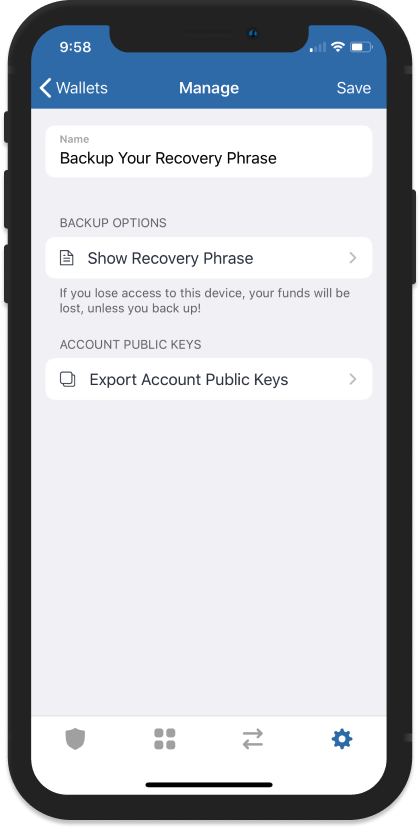
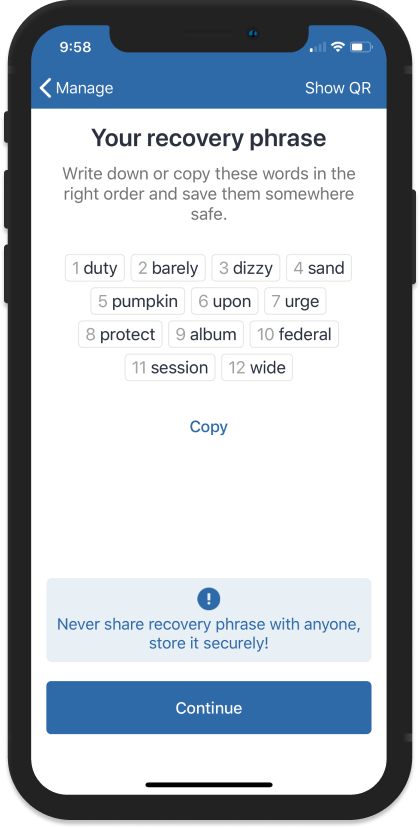

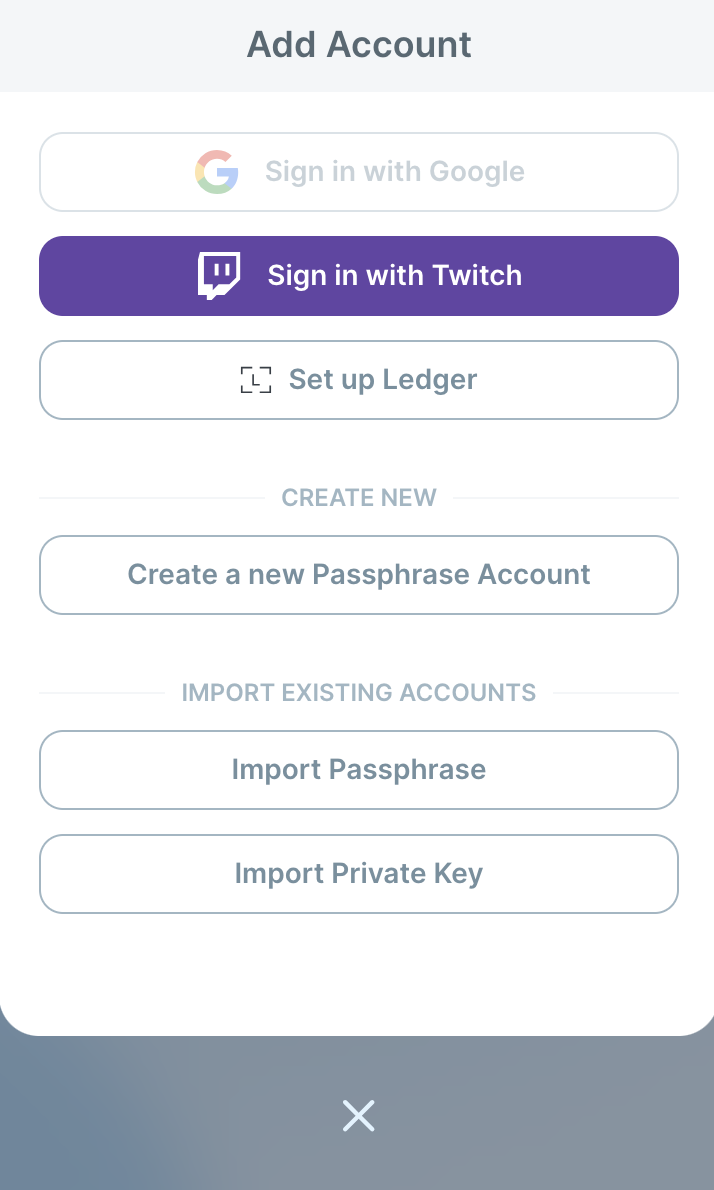
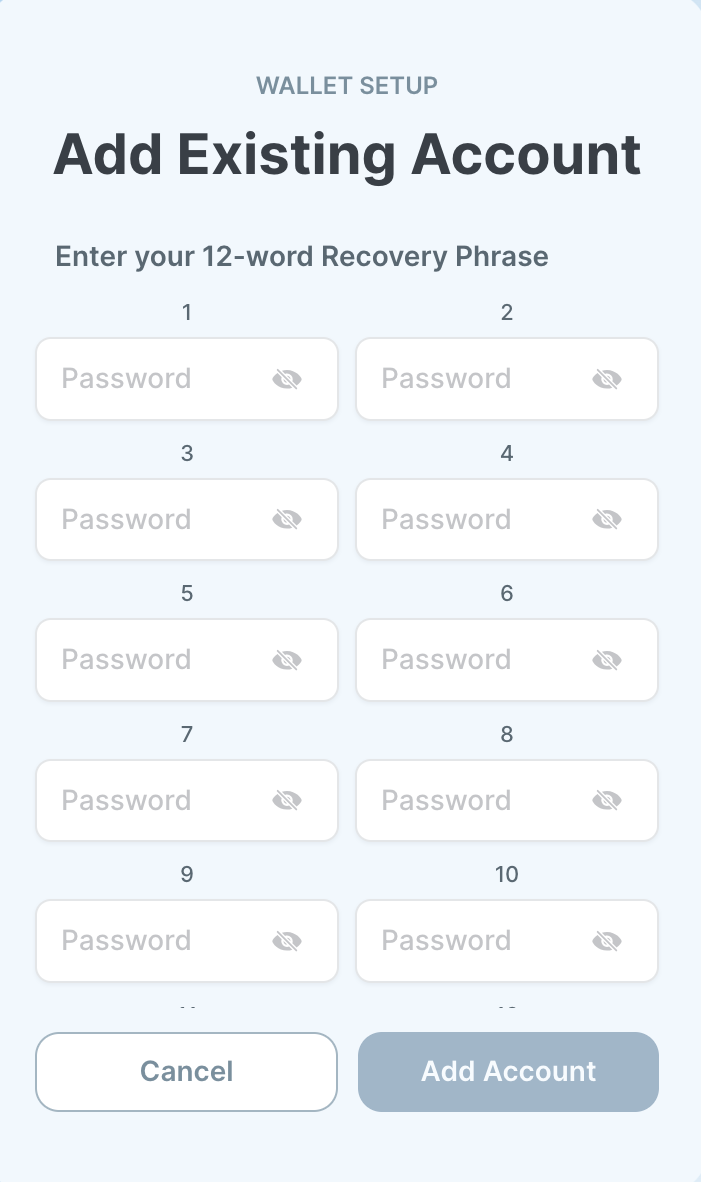


 Click on the **Claim Rewards** button to сlaim the reward.

Enter the number of tokens you want to withdraw, or simply click the “Max without penalty” button to withdraw the maximum number of tokens you can claim without penalty to your wallet.
You will see the Penalty Amount, the transaction fee, and the total amount of the claimable reward. **Wait until epoch 45 and you will be able to debit the first epoch's reward without penalty, while later epochs will continue unlocking sequentially.**
Click on the **Continue** button.
Click on the **Claim Rewards** button to сlaim the reward.

Enter the number of tokens you want to withdraw, or simply click the “Max without penalty” button to withdraw the maximum number of tokens you can claim without penalty to your wallet.
You will see the Penalty Amount, the transaction fee, and the total amount of the claimable reward. **Wait until epoch 45 and you will be able to debit the first epoch's reward without penalty, while later epochs will continue unlocking sequentially.**
Click on the **Continue** button.


